
Introduction
Modern organizations rely on data to run their daily operations. Leaders track sales figures, inventory managers balance warehouse stock, and marketing teams adjust ad campaigns based on hourly reports.
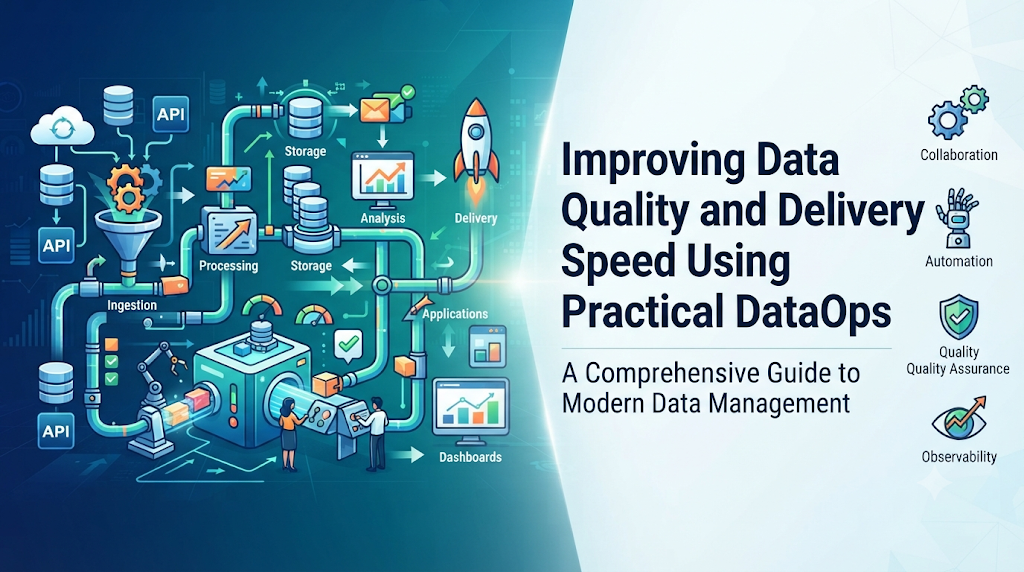
Behind every chart sits a data pipeline. A pipeline is simply a pathway that moves raw facts from transactional databases into an analytics system where people can study them.
When everything runs smoothly, decisions happen quickly. But in many companies, these pathways break without warning. An application developer might rename a column in the customer database, or an unexpected batch of duplicate records might slip into the warehouse. When that happens, morning reports show incorrect figures or fail to update entirely.
The engineering team then stops their planned work to investigate the failure. They spend hours searching through log files, re-running scripts by hand, and cleaning up corrupted tables.
This reactive firefighting causes two widespread issues:
- Slow delivery: Adding a new metric or fixing a report takes weeks of careful, manual checking.
- Low trust: Business teams lose confidence in their numbers because reports break or show conflicting results.
DataOps exists to solve these exact frustrations. It replaces manual handoffs and guesswork with reliable, repeatable, automated workflows.
What Is DataOps?
DataOps is a set of working practices that helps teams build, test, deploy, and maintain data pipelines with fewer mistakes and faster turnarounds.
The name combines Data and Operations. It draws direct inspiration from DevOps, which transformed standard software development over a decade ago.
Years ago, software engineers wrote code and passed it to a separate operations team to install on physical servers. The two groups rarely communicated, deployments were stressful, and fixes took weeks. DevOps solved this by uniting developers and operations teams under shared goals, automated testing, and continuous delivery systems.
DataOps applies these proven ideas to the world of data. However, data work carries an extra challenge that traditional software development does not face.
In regular software, if the code compiles and passes its logic tests, it usually runs fine in production. In data engineering, the code might be completely free of errors, but the incoming data itself can change. If a partner system sends text values inside a field that expects numbers, the pipeline will crash or produce bad calculations.
DataOps addresses both sides of this challenge. It automates the testing of your transformation code, and it continuously tests the health and accuracy of the data passing through that code.
Why Data Pipeline Quality and Speed Matter
When data moves slowly or contains hidden errors, the damage spreads across the entire business:
- Delayed decisions: If inventory data arrives twenty-four hours late, a retail company cannot reorder popular items before stores run out.
- Costly strategic errors: If an executive dashboard miscalculates customer churn because of dropped rows, the company might spend marketing budgets solving the wrong problem.
- Burnout on engineering teams: When data engineers spend eighty percent of their week troubleshooting broken batch jobs, they have no time to build new capabilities.
- Loss of stakeholder trust: Once business managers notice inaccurate numbers on their screens, they stop using automated dashboards and return to building personal, error-prone spreadsheets.
Fast, high-quality pipelines turn data into a dependable utility. When teams know their numbers are fresh and correct, they act with clarity and confidence.
How DataOps Boosts Speed and Quality
DataOps improves pipeline performance through four core operational principles.
1. Version Control for All Pipeline Assets
In teams without DataOps, transformations often run as loose SQL scripts saved on personal laptops or edited directly inside database management windows. If two team members edit the same transformation query at the same time, one person accidentally overwrites the work of the other.
DataOps requires every query, schedule definition, and configuration file to live inside a shared version control system.
- Every update happens on a separate branch.
- Teammates review the proposed changes before anything merges into the main pipeline.
- If a new change creates an unexpected calculation error, the team rolls the system back to the previous working version with a single action.
2. Continuous Integration and Automated Testing
In a traditional setup, testing means an analyst opens a dashboard after a nightly batch run and visually checks if the numbers look reasonable. This manual spot-checking fails to catch subtle issues, such as duplicate transaction records or missing historical rows.
DataOps introduces automated testing before and during every execution:
- Logic tests: Before transformation code goes live, an automated test runner checks whether the calculations produce correct outputs using sample scenarios. For example, it tests whether a discount function handles zero values and negative numbers properly.
- Data assertions: As live data travels through the pipeline, automated checkpoints test the incoming records. They check whether key identifiers are unique, whether required fields are populated, and whether daily row counts match historical averages.
If a test detects invalid data, the pipeline stops immediately. It quarantines the problematic records and alerts the engineering team before bad data corrupts reporting tables.
3. Isolated Development Environments
Engineers often struggle to test modifications safely. If they test in the live production database, they risk breaking reports that colleagues are viewing. If they test on a tiny sample file on their laptop, they miss performance slowdowns that only happen with large data volumes.
DataOps provides isolated testing environments that mirror production without risking real operational tables. Engineers run their updated queries against realistic data copies, verify the results, and push the code forward knowing it will not interfere with active business operations.
4. Continuous Observability and Early Alerts
Rather than waiting for a business manager to say, “My report looks wrong,” DataOps teams monitor their pipelines with continuous tracking systems.
These monitoring systems watch five key operational indicators:
- Freshness: Did the sales data arrive on schedule?
- Volume: Did we receive the expected volume of records, or did half the rows fail to export from the source app?
- Schema: Did an upstream team add, delete, or rename any columns?
- Distribution: Are the values within normal ranges, or are prices suddenly reading as zero?
- Lineage: Exactly which source tables fed this specific dashboard?
When any indicator behaves unusually, the system sends an early alert to the data team with details on where the variance occurred.
Comparing Traditional Data Workflows and DataOps
| Operational Area | Traditional Data Workflows | DataOps Workflows |
| Managing Changes | Changes are applied directly to production scripts or database views. | All code is tracked in version control, reviewed by peers, and tested automatically. |
| Catching Errors | Business users discover wrong numbers and broken dashboards. | Automated tests flag schema mismatches and invalid records during the run. |
| Testing Methods | Manual spot-checking in reports after the data has loaded. | Automated logic tests and data assertions execute on every batch or stream. |
| Fixing Problems | Engineers spend hours reading logs, editing tables, and re-running jobs by hand. | Problem records route to quarantine; code rolls back automatically if needed. |
| Release Frequency | Monthly or bi-weekly updates with high risk of unexpected failure. | Multiple safe, incremental releases per week or day. |
| Team Confidence | Constant anxiety around whether numbers are accurate. | High confidence backed by verified automated checks. |
A Practical Walkthrough: Before and After DataOps
Consider a medium-sized retail business with an online store and a customer analytics portal.
The Situation
The engineering team that maintains the online storefront updates their database. To support international customers, they change how currency values are stored, changing a field named order_amount from a pure number into a text string that includes a currency symbol.
Without DataOps
The nightly extraction script runs as usual and dumps the new raw data into the staging area.
At 2:00 AM, the central transformation script attempts to calculate the total daily revenue. Because the query tries to add text values together instead of numbers, the query crashes.
The pipeline halts. The reporting tables remain unrefreshed.
At 8:30 AM, the sales director logs in to prepare for the weekly leadership meeting and finds completely blank dashboards. The director calls the head of engineering. A senior engineer spends the next three hours diagnosing the issue, rewriting the SQL queries, and manually reloading the missing records. Half the workday is lost to emergency repair.
With DataOps
The storefront team pushes their update, and the ingestion pipeline receives the altered records.
At 2:01 AM, an automated schema validation assertion runs at the pipeline boundary. The assertion immediately notices that the order_amount column now contains text symbols instead of purely numeric values.
Instead of crashing the entire warehouse run, the pipeline handles the event gracefully:
- It diverts the non-compliant orders into a secure quarantine table for review.
- It processes the remaining compliant records through the transformation layers so normal reporting continues uninterrupted.
- It posts an automated incident notice directly to the engineering team’s messaging channel, stating the exact column, source table, and timestamp of the mismatch.
When the data engineer logs in at 9:00 AM, the issue is already diagnosed and isolated. The dashboard is operational, and the engineer spends thirty minutes coordinating a simple parsing rule with the storefront team to handle the new format permanently.
Common Implementation Mistakes to Avoid
Adopting DataOps requires changes in daily work habits. Teams often run into difficulty when they fall into these common traps.
1. Treating DataOps as Just Another Software Purchase
Some leaders believe they can achieve DataOps simply by purchasing a suite of monitoring and transformation tools.
Buying modern platforms does not help if team members continue making unreviewed manual edits directly in production databases.
What to do instead: Focus on engineering habits first. Move all existing queries into version control. Mandate that every code change requires a review from another team member. Once the team builds the discipline of peer review and version management, introduce automated testing tools to support that workflow.
2. Setting Too Many Hardcoded Alerts
When teams first discover automated assertions, they often create strict alerts on every single column. For example, an engineer might configure an alert to fire whenever daily customer signups drop below five hundred.
On public holidays, signups naturally decline. The system sends emergency alerts to the on-call engineer during family time. Over several weeks of false alarms, the team develops alert fatigue. Engineers create email filters to silence the notices, defeating the entire purpose of the monitoring system.
What to do instead: Start with checks that matter most: primary key uniqueness, null values in mandatory fields, and pipeline execution failures. For business metrics, use dynamic statistical ranges that account for day-of-week trends rather than rigid, static numbers.
3. Trying to Fix Everything Downstream
When source systems generate messy or inconsistent data, data engineers often write layer upon layer of complex cleanup scripts to patch the problems inside the warehouse. Over time, these transformation queries become fragile, slow, and impossible to maintain.
What to do instead: Implement Data Contracts with upstream teams. A data contract is an agreement between application developers who generate data and data engineers who consume it. It defines the expected columns, data types, and update schedules. When application teams know their changes directly affect company reports, they coordinate schema updates ahead of time.
Decision Framework: When Should an Organization Adopt DataOps?
Not every company needs an elaborate DataOps setup. Adding complex continuous deployment workflows to a tiny operation can create unnecessary overhead.
Use this simple decision path to evaluate your team’s readiness:
Scenario A: Keep It Simple
You have one analyst using a single database to generate weekly sales summaries. Changes happen once every few months.
- Recommendation: You do not need an extensive DataOps platform. Store your analytical queries in a version-controlled repository, write clear documentation, and use simple scheduled checks.
Scenario B: Adopt Foundation-Level DataOps
You have two or three engineers building pipelines that update daily operational reports. Small data discrepancies appear once or twice a month, causing occasional delays.
- Recommendation: Implement Phase 1 DataOps. Put all pipeline code into a shared repository, require peer code reviews on every change, and introduce automated schema and uniqueness checks on your main tables.
Scenario C: Implement Full DataOps Architecture
You have multiple data sources feeding customer-facing applications, machine learning models, or executive dashboards. Multiple engineers modify the same pipeline code weekly, and data errors directly impact revenue or customer trust.
- Recommendation: Deploy a complete DataOps practice. Use automated continuous integration pipelines, isolated testing sandboxes, end-to-end data observability, and formal data contracts with upstream teams.
Operational Verification Checklist
Use this practical checklist to confirm that your data pipeline includes proper DataOps protections before deploying changes:
- Tracked in Version Control: Are all queries, transformation scripts, and schedule definitions stored in a shared repository?
- Peer-Reviewed: Has at least one other engineer reviewed the logic and signed off on the pull request?
- Tested in Isolation: Were the changes executed and checked in a separate testing environment rather than directly in production?
- Input Validation: Does the pipeline verify that incoming source columns and data types match expected formats before loading begins?
- Uniqueness and Null Checks: Are automated checks active to confirm that primary identifiers are unique and essential fields do not contain null values?
- Graceful Failure Handling: If a record is malformed, does the pipeline route it to a quarantine table rather than crashing the entire process?
- Clear Ownership and Lineage: Is it documented which upstream system produced the data and which downstream reports consume it?
- Fast Rollback Plan: Can the team revert to the previous working version within five minutes if an unexpected logic error appears?
Key Terms Explained
- Data Pipeline: A connected series of automated tasks that extracts data from source applications, cleans and transforms it, and loads it into a destination for reporting.
- Continuous Integration: A practice where developers frequently combine their code changes into a central repository, where automated tests run to catch mistakes immediately.
- Continuous Delivery: An automated workflow that takes tested code changes and safely publishes them to production environments without manual intervention.
- Data Assertion: A pass-or-fail rule applied to live data to confirm it meets business expectations, such as checking that an order price is never a negative number.
- Data Observability: The ability to understand the internal health of data systems by tracking freshness, volume, distribution, schema changes, and lineage.
- Data Lineage: The recorded history that shows where data originated, what transformations it went through, and where it is currently displayed.
- Data Contract: A documented agreement between the team producing data and the team analyzing it, specifying expected schemas and service quality levels.
- Quarantine Table: A safe, separate storage location where invalid or damaged records are set aside so the primary pipeline can continue running without interruption.
Frequently Asked Questions
Is DataOps only useful for large enterprise corporations?
No. While large companies experience the highest volume of data issues, small teams often gain the most immediate relief from DataOps. On a team with only two engineers, an automated testing framework acts like an extra team member. It monitors data quality overnight, saving engineers hours of manual troubleshooting every morning.
Does our team need to rewrite existing pipelines to use DataOps?
No. You do not need to rebuild your infrastructure from scratch. Most teams adopt DataOps gradually. Start by moving your existing queries into a version control system like Git. Next, add automated tests to your single most important data table. Expand your testing and monitoring as your team becomes comfortable with the process.
How does DataOps make pipeline development faster?
DataOps speeds up development by eliminating fear and manual checks. When engineers have automated tests and isolated sandboxes, they can write code, run verification scripts in minutes, and deploy with confidence. They no longer need to spend days cautiously verifying queries by hand across shared environments.
What is the difference between data quality and data observability?
Data quality refers to whether data values are accurate, complete, and formatted properly according to specific rules. Data observability is broader. It monitors the health of the entire pipeline system over time, tracking whether data arrived late, whether volumes shifted unexpectedly, and how changes in one step affect downstream reports.
Can DataOps prevent all pipeline failures?
DataOps cannot prevent an external source system from experiencing an outage or sending unexpected formats. What it does is prevent those external issues from secretly poisoning your production reports. By catching anomalies at the pipeline boundary, DataOps isolates bad data, keeps valid processes running, and alerts engineers instantly so fixes happen fast.
Who is responsible for managing DataOps in an organization?
DataOps is a shared responsibility rather than a single job title. Data engineers, analytics engineers, and data analysts collaborate to write tests, review code, and maintain pipeline health. In larger organizations, dedicated platform teams help build and maintain the testing environments and automated deployment tools used by the rest of the team.
How does DataOps help with data security and regulatory compliance?
DataOps incorporates security checks directly into the continuous integration workflow. Automated rules can scan incoming data to ensure personal information, such as phone numbers or email addresses, is masked or removed before records reach general analytics tables. This ensures compliance rules are enforced consistently every time data moves.
Conclusion
A successful data operation is not a one-time project that ends when an analytics dashboard goes live. It is an ongoing production process that demands structure, monitoring, and regular maintenance. By bringing version control, automated testing, and active observability into data workflows, DataOps eliminates the constant firefighting that slows teams down. Organizations that practice DataOps deliver dependable metrics faster, giving everyone the confidence to make important decisions without second-guessing their reports.

