
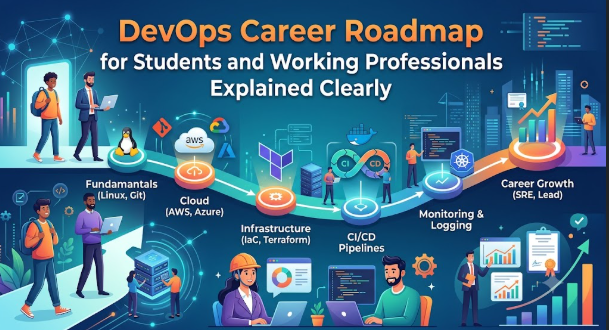
Introduction
Many students and working professionals hear that DevOps offers strong career opportunities, but they often feel confused by the number of tools, job titles, cloud platforms, and learning resources available. Some begin with Kubernetes before understanding Linux, while others collect certificates without building practical skills. A clear DevOps Career Roadmap for Students and Working Professionals solves this problem by arranging learning in a sensible order. It explains what to study, why each skill matters, how technologies connect, and which projects demonstrate real ability. This guide is useful for beginners, developers, testers, system administrators, support engineers, and professionals planning a technical career transition without depending on shortcuts or unrealistic promises.
Understanding the DevOps Career Roadmap in Simple Words
A DevOps career roadmap is an organized learning and career-development plan that helps a person understand how software is built, tested, released, operated, monitored, and improved.
DevOps is not a single tool, programming language, certification, or job title. It is a way of working in which development and operations teams collaborate to deliver software more reliably and efficiently.
A practical roadmap connects several areas:
- Operating systems
- Networking
- Programming and scripting
- Version control
- Software build processes
- Continuous integration
- Continuous delivery
- Infrastructure automation
- Cloud computing
- Containers
- Container orchestration
- Monitoring
- Security
- Communication and collaboration
People search for a DevOps roadmap because the field can appear overwhelming. One job description may mention Linux, Git, Jenkins, Docker, Kubernetes, Terraform, AWS, Python, monitoring, security, and troubleshooting. Beginners may incorrectly believe they must master every technology before applying for a job.
The better approach is to build skills in layers. First learn basic computing and operating systems. Then understand version control and scripting. After that, study automation, cloud infrastructure, containers, deployment pipelines, and monitoring.
Beginner-Friendly Example
Consider a student who creates a simple web application. Initially, the student runs it manually on a laptop. Through DevOps learning, the student can place the code in Git, test it automatically, package it in a container, deploy it to a cloud server, monitor its health, and update it through a pipeline.
This complete workflow demonstrates DevOps more clearly than memorizing tool definitions.
Common Misunderstanding
A common misunderstanding is that DevOps means learning Jenkins, Docker, and Kubernetes. These tools may be useful, but using them without understanding software delivery, infrastructure, networking, and troubleshooting creates weak knowledge.
Practical Takeaway
Think of DevOps as a connected software-delivery system. Learn why a task is performed before learning the tool that automates it.
Why a DevOps Career Roadmap Is Important
A structured roadmap is important because DevOps involves several technical disciplines. Without an organized plan, learners may spend months moving between unrelated videos, tools, and certificates without becoming job-ready.
It Creates a Logical Learning Order
Linux commands are easier to understand before container management. Networking fundamentals are useful before cloud architecture. Git should be learned before continuous integration. Containers should generally be understood before Kubernetes.
A roadmap prevents learners from beginning with advanced tools before developing the required foundation.
It Reduces Learning Confusion
Online advice often presents long lists of technologies without explaining priorities. One source may say to learn one cloud platform, while another recommends multiple platforms. A roadmap helps learners separate essential skills from optional or role-specific skills.
It Supports Better Career Planning
Students, developers, testers, system administrators, and support professionals do not start from the same position. A roadmap allows each person to identify existing strengths and learning gaps.
For example:
- A developer may already understand coding and Git but need infrastructure knowledge.
- A system administrator may understand Linux and networking but need CI/CD and programming.
- A tester may understand software quality but need automation, containers, and cloud deployment.
- A student may need to build every foundation gradually.
It Encourages Practical Learning
DevOps employers generally expect candidates to understand workflows and solve problems. Practical projects demonstrate that a learner can connect tools instead of only defining them.
It Controls Training Expenses
Without a plan, learners may purchase multiple courses, examinations, lab subscriptions, or cloud services that overlap. A roadmap helps them choose resources based on an actual skill gap.
It Improves Emotional Discipline
Career transitions can create pressure. Learners may compare themselves with experienced engineers, follow unrealistic salary claims, or change learning paths repeatedly. A clear plan encourages steady progress.
Practical Scenario
A technical support engineer wants to become a DevOps engineer. Instead of immediately studying advanced Kubernetes administration, the engineer reviews existing skills. Linux troubleshooting is already strong, but Git, scripting, CI/CD, infrastructure as code, and cloud deployment require improvement. This assessment produces a focused learning plan and avoids unnecessary repetition.
The Real Problems Readers Face With a DevOps Career Roadmap
The main difficulty is usually not a lack of learning material. The real problem is choosing what to learn, in which order, and to what depth.
Too Many Tools
The DevOps ecosystem contains hundreds of platforms and utilities. Beginners may assume every tool is compulsory. In reality, most roles require strong fundamentals and practical ability with a selected technology stack.
Confusing Online Advice
Some roadmaps are created for experienced engineers but presented to beginners. Others recommend tools without explaining prerequisites. This makes learners feel behind before they have started.
Learning Tools Without Understanding Problems
A learner may know how to write a basic pipeline file but may not understand why a build failed, how credentials should be secured, or how an application moves between environments.
Depending Only on Certificates
Certifications can organize learning and demonstrate commitment, but they cannot replace practical experience. Employers may ask candidates to troubleshoot a failed deployment, explain a network problem, or design a release process.
Unrealistic Career Expectations
Some people expect to become job-ready after watching a short course. DevOps requires repeated practice across systems, software, automation, and operations. Progress depends on existing experience, study consistency, project quality, and troubleshooting exposure.
Weak Planning
Learners sometimes begin several courses at once, switch cloud platforms frequently, and abandon projects when errors appear. This creates broad but shallow knowledge.
Fear of Coding
DevOps professionals do not always build large applications, but scripting and automation are important. Avoiding code completely limits career options and makes repetitive tasks harder to automate.
Ignoring Communication Skills
DevOps work involves developers, testers, security teams, operations teams, managers, and business stakeholders. Technical ability without documentation, communication, and incident coordination can reduce effectiveness.
Not Knowing the Next Step
A person may complete Linux, Git, Docker, or a cloud course but remain unsure about what to build next. The solution is to connect each new skill to a growing project rather than treating every subject as an isolated module.
How the DevOps Career Roadmap Works Step by Step
Step 1: Build Computing, Linux, and Networking Foundations
Begin with operating-system concepts, files, processes, users, permissions, services, package management, storage, logs, and command-line operations. Linux matters because many servers, cloud workloads, containers, and automation systems run on Linux-based environments. Practise creating users, managing permissions, installing software, checking processes, reading logs, and troubleshooting services. For example, deploy a basic web server and investigate what happens when the service stops. A common mistake is memorizing commands without understanding their effect. A better approach is to create small problems intentionally, observe the symptoms, and solve them using commands and logs.
Networking knowledge should include IP addresses, ports, protocols, Domain Name System, routing, firewalls, proxies, load balancers, Secure Shell access, and HTTP or HTTPS basics. You do not need to become a network architect, but you should understand how users reach an application and where communication can fail.
Step 2: Learn Git and Collaborative Development
Git records code changes and supports collaboration. Learn repositories, commits, branches, merging, pull requests, tags, release versions, conflict resolution, and rollback methods. This matters because almost every DevOps workflow begins with a change stored in version control. Create a repository for scripts or a small application and use branches for new features. A common mistake is learning only a few commands without understanding branching and collaboration. A better approach is to simulate team activity by creating branches, reviewing differences, resolving conflicts, and tagging releases.
Also learn how code-review practices support quality. DevOps is not only about faster delivery; it is about controlled, visible, and repeatable delivery.
Step 3: Develop Scripting and Programming Ability
Choose one practical language such as Python, along with shell scripting. Learn variables, conditions, loops, functions, files, data formats, error handling, modules, and API interaction. Scripting matters because DevOps teams automate repetitive operational tasks. A beginner project could read a log file, identify errors, and generate a summary. A common mistake is spending too much time on advanced application-development topics before automating simple tasks. A better approach is to solve actual system problems with small scripts and gradually improve code quality.
You should also understand common data formats such as JSON and YAML because configuration files and APIs frequently use them.
Step 4: Understand Software Builds, Testing, and CI/CD
Learn how source code becomes a deployable application. Understand dependencies, compilation where applicable, testing, artifacts, package repositories, environment variables, configuration, and release stages.
Continuous integration automatically validates changes through builds, tests, quality checks, or security scans. Continuous delivery prepares approved changes for release, while continuous deployment may release them automatically under defined controls.
Build a pipeline that retrieves code, installs dependencies, runs tests, creates an artifact, and reports failure clearly. A common mistake is copying a pipeline configuration without understanding every stage. A better approach is to create the pipeline gradually, beginning with one working step and adding validation, packaging, and deployment.
Step 5: Learn Cloud and Infrastructure Fundamentals
Choose one major cloud platform for focused learning. Understand identity and access, virtual networks, compute services, storage, databases, load balancing, monitoring, pricing basics, and security controls.
Cloud knowledge matters because many DevOps roles involve deploying and operating cloud infrastructure. Create a small environment containing a virtual network, server, security rules, and an application. A common mistake is creating resources through the console without documenting or securing them. A better approach is to begin visually for understanding and then reproduce the environment using infrastructure as code.
Always delete unused practice resources and configure spending alerts where available. Cloud learning should include cost awareness, not only resource creation.
Step 6: Learn Containers and Image Management
Containers package an application with the files and dependencies needed to run it consistently. Learn images, containers, registries, volumes, networks, environment variables, image layers, and container security.
Create a container image for a small application and run it locally. Store the image in a registry and deploy it on another environment. A common mistake is using unnecessarily large images or placing passwords inside image files. A better approach is to use minimal base images, externalize configuration, scan images, and keep secrets outside source code.
Understand the problem containers solve before moving to orchestration.
Step 7: Study Infrastructure as Code and Configuration Automation
Infrastructure as code allows teams to define infrastructure through version-controlled configuration. Learn resources, variables, outputs, state, modules, plans, dependencies, and environment separation.
Configuration-management tools help install software, maintain settings, and keep servers consistent. Build a project that creates infrastructure and configures an application automatically. A common mistake is making manual changes after automation has been introduced. This creates configuration drift. A better approach is to treat code as the main source of infrastructure truth and review changes before applying them.
Step 8: Add Kubernetes, Monitoring, Security, and Reliability
Kubernetes is useful for managing containerized applications at scale, but it should follow container and networking fundamentals. Learn pods, deployments, services, configuration, secrets, storage, namespaces, health checks, scaling, and basic troubleshooting.
Monitoring should include metrics, logs, traces, dashboards, and alerts. Security should include access control, secret protection, dependency scanning, image scanning, patching, and least-privilege permissions.
A final project can combine Git, CI/CD, containers, infrastructure as code, cloud deployment, Kubernetes, monitoring, and documentation. A common mistake is building an impressive architecture that the learner cannot explain. A better approach is to keep the design manageable and understand every component, failure point, and security decision.
Key Factors That Influence DevOps Career Growth
Existing Technical Background
Your current role affects the roadmap. Developers may progress quickly through programming and version control. Operations professionals may progress quickly through Linux, networking, and troubleshooting. Students may require more time to build a complete foundation.
The common mistake is copying another person’s study schedule. The better approach is to assess current skills honestly and create a personalized gap list.
Quality of Fundamentals
Strong fundamentals make new tools easier to learn. A person who understands processes, ports, logs, permissions, and APIs can adapt when tools change.
Tool-specific knowledge can become outdated, but foundational reasoning remains useful.
Practical Project Depth
One complete, well-documented project can be more useful than ten unfinished demonstrations. A strong project should explain:
- The problem being solved
- The architecture
- The technology choices
- Installation and deployment steps
- Security considerations
- Known limitations
- Troubleshooting methods
- Possible improvements
Troubleshooting Ability
Real DevOps work includes failed builds, unavailable services, expired credentials, incorrect configurations, network errors, capacity problems, and deployment mistakes.
Do not hide errors during practice. Record them, understand their cause, and document the solution.
Learning Consistency
Studying for a few hours regularly is generally more effective than completing long but infrequent sessions. Consistency builds command-line confidence, tool memory, and troubleshooting habits.
Communication and Documentation
Clear documentation demonstrates engineering maturity. Candidates should be able to explain an architecture, deployment process, incident, or technical trade-off in simple language.
Job-Market Relevance
Job descriptions differ by company, industry, and technical environment. Review relevant openings and identify repeated skills, but do not attempt to learn every item from every listing.
Look for skill patterns across several roles.
Professional Experience
Personal projects create valuable evidence, but workplace exposure adds collaboration, deadlines, security controls, production constraints, and operational responsibility.
Working professionals should look for DevOps-related tasks in their current organization, such as automating reports, improving deployments, writing scripts, creating dashboards, or supporting cloud migration.
Certification Strategy
Certifications can provide structure, especially for cloud, Kubernetes, security, or infrastructure technologies. However, a certificate should support practical ability rather than replace it.
A useful pattern is to learn the subject, build a project, prepare for the examination, and then explain how the knowledge applies to real work.
Detailed Breakdown of the DevOps Career Roadmap
Phase 1: Technical Foundations
The first phase develops the knowledge needed to understand computing systems.
Operating Systems
Learn how an operating system manages files, memory, processes, services, users, permissions, devices, and software packages. Practise primarily in a Linux environment while understanding basic differences between platforms.
Important activities include:
- Navigating the file system
- Creating and editing files
- Managing users and groups
- Setting file permissions
- Installing packages
- Starting and stopping services
- Reading system and application logs
- Scheduling tasks
- Checking CPU, memory, disk, and network usage
- Using Secure Shell for remote access
The mistake is treating Linux as a list of commands. The better approach is to connect commands with administrative problems.
Networking
Understand how machines communicate. Learn IP addressing, ports, Domain Name System resolution, HTTP requests, routing, firewalls, proxies, and load balancing.
For example, when an application is unavailable, check whether:
- The process is running
- The expected port is open
- The firewall permits traffic
- The domain resolves correctly
- The proxy configuration is valid
- The application can reach its database
This troubleshooting sequence is more valuable than memorizing definitions.
Phase 2: Source Code and Automation
Git and Version Control
Version control creates traceability. Infrastructure definitions, scripts, pipeline files, documentation, and application code should be managed through repositories.
Learn how to:
- Create and clone repositories
- Stage and commit changes
- Compare revisions
- Create and merge branches
- Resolve merge conflicts
- Use pull requests
- Revert unwanted changes
- Create tags and releases
- Write useful commit messages
Avoid placing credentials, private keys, tokens, or sensitive configuration in repositories.
Shell Scripting
Shell scripting is useful for server tasks, file processing, deployment commands, health checks, backups, and job automation.
Start with short scripts that:
- Check disk space
- Verify whether a service is running
- Archive log files
- Create users
- Test endpoint availability
- Generate operational reports
Include clear output and basic error handling.
Python or Another Practical Language
Python is widely used for automation, cloud APIs, data processing, and operational utilities. Focus on practical programming rather than complex theory in the beginning.
Build scripts that:
- Read configuration files
- Call an API
- Parse JSON
- Process logs
- Send a notification
- Validate deployment inputs
- Compare environment settings
The goal is to reduce manual work safely and repeatably.
Phase 3: Software Delivery and CI/CD
A DevOps learner should understand what happens from code commit to production release.
Build Process
Learn how applications manage dependencies and create deployable outputs. The exact process varies by language, but common concepts include:
- Dependency installation
- Compilation
- Unit testing
- Static analysis
- Packaging
- Artifact storage
- Versioning
Continuous Integration
A CI system should provide fast feedback when code changes. A basic pipeline may:
- Retrieve the code.
- Install dependencies.
- Run tests.
- Perform quality checks.
- Build an artifact.
- Store the artifact.
- Report success or failure.
Do not hide pipeline failures by disabling tests. Failures should be visible and actionable.
Continuous Delivery and Deployment
Continuous delivery keeps software ready for release. Continuous deployment automatically releases approved changes when all controls pass.
Beginners should understand approval gates, rollback plans, environment promotion, release logs, and deployment verification.
Speed without control creates instability. Good delivery systems balance automation with safety.
Phase 4: Cloud Infrastructure
Cloud platforms provide infrastructure and managed services through APIs and web interfaces.
Core Cloud Skills
Focus on:
- Identity and access management
- Virtual networks
- Compute instances
- Object and block storage
- Managed databases
- Load balancers
- Autoscaling concepts
- Monitoring
- Logging
- Backup and recovery
- Cost management
- Security configuration
Cloud Security
Use least-privilege access. Avoid public exposure unless required. Protect administrative access, rotate credentials, enable logging, and separate development from production environments.
A frequent beginner mistake is granting broad permissions because they are easier. The better approach is to begin with minimum required access and expand only when justified.
Cost Awareness
Learning accounts can create unexpected charges when resources remain active. Track usage, remove unused services, use spending alerts, and understand which resources continue charging even when applications are not actively used.
Phase 5: Containers
Containers help standardize application environments.
Container Images
An image contains application files and runtime requirements. Learn image layers, build instructions, tagging, registries, and vulnerability scanning.
Keep images small and reproducible. Pin important dependency versions where appropriate and avoid unnecessary packages.
Container Runtime
Practise:
- Starting and stopping containers
- Mapping ports
- Mounting volumes
- Passing environment variables
- Creating networks
- Viewing logs
- Inspecting container details
- Cleaning unused resources
Container Security
Do not run containers with unnecessary privileges. Avoid embedding secrets. Scan images and use trusted sources for base images.
Phase 6: Infrastructure as Code
Infrastructure as code creates repeatability, peer review, and change history.
Core Concepts
Learn:
- Providers
- Resources
- Data sources
- Variables
- Outputs
- State
- Modules
- Dependencies
- Planning and applying changes
- Importing existing resources
- Handling environment differences
State files may contain sensitive information and must be protected. Teams should use suitable remote storage and access controls.
Reusable Modules
Modules reduce repetition, but beginners should first understand individual resources. Premature abstraction can hide important behavior.
Create reusable modules only after identifying a stable pattern.
Phase 7: Kubernetes and Orchestration
Kubernetes manages containerized workloads across clusters.
Essential Concepts
Study:
- Clusters and nodes
- Pods
- Replica sets
- Deployments
- Services
- Ingress
- Namespaces
- Configuration objects
- Secrets
- Persistent storage
- Health checks
- Resource requests and limits
- Scaling
- Rollouts and rollback
Troubleshooting Practice
Investigate common situations:
- A pod remains pending
- A container repeatedly restarts
- An image cannot be pulled
- A service cannot reach another service
- Configuration is missing
- Storage cannot be mounted
- Health checks fail
- Resource limits are too low
Do not focus only on creating resources. Learn to inspect events, logs, status, and network connectivity.
Phase 8: Observability and Reliability
Observability helps teams understand system behavior through metrics, logs, and traces.
Metrics
Metrics show measurable values such as request volume, response time, CPU usage, memory use, and error rate.
Logs
Logs provide event details. Learn structured logging, search, retention, correlation, and access control.
Traces
Distributed traces help follow a request across multiple services. They are particularly helpful in complex applications.
Alerting
An alert should indicate a meaningful condition that requires attention. Too many weak alerts create noise and may cause important signals to be ignored.
Reliability Thinking
Understand availability, service-level objectives, incident response, post-incident review, capacity planning, and recovery methods.
The aim is not to claim that failures can be eliminated completely. The aim is to detect, manage, learn from, and reduce them.
Phase 9: DevSecOps Fundamentals
Security should be integrated throughout delivery rather than added only at the end.
Learn:
- Secure coding awareness
- Secret management
- Dependency scanning
- Container image scanning
- Infrastructure checks
- Access control
- Audit logging
- Patch management
- Secure pipeline practices
- Data protection
- Compliance awareness
A common mistake is treating every scanner warning as equally urgent. A better approach is to understand severity, exposure, exploitability, and business impact.
Phase 10: Portfolio and Job Preparation
A DevOps portfolio should demonstrate applied knowledge.
Recommended Portfolio Project
Create a small web application delivery platform with:
- Source code stored in Git
- Automated tests
- A CI/CD pipeline
- Container packaging
- Infrastructure as code
- Cloud deployment
- Secure configuration
- Monitoring and logging
- Deployment documentation
- A rollback method
- A troubleshooting section
Resume Preparation
Describe outcomes and responsibilities clearly. Avoid claiming tools you have only watched in demonstrations.
Instead of writing “Expert in Kubernetes,” explain what you did:
- Deployed a containerized application using Kubernetes
- Configured service discovery and health checks
- Investigated pod failures and image-pull errors
- Added resource limits and rollout controls
Interview Preparation
Prepare to explain:
- Your project architecture
- Why you selected each tool
- A failure you encountered
- How you diagnosed it
- Security decisions
- Alternative designs
- Cost and reliability considerations
- What you would improve
Honest, structured explanations build more trust than exaggerated claims.
Common Mistakes Beginners Make With the DevOps Career Roadmap
Learning Every Tool at Once
This happens because job advertisements list many technologies. Attempting all of them creates shallow knowledge and constant switching.
Choose one tool for each major function and understand the underlying concept. Additional tools become easier afterward.
Starting With Kubernetes Too Early
Kubernetes is visible in many DevOps roles, so learners often begin there. Without containers, networking, Linux, and deployment fundamentals, its behavior becomes difficult to understand.
Learn the prerequisite concepts first.
Collecting Certificates Without Projects
Certificates may validate structured study, but interviews often test application and troubleshooting.
Build a project related to each major certification area.
Copying Commands Without Understanding Them
Copied commands may work in one environment and fail in another. They may also create security or cost risks.
Read the command, understand its options, test it safely, and document the result.
Ignoring Programming
Avoiding scripting limits automation ability. Begin with small scripts rather than trying to become an advanced software developer immediately.
Hiding Errors
Some learners repeatedly restart a project instead of investigating failures. This removes the best learning opportunity.
Read logs, check recent changes, form a hypothesis, test it, and record the solution.
Using Too Many Cloud Platforms
Learning several platforms at the beginning divides attention. Select one platform to understand core cloud concepts deeply. Compare alternatives later.
Building Projects Without Documentation
A project that only works on the creator’s laptop is difficult to review. Add prerequisites, architecture, installation steps, usage instructions, known limitations, and troubleshooting notes.
Ignoring Security
Placing passwords in code, opening all network ports, or assigning full administrative access creates dangerous habits.
Use secrets management, restricted access, secure defaults, and change review.
Applying for Roles Without Reviewing Requirements
Sending the same resume everywhere is ineffective. Compare your skills with the role, highlight relevant projects, and identify honest gaps.
Comparing Progress With Others
People begin with different education, work exposure, and available study time. Compare current ability with your previous ability and track completed outcomes.
Expecting Immediate Results
Career development requires practice, applications, feedback, and improvement. A rejected application does not automatically mean the roadmap has failed.
Don’t Do This Checklist
- Do not learn tools only to add them to a resume.
- Do not share cloud keys, passwords, tokens, or private keys.
- Do not copy infrastructure commands into important environments without review.
- Do not create expensive cloud resources without cost controls.
- Do not skip Linux and networking fundamentals.
- Do not claim production experience you do not have.
- Do not ignore failed builds or security warnings.
- Do not change learning paths every few days.
- Do not depend only on video courses.
- Do not apply for roles without demonstrating practical work.
- Do not expose personal or company information in public repositories.
- Do not treat certifications as guaranteed employment.
Practical Real-Life Examples of the DevOps Career Roadmap
Example 1: Computer Science Student
A student knows basic programming but has no experience with servers or deployments. The challenge is trying to learn cloud, Docker, and Kubernetes together. A better action is to begin with Linux, Git, networking, and a simple application deployment. The learning is that strong foundations make advanced tools easier to understand.
Example 2: System Administrator
A system administrator is comfortable with Linux and troubleshooting but performs many tasks manually. The challenge is limited scripting and version-control experience. A better action is to automate repeated tasks, place scripts in Git, and create a basic deployment pipeline. The learning is that existing operational knowledge is a valuable DevOps foundation.
Example 3: Software Developer
A developer understands code and testing but depends on another team for deployment. The challenge is weak infrastructure and cloud knowledge. A better action is to containerize an application, create infrastructure through code, and monitor the deployment. The learning is that DevOps expands a developer’s understanding of the complete software lifecycle.
Example 4: Manual Tester
A tester understands quality processes but has limited automation exposure. The challenge is believing DevOps is only for developers and system administrators. A better action is to learn Git, scripting, automated testing, pipelines, and environment provisioning. The learning is that quality engineering is an important part of continuous delivery.
Example 5: Technical Support Professional
A support professional regularly investigates application and customer issues but lacks formal development experience. The challenge is presenting existing troubleshooting skills as relevant experience. A better action is to learn scripting, cloud monitoring, incident management, and deployment workflows. The learning is that support experience can provide strong operational awareness for DevOps roles.
Table 1: DevOps Learning Phases and Practical Outcomes
| Learning Phase | Main Skills | Practical Outcome | Evidence to Create |
|---|---|---|---|
| Foundation | Linux, networking, command line | Operate and troubleshoot a basic server | Server setup notes and troubleshooting log |
| Collaboration | Git, branches, pull requests | Manage code changes safely | Public or private project repository |
| Automation | Shell and Python scripting | Reduce repeated manual work | Automation scripts with documentation |
| Software delivery | Builds, testing, CI/CD | Automate validation and packaging | Working pipeline with failure handling |
| Cloud | Compute, networking, storage, identity | Deploy an application securely | Small cloud architecture project |
| Containers | Images, registries, networking, volumes | Package applications consistently | Containerized application |
| Infrastructure as code | Resources, variables, state, modules | Create repeatable environments | Version-controlled infrastructure project |
| Orchestration | Kubernetes fundamentals | Operate containerized workloads | Cluster deployment and troubleshooting notes |
| Observability | Metrics, logs, traces, alerts | Detect and investigate failures | Dashboard and alert configuration |
| Security | Secrets, scanning, access control | Reduce delivery and infrastructure risk | Security checklist and scan results |
Table 2: Common Mistakes and Better Approaches
| Common Mistake | Why It Creates Problems | Better Approach |
|---|---|---|
| Learning many tools simultaneously | Knowledge remains shallow and disconnected | Learn one tool per function and connect it to a project |
| Beginning with advanced orchestration | Fundamental problems become difficult to diagnose | Learn Linux, networking, containers, and deployments first |
| Collecting certificates only | Practical ability remains untested | Combine study with projects and troubleshooting |
| Copying complete projects | The learner cannot explain design decisions | Build gradually and document each component |
| Ignoring errors | Troubleshooting ability does not develop | Investigate logs, status, changes, and dependencies |
| Storing secrets in repositories | Credentials may be exposed | Use secret-management methods and repository scanning |
| Using unrestricted cloud permissions | Security risk increases | Apply least-privilege access |
| Creating resources without cost review | Unexpected charges may occur | Use budgets, alerts, and regular cleanup |
| Applying with an exaggerated resume | Interview credibility is damaged | Describe honest tasks, outcomes, and learning |
| Ignoring communication skills | Collaboration and incident handling suffer | Practise documentation, explanations, and handovers |
Tools, Methods, and Frameworks Readers Can Use
Skills Inventory
A skills inventory is a written assessment of what you already know, what you have practised, and what you still need to learn.
Create three categories:
- Confident
- Practised but needs improvement
- Not yet learned
Review areas such as Linux, networking, Git, scripting, cloud, containers, CI/CD, infrastructure as code, monitoring, and security.
This method prevents unnecessary repetition and helps working professionals recognize transferable skills.
Learning Backlog
A learning backlog is a prioritized list of topics and tasks. Treat it like a small engineering project.
Each item should include:
- Skill to learn
- Reason it matters
- Practice task
- Completion evidence
- Current status
For example, “Learn Git branching” is too broad. A better task is, “Create two branches, make conflicting changes, resolve the conflict, and document the process.”
Project-Based Learning
Project-based learning connects concepts. Instead of completing unrelated demonstrations, build one project that improves over time.
Begin with a local application. Add Git, tests, a pipeline, containers, cloud infrastructure, monitoring, and security checks in stages.
This method prevents isolated tool knowledge.
Troubleshooting Journal
Maintain a record of technical problems encountered during practice.
For each issue, record:
- Symptoms
- Environment
- Recent changes
- Investigation steps
- Root cause
- Fix
- Prevention method
This journal becomes useful for interviews because it provides real examples of analytical thinking.
Architecture Diagram
A simple architecture diagram shows how users, applications, pipelines, infrastructure, databases, monitoring tools, and security controls connect.
Creating diagrams helps beginners identify missing components and explain systems clearly.
Do not add unnecessary complexity to make a diagram look advanced.
Weekly Review Method
At the end of each week, review:
- What you learned
- What you built
- What failed
- What you can explain without notes
- What needs more practice
- What task should come next
This prevents passive course completion.
Job Description Analysis
Collect several relevant job descriptions and identify repeated skills. Separate requirements into:
- Foundational
- Frequently requested
- Organization-specific
- Advanced or optional
This method provides market context without forcing you to chase every tool.
Portfolio Quality Checklist
Before sharing a project, verify that it includes:
- Clear purpose
- Setup instructions
- Architecture overview
- Security considerations
- Testing method
- Deployment process
- Monitoring approach
- Known limitations
- Troubleshooting guidance
- Cleanup instructions
This checklist helps reviewers understand your work.
Interview Story Framework
Use a structured method when explaining technical experience:
- Situation
- Problem
- Investigation
- Action
- Result
- Learning
This framework makes answers clearer and prevents unorganized explanations.
Skill Depth Review
For every technology on your resume, ask:
- Can I explain the problem it solves?
- Can I install or configure it?
- Can I troubleshoot a basic failure?
- Can I describe security concerns?
- Can I compare it with an alternative?
- Can I show a project where I used it?
Remove or study technologies that cannot pass this review.
Expert Tips to Make Better Career Decisions
1. Learn Concepts Before Products
Understand version control before focusing on a Git hosting platform. Understand CI/CD before specializing in a pipeline product. Understand containers before orchestration.
This matters because products change, while concepts remain transferable. During study, write down the problem each tool solves and the workflow it supports.
2. Build One Complete Project
A connected project demonstrates more ability than several isolated screenshots. It shows that you understand dependencies between code, infrastructure, deployment, monitoring, and security.
Start small and add one capability at a time.
3. Practise Troubleshooting Deliberately
DevOps interviews and jobs often involve imperfect systems. Create safe failures such as incorrect ports, missing permissions, failed health checks, or invalid configuration.
Investigate them systematically rather than immediately searching for a complete solution.
4. Document While Learning
Documentation improves memory and communication. Record commands, decisions, errors, architecture, and recovery procedures.
Write for another beginner who must reproduce your work without asking you for help.
5. Choose One Cloud Platform First
Core cloud principles transfer between providers. Focused learning creates deeper understanding of identity, networking, compute, storage, and monitoring.
Study additional providers when a role or project requires them.
6. Keep Security Inside Every Project
Do not create a project first and think about security later. Protect credentials, restrict access, scan dependencies, and explain security decisions from the beginning.
Security-aware projects appear more realistic and responsible.
7. Measure Progress Through Outcomes
Course completion is not the same as skill development. Measure whether you can deploy, automate, troubleshoot, explain, and improve a system.
Use demonstrable outcomes as milestones.
8. Keep Cloud Costs Controlled
Set budgets and alerts, shut down unused resources, and document cleanup steps. Cost management is a professional responsibility and an important cloud skill.
Never assume that an inactive-looking resource is free.
9. Improve Communication Skills
Practise explaining technical concepts to both technical and non-technical people. Write concise incident updates, project summaries, and handover notes.
DevOps depends on collaboration as much as automation.
10. Use Certifications Strategically
Select a certification that supports your target role and current learning phase. Prepare through labs and projects rather than memorization alone.
A certification is most useful when you can connect its objectives to practical work.
11. Apply Before You Feel Completely Ready
No candidate matches every requirement. Apply when you understand the major foundations and can demonstrate relevant projects.
Be honest about gaps and show a plan for learning them.
12. Request Feedback
Ask experienced professionals, mentors, or peers to review your resume, repository, architecture, and explanations.
Specific feedback can reveal weak documentation, unclear design decisions, or missing security controls.
13. Avoid Resume Keyword Overloading
Listing every popular technology may create difficult interview questions. Include tools you can explain and support with evidence.
Depth creates more credibility than a long list.
14. Review Your Roadmap Regularly
Your target role, available time, and existing skills may change. Review the roadmap periodically and adjust priorities without abandoning the foundation.
Changing a plan based on evidence is different from switching paths because of online trends.
15. Develop Professional Patience
Learning DevOps involves errors, failed deployments, and repeated configuration. These are not signs that you are unsuitable.
Treat every failure as a system to investigate and a lesson to record.
Case Studies: How Better Understanding Changes Decisions
Case Study 1: Student Building an Entry-Level Portfolio
Profile
A final-year engineering student understands basic programming and has completed introductory cloud videos.
Situation
The student wants an entry-level DevOps role and begins learning Docker, Kubernetes, Terraform, Jenkins, and multiple cloud platforms simultaneously.
Problem
The student can repeat definitions but cannot deploy a complete application or troubleshoot common failures.
Wrong Approach
The original plan focuses on finishing as many courses as possible and adding tool names to the resume.
Better Approach
The student returns to Linux, Git, networking, and scripting. A small application is placed in version control, tested through a pipeline, packaged as a container, deployed to a controlled cloud environment, and monitored. Every stage is documented.
Result or Learning
The student develops a smaller but more credible skill set and can explain the complete delivery workflow during interviews.
Key Takeaway
A focused project with strong fundamentals provides better evidence than a large collection of disconnected course certificates.
Case Study 2: System Administrator Moving Into DevOps
Profile
A system administrator has several years of experience managing Linux servers, backups, users, and application incidents.
Situation
The professional wants to move into DevOps but believes the existing experience has little value because job listings emphasize coding and cloud tools.
Problem
The professional studies advanced orchestration immediately and becomes discouraged by unfamiliar development and deployment concepts.
Wrong Approach
The transition plan ignores transferable skills and attempts to restart the career from zero.
Better Approach
The administrator maps existing strengths to DevOps responsibilities. Repetitive maintenance tasks are automated with scripts, configurations are stored in Git, servers are created through infrastructure code, and a simple CI/CD process is added.
Result or Learning
The professional recognizes that troubleshooting, Linux, security, and operations experience are strong foundations. Learning becomes focused on specific gaps.
Key Takeaway
A career transition should build on existing experience rather than discard it.
Case Study 3: Developer Expanding Into Platform Engineering
Profile
A backend developer understands application development, automated tests, APIs, and source control.
Situation
The developer wants to take greater responsibility for deployment and platform reliability.
Problem
The developer can build application features but lacks knowledge of cloud networking, infrastructure permissions, monitoring, and operational risk.
Wrong Approach
The developer creates cloud resources manually and gives broad permissions to avoid access errors.
Better Approach
The developer studies cloud identity, networking, infrastructure as code, container deployment, monitoring, and least-privilege access. A deployment pipeline includes testing, image scanning, approval controls, and rollback instructions.
Result or Learning
The developer gains a complete view of how application decisions affect deployment, security, cost, and reliability.
Key Takeaway
DevOps growth requires understanding the full operational lifecycle, not only automating a build command.
Risk Awareness: What Readers Must Check First
Security Risk
Security risk includes exposed credentials, unrestricted permissions, vulnerable dependencies, unsafe network access, and insecure configurations.
Reduce it by using least privilege, secret-management practices, scanning, secure defaults, and access reviews.
Cloud Cost Risk
Cloud resources can generate charges while running, storing data, transferring traffic, or reserving capacity.
Reduce this risk by configuring spending alerts, understanding pricing, tagging resources, reviewing usage, and deleting practice infrastructure after use.
Data Privacy Risk
Projects may accidentally expose personal information, company data, logs, customer details, or credentials.
Use synthetic data for demonstrations, review repositories before publishing, and never copy confidential workplace material into a personal portfolio.
Operational Risk
An automated process can repeat mistakes quickly. A poorly reviewed script or infrastructure change may remove, expose, or interrupt resources.
Use testing, change review, limited permissions, backups, and safe practice environments.
Career Expectation Risk
Training advertisements and social media posts may create unrealistic expectations about salaries, timelines, and guaranteed placements.
Evaluate career claims carefully. Progress depends on skill level, previous experience, location, interview ability, role availability, and practical evidence.
Misinformation Risk
Outdated or incomplete instructions can create insecure configurations or failed deployments.
Use official product documentation where appropriate, verify commands, understand versions, and test changes in controlled environments.
Certification Dependence Risk
A learner may assume certification automatically creates job readiness.
Use certifications for structured learning, but support them with projects, troubleshooting practice, and communication skills.
Over-Specialization Risk
Learning only one product can create difficulty when organizations use alternatives.
Understand transferable concepts such as source control, pipelines, containerization, infrastructure automation, monitoring, and access management.
Burnout Risk
Attempting to learn every tool quickly can cause exhaustion and loss of confidence.
Choose realistic weekly goals, take breaks, review progress, and reduce unnecessary learning scope.
Legal and Compliance Risk
Workplace systems may contain regulated, licensed, confidential, or customer-controlled data. Unauthorized copying or public sharing may violate policies or legal requirements.
Use personal labs and approved resources. Consult qualified security, legal, or compliance professionals when handling sensitive environments.
Checklist Before Applying for DevOps Roles
- I understand basic Linux administration and troubleshooting.
- I can explain common networking concepts such as ports, DNS, HTTP, firewalls, and load balancing.
- I can use Git for branches, commits, merges, conflict resolution, and release tags.
- I can write basic shell or Python automation.
- I understand how code is built, tested, packaged, and deployed.
- I have created at least one working CI/CD pipeline.
- I understand core cloud identity, networking, compute, storage, security, and cost concepts.
- I can build and troubleshoot a container image.
- I understand infrastructure-as-code fundamentals.
- I can explain basic Kubernetes concepts if the target role requires them.
- I understand metrics, logs, alerts, and application health checks.
- I protect credentials and follow least-privilege practices.
- My portfolio does not expose personal, company, or sensitive information.
- My project contains installation, deployment, architecture, and troubleshooting documentation.
- I can explain at least one technical failure and how I investigated it.
- My resume contains only skills I can discuss honestly.
- I have compared my skills with several relevant job descriptions.
- I have prepared clear project stories for interviews.
- I understand that certification does not guarantee employment.
- I have a written plan for improving my remaining gaps.
Use this checklist as a readiness review rather than a demand for perfection. Entry-level candidates are not expected to know every tool. The purpose is to confirm that your learning is connected, practical, secure, and explainable.
Strategic Insights for Better Decision-Making
Select a Career Direction
DevOps is a broad field. Possible directions include:
- DevOps engineering
- Cloud engineering
- Site reliability engineering
- Platform engineering
- Build and release engineering
- Infrastructure automation
- DevSecOps
- Cloud security
- Observability engineering
- Kubernetes administration
Beginners do not need to choose a permanent specialization immediately. However, selecting a near-term target helps prioritize tools and projects.
Build T-Shaped Skills
T-shaped learning means having broad understanding across the software-delivery lifecycle and deeper expertise in one or two areas.
For example, a cloud-focused DevOps engineer may understand Git, pipelines, containers, monitoring, and security broadly while developing deeper expertise in cloud infrastructure and infrastructure as code.
This approach balances flexibility with professional depth.
Use Progressive Project Complexity
Do not begin with a large microservices platform. Build complexity gradually:
- Deploy one application manually.
- Automate its build and tests.
- Package it in a container.
- Provision infrastructure through code.
- Add automated deployment.
- Add monitoring and alerts.
- Add security checks.
- Introduce orchestration only when justified.
This sequence makes every new component understandable.
Connect Every Tool to a Business or Engineering Need
Ask why the tool is required.
Examples include:
- Git provides traceability and collaboration.
- CI provides fast feedback.
- Containers improve environment consistency.
- Infrastructure as code improves repeatability.
- Monitoring improves visibility.
- Secrets management protects sensitive values.
- Kubernetes coordinates containerized workloads.
Tools without a clear purpose add complexity.
Treat Reliability as a Design Responsibility
Reliability is not only the operations team’s responsibility. Application design, deployment methods, monitoring, capacity, dependencies, and recovery plans all affect reliability.
Include health checks, rollback planning, useful logs, and failure testing in projects.
Develop Cost Awareness
A technically successful solution may still be unsuitable if it is unnecessarily expensive. Learn to discuss resource sizing, managed services, scaling, storage, traffic, and cleanup.
Beginners do not need advanced financial modelling, but they should recognize that infrastructure choices have cost consequences.
Practise Incident Thinking
When a system fails, avoid random changes. Use a method:
- Confirm the impact.
- Check recent changes.
- Review metrics and logs.
- Identify the affected component.
- Test a clear hypothesis.
- Restore service safely.
- document the root cause.
- Improve prevention or detection.
This method develops disciplined troubleshooting.
Separate Learning Environments From Important Systems
Use local labs, isolated cloud accounts, development subscriptions, or approved sandboxes. Do not practise uncertain commands in production or shared workplace environments.
Environment separation reduces operational and security risk.
Review Your Skill Evidence
Every important skill should have evidence such as:
- A repository
- A script
- A pipeline
- An architecture diagram
- A troubleshooting note
- A lab report
- A certification
- An approved workplace achievement
Evidence makes career planning more objective.
Key Terms Explained for Beginners
- DevOps: DevOps is a collaborative approach to building, testing, releasing, operating, and improving software through shared responsibility and automation.
- Continuous Integration: Continuous integration automatically checks code changes through builds, tests, and other validations so problems can be identified early.
- Continuous Delivery: Continuous delivery keeps software in a release-ready condition through repeatable testing and deployment processes.
- Continuous Deployment: Continuous deployment automatically releases changes after required checks pass. It requires strong testing, monitoring, and recovery controls.
- Version Control: Version control records changes to code and configuration. It helps teams collaborate, review work, and restore earlier versions.
- Pipeline: A pipeline is a sequence of automated steps used to build, test, scan, package, and deploy software.
- Artifact: An artifact is a packaged output created by a build process, such as an application package, container image, or compiled file.
- Container: A container packages an application and its required runtime components so it can run consistently across environments.
- Container Image: A container image is the reusable template from which containers are started.
- Orchestration: Orchestration manages the deployment, networking, scaling, and recovery of multiple containerized workloads.
- Infrastructure as Code: Infrastructure as code defines servers, networks, permissions, and other resources through version-controlled files.
- Configuration Drift: Configuration drift occurs when an environment differs from its approved or automated definition because of untracked manual changes.
- Observability: Observability uses metrics, logs, and traces to help teams understand the internal condition of a system.
- Rollback: A rollback returns an application or configuration to a previous working state after a problematic change.
- Least Privilege: Least privilege means giving users, applications, and automation only the permissions needed for their tasks.
Who Should Read This Blog
Beginners
Beginners can use this guide to understand DevOps without being overwhelmed by tools and job titles.
Students
Students can follow the learning order, build portfolio projects, and prepare for internships or entry-level technical roles.
Salaried Employees
Working employees can identify transferable skills and create a realistic transition plan without abandoning their existing experience.
Software Developers
Developers can learn deployment, infrastructure, monitoring, cloud operations, and reliability beyond application coding.
System Administrators
System administrators can extend Linux, networking, security, and troubleshooting knowledge into automation and cloud delivery.
Testers and Quality Engineers
Testers can understand automated testing, pipelines, environment provisioning, release quality, and continuous feedback.
Technical Support Professionals
Support professionals can build on incident investigation, customer-impact awareness, logs, monitoring, and troubleshooting experience.
Cloud Learners
Cloud learners can understand how cloud services connect with software builds, automation, containers, infrastructure code, and operations.
Small Business Owners
Technical business owners can understand the responsibilities involved in maintaining reliable and secure software delivery, even when specialists perform the implementation.
New Technology Professionals
People moving into technical careers can use the roadmap to assess foundational gaps before paying for advanced training.
Engineering Managers
Managers can use the framework to understand skill areas, project expectations, and development plans for DevOps team members.
People Trying to Avoid Career Mistakes
Anyone confused by conflicting advice, excessive tool lists, or unrealistic career claims can use the guide to make more measured learning decisions.
Frequently Asked Questions
1. What is a DevOps Career Roadmap for Students and Working Professionals?
It is a structured learning and career plan covering Linux, networking, Git, scripting, CI/CD, cloud, containers, infrastructure automation, monitoring, and security. It helps learners study these areas in a practical order and connect them through projects.
2. Is DevOps suitable for complete beginners?
Yes, but complete beginners should begin with computing fundamentals, Linux, networking, and basic programming. Starting with advanced tools without these foundations can create confusion and weak troubleshooting ability.
3. Do I need strong coding skills for DevOps?
You do not always need advanced application-development ability, but scripting and automation are important. Basic shell scripting and one language such as Python can help you automate tasks, process data, and interact with APIs.
4. Which DevOps tool should I learn first?
Begin with Linux and Git rather than an advanced DevOps platform. After that, learn scripting, software builds, CI/CD, one cloud platform, containers, infrastructure as code, monitoring, and orchestration according to your target role.
5. How does the DevOps Career Roadmap help students?
The DevOps Career Roadmap for Students and Working Professionals gives students a clear sequence for building technical foundations, projects, portfolio evidence, and interview stories. It reduces random learning and helps connect academic knowledge with practical software delivery.
6. Can a non-IT professional move into DevOps?
A transition is possible, but the person may need additional time for operating systems, networking, programming, and software-development concepts. A realistic foundation-first plan is safer than beginning with advanced cloud or orchestration tools.
7. Are DevOps certifications necessary?
Certifications are not compulsory for every role, but they can provide structured learning and demonstrate commitment. They are most useful when supported by hands-on projects, troubleshooting ability, and clear understanding.
8. Should I learn multiple cloud platforms?
Beginners should normally focus on one platform first. Core concepts such as identity, networking, compute, storage, monitoring, and cost management are transferable. Additional platforms can be studied later when required.
9. What is the biggest DevOps learning mistake?
The biggest mistake is collecting tool knowledge without understanding the complete software-delivery process. Learners should connect every tool to a practical need and build projects that combine several stages.
10. How long does a DevOps career transition take?
There is no fixed timeline. It depends on existing experience, weekly study time, project complexity, troubleshooting practice, and the target role. Measure progress through practical outcomes rather than a promised number of days.
11. What projects should a DevOps beginner build?
A beginner should build a small application delivery project using Git, automated testing, CI/CD, containers, cloud infrastructure, monitoring, and documentation. The project should remain simple enough to explain and troubleshoot fully.
12. What should I do after completing the DevOps Career Roadmap?
Review job requirements, improve remaining gaps, refine your portfolio, prepare project explanations, and begin applying for suitable roles. Continue learning through feedback, practical work, and controlled projects rather than waiting to know every available tool.
Conclusion
A DevOps Career Roadmap for Students and Working Professionals should provide direction, not create pressure to master every tool. The most reliable path begins with Linux, networking, Git, and scripting before moving into software builds, CI/CD, cloud infrastructure, containers, infrastructure as code, orchestration, observability, and security. Students should focus on building practical evidence, while working professionals should identify transferable experience from development, testing, support, system administration, operations, or cloud work. Certifications can support learning, but they should be combined with projects, documentation, troubleshooting, and honest communication. The next practical step is to assess your current skills, select one target role, and create a prioritized learning backlog. Build one manageable project and improve it gradually instead of copying a complex architecture. Record failures, protect sensitive data, control cloud costs, and review your progress through outcomes you can demonstrate. DevOps career development is not based on shortcuts or guaranteed job claims. It grows through consistent learning, careful experimentation, collaboration, and the ability to understand systems from source code to reliable operation.

