
Introduction
Every digital service you use—from your banking app to online shopping—runs on complex computer systems. Behind those systems are IT operations teams. Their job is simple to state but hard to do: keep everything online, fast, and secure.
For decades, teams managed these systems using traditional tools. But as computer systems grew from a few servers into massive cloud networks, traditional methods started to break. Human brains simply cannot read millions of system events per second.
This is where AIOps enters the picture. It is not just a buzzword; it is a fundamental shift in how organizations manage technology. This article breaks down how traditional IT operations work, what AIOps changes, and how to understand the trade-offs between the two approaches.
What Is Traditional IT Operations?
Traditional IT operations—often called IT Ops—is the standard way companies manage their physical servers, software applications, and computer networks.
Core Meaning
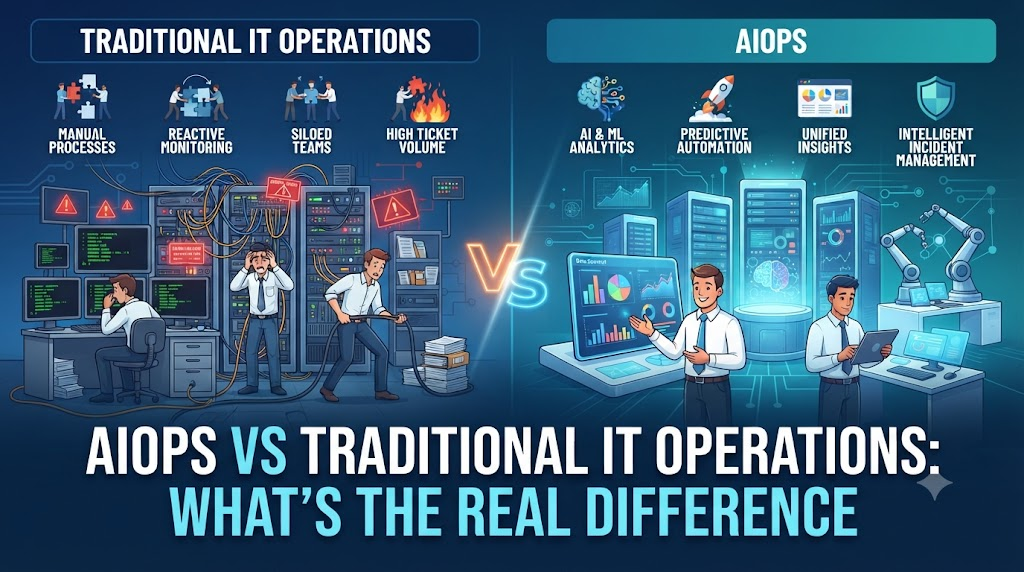
Traditional IT operations rely on human administrators using monitoring dashboards, alert tools, and standard operating procedures to maintain system health.
Why It Matters
For years, this was the backbone of the tech world. It gives human engineers direct control over every piece of hardware and software. Teams write rules that say, “If CPU usage goes above 90%, send an email to the on-call engineer.”
Example
Imagine a hotel where the front desk clerk watches a wall of analog gauges. If the water pressure drops in room 302, a red light blinks. The clerk reads a manual, calls a plumber, and tells them where to look. In IT, a server gets too busy, a light turns red, and an engineer logs in to investigate.
What Is AIOps?
Coined by industry research firm Gartner, AIOps stands for Artificial Intelligence for IT Operations.
Core Meaning
AIOps combines big data and machine learning to automate and improve IT operations processes. It collects data from every corner of an IT environment, analyzes it in real time, and spots hidden patterns.
Why It Matters
Modern systems generate an overwhelming amount of data—called telemetry. Traditional tools create too much noise. AIOps acts as a smart filter that separates critical problems from harmless background noise, allowing teams to solve real issues in minutes instead of hours.
Example
Sticking with our hotel analogy, AIOps is like an intelligent building system that notices water pressure is slowly dropping in room 302 every Tuesday at 2 PM. It predicts that a pipe will crack next week, orders the replacement part automatically, and alerts the maintenance team before any guest notices a problem.
How Traditional IT Operations Work
To understand why AIOps is growing in popularity, you need to look at how traditional IT operations function day-to-day.
Reactive Problem Solving
Traditional IT operations are mostly reactive. Something breaks, an alarm goes off, a customer complains, and the team scrambles to fix it.
Siloed Tools
In a traditional setup, the networking team uses one monitoring tool, the database team uses another, and the security team uses a third. None of these tools talk to each other easily. When an application slows down, engineers must check multiple dashboards to figure out which team owns the broken piece.
Static Alerting Rules
Traditional systems use threshold-based alerts. You set a hard rule: alert when memory hits 85%. But what if 85% memory is normal for your system on Friday afternoons? The system still sends an alert, causing alert fatigue for the engineers on call.
How AIOps Works
AIOps changes this workflow by turning raw data into actionable insights through three main steps: data ingestion, analysis, and automated action.
1. Data Ingestion (Collecting Everything)
AIOps platforms pull data from every available source:
- Metrics: CPU usage, memory load, network traffic speed.
- Logs: Text files recording every event, error, and user click.
- Traces: The exact path a user request takes through various software services.
2. Machine Learning and Pattern Recognition
Instead of relying on rigid rules, machine learning algorithms study historical data to learn what “normal” looks like for your specific system. They can spot subtle trends—like a memory leak that grows slowly over three weeks—that humans or static alerts would miss.
3. Correlation and Noise Reduction
When a major failure happens, a single root cause can trigger 500 individual alarms. AIOps groups these related alerts into a single incident ticket, telling the engineer: “Ignore the other 499 warnings; fix this one database connection.”
Why the Shift to AIOps Matters
The transition from traditional IT operations to AIOps is driven by scale and complexity.
The Problem of Scale
Modern businesses run software across multiple cloud providers, containers, and microservices. A single user click might trigger hundreds of tiny software components behind the scenes. No human team can manually track the dependencies between thousands of moving parts.
Burnout and Alert Fatigue
In traditional IT operations, on-call engineers are constantly woken up at night by false alarms. This leads to burnout, high staff turnover, and missed warnings when a real crisis occurs. AIOps reduces noise, protecting engineering teams and keeping services stable.
Practical Examples: AIOps vs Traditional IT Operations
| Scenario | Traditional IT Operations | AIOps Approach |
| Server CPU Spike | Sends an alert when CPU crosses 90%. Engineer logs in, checks logs, and searches for the runaway process manually. | Analyzes historical patterns, identifies that a scheduled backup is running late, and suppresses the unnecessary alert while logging the trend. |
| Application Slowdown | Multiple teams argue over whose system is causing the lag. Hours spent comparing independent dashboards. | Automatically correlates metrics across all layers, pinpointing the exact microservice causing the latency in seconds. |
| Outage Prevention | Waits for the system to crash, then initiates disaster recovery steps. | Predicts impending disk failure based on error rates and triggers an automated migration of workloads before failure occurs. |
Common Mistakes When Adopting AIOps
Organizations moving toward AIOps often run into predictable traps.
1. Feeding Bad Data into the AI
- What people do: Plug an AIOps tool directly into messy, unorganized logs and expect instant magic.
- Why it causes problems: Machine learning models require clean, structured data to work correctly. Garbage in equals garbage out.
- What to do instead: Clean up your logging standards and organize your core metrics before implementing advanced automation.
2. Expecting Full Automation on Day One
- What people do: Turn on automated remediation and let the AI make changes to production systems immediately.
- Why it causes problems: If the AI misinterprets a rare event, automated changes can accidentally take down healthy services.
- What to do instead: Start in “advisor mode.” Let the AIOps platform suggest fixes, have humans approve them, and slowly move toward automation as trust builds.
3. Treating AIOps as a Replacement for Skilled Engineers
- What people do: Reduce headcount, assuming the AI will run the entire infrastructure autonomously.
- Why it causes problems: AIOps is a force multiplier, not a replacement. It highlights problems and suggests fixes, but human architects are still needed to design robust systems and interpret complex strategic decisions.
Risks and Limitations of AIOps
While powerful, AIOps is not a silver bullet. Understanding its limitations helps organizations avoid costly missteps.
1. Privacy and Security Risks
- Risk: Feeding sensitive customer data or internal infrastructure secrets into third-party machine learning models.
- Why it matters: Data leaks can expose proprietary code or violate compliance laws like GDPR.
- How to reduce it: Use on-premise AIOps solutions or ensure cloud vendors sign strict data privacy agreements that prevent your data from training public models.
2. The “Black Box” Problem
- Risk: The AI tells engineers to restart a specific service, but cannot clearly explain why.
- Why it matters: If engineers don’t understand the reasoning behind an AI recommendation, they hesitate to trust it during high-pressure outages.
- How to reduce it: Choose tools that provide clear audit trails and explainable AI insights rather than blind black-box outputs.
Decision-Making Framework: Do You Need AIOps?
Not every company needs an enterprise AIOps platform. Use this simple framework to evaluate your readiness:
- Assess Your Scale: If you run a small website with a few servers, traditional monitoring tools and standard alerts are likely sufficient and much cheaper.
- Measure Alert Fatigue: Are your on-call engineers drowning in false alarms and spending hours troubleshooting routine issues?
- Check Data Maturity: Do you have centralized logging and consistent metrics across your applications?
- Evaluate Complexity: Are you running complex, distributed cloud architectures where manual troubleshooting takes too long?
- Calculate ROI: Compare the cost of software downtime against the licensing and implementation cost of an AIOps solution.
If your scale and complexity are high, and alert fatigue is burning out your team, it is time to invest in AIOps.
Key Terms
- Telemetry: The automated collection and transmission of data from remote sources, such as servers and applications.
- Alert Fatigue: Emotional exhaustion and desensitization caused by a high volume of false or low-priority system alerts.
- Root Cause Analysis (RCA): The method of discovering the fundamental reason why a problem or failure occurred in a system.
- Machine Learning (ML): A branch of artificial intelligence where computer systems learn from data to make predictions without being explicitly programmed.
- Microservices: An architectural style where an application is built as a collection of small, independent services.
- Log Management: The process of collecting, storing, and analyzing system log files for security and troubleshooting.
FAQs
Is AIOps going to replace human system administrators?
No. AIOps automates repetitive tasks, reduces alert noise, and speeds up troubleshooting. However, human engineers are still essential for designing resilient architectures, writing software, making strategic decisions, and validating complex fixes.
Is AIOps the same thing as DevOps?
No. DevOps is a culture and set of practices that unites software development (Dev) and IT operations (Ops) to deliver code faster. AIOps is a technology category that applies artificial intelligence and machine learning to IT operations data. They complement each other well.
Can small businesses use AIOps?
While large enterprises with complex cloud networks benefit the most, many modern cloud-monitoring tools include lightweight AIOps features out of the box. Small businesses can benefit from built-in anomaly detection without buying expensive enterprise platforms.
How long does it take to implement AIOps?
Implementation timelines vary widely. Basic anomaly detection and alert noise reduction can take a few weeks, while deep integration across complex enterprise infrastructure can take several months of data tuning and model training.
What is the biggest challenge when adopting AIOps?
Data silos are usually the biggest hurdle. If different departments store their logs and metrics in separate, incompatible formats, getting them into a single platform for AI analysis takes significant upfront effort.
Conclusion
Traditional IT operations laid the foundation for modern technology, but the sheer volume of data generated by modern cloud systems has stretched human capabilities to the limit.
AIOps offers a necessary evolution. By cutting through alert noise, predicting failures, and automating routine fixes, it transforms IT teams from reactive firefighters into proactive architects. Success with AIOps does not come from flipping a switch; it comes from pairing clean data, realistic expectations, and skilled human oversight with powerful machine intelligence.

