
Introduction
Modern companies rely on digital systems to run their operations. A retail bank needs a web application so customers can transfer money. It also needs automated reporting systems so risk managers can track suspicious transactions.
These two requirements seem similar, but they face very different daily challenges.
When a software engineer writes a banking application, the core logic behaves predictably once tested. If function A receives input B, it consistently outputs result C. The primary challenge is updating that code without taking down the website.
Data teams face a completely different headache. Even if their pipeline code has zero bugs, an upstream payment partner might send corrupt numbers, missing timestamps, or double the normal volume of records. The code runs fine, but the resulting dashboard is wrong.
This is why traditional software practices alone do not work for data.
Many teams try to force software delivery rules directly onto data analytics, only to end up with broken reports, distrustful executives, and burnt-out engineers. Understanding how DataOps vs DevOps work—and where their differences lie—saves companies months of wasted engineering effort.
Understanding DevOps: Delivering Predictable Code
What is DevOps?
DevOps combines software development (Dev) and IT operations (Ops).
Before DevOps became standard practice, software developers wrote code in isolation and handed it to a separate operations team to deploy onto physical servers. When an application crashed in production, developers blamed the servers, and system administrators blamed the code.
DevOps broke this barrier by unifying tools, processes, and responsibilities. Developers and operations engineers work together throughout the entire application lifecycle—from writing code to monitoring live systems.
Core Goals of DevOps
- Shorten development cycles: Deliver bug fixes and new features in days or hours instead of months.
- Increase deployment frequency: Push small, incremental updates frequently rather than launching risky, massive quarterly releases.
- Maintain system stability: Use automated checks to catch defects before users ever see them.
How DevOps Works: The Continuous Delivery Pipeline
DevOps relies on an automated workflow known as a CI/CD pipeline (Continuous Integration and Continuous Delivery).
- Continuous Integration (CI): Every time a developer writes new code, they merge it into a central repository (such as Git). Automated tests run immediately to ensure the new code does not break existing features.
- Continuous Delivery (CD): Once the code passes all automated tests, it is automatically built, packaged into an environment (like a Docker container), and deployed to production servers with minimal human intervention.
If an error slips through, teams use version control to roll back the application to the previous working version within seconds.
Understanding DataOps: Delivering Trustworthy Data
What is DataOps?
DataOps is an operational framework designed to improve the speed, quality, and reliability of data analytics and data pipelines.
It borrows ideas from three fields:
- Agile development: Delivering work in small, flexible increments.
- DevOps: Using version control, automated testing, and continuous deployment for pipeline code.
- Statistical Process Control (SPC): Monitoring manufacturing lines to catch product defects early.
The Real Problem DataOps Solves
To understand DataOps, imagine a car manufacturing plant.
DevOps builds and maintains the robotic assembly line. It makes sure the robotic arms move correctly, the conveyor belts run at the right speed, and the safety sensors work.
DataOps monitors the raw materials entering that factory. If a supplier delivers cracked metal sheets or defective bolts, the robotic arms will still assemble the car perfectly—but the car will fail safety inspections.
In the data world:
- The assembly line is your pipeline code.
- The raw materials are the incoming data records.
Data pipelines ingest numbers, strings, and files from hundreds of external databases, third-party APIs, and user devices. These sources change without warning. DataOps ensures that both the pipeline code and the incoming raw data meet quality standards before anyone uses the numbers to make business decisions.
How DataOps Works: The Dual-Feedback Pipeline
A DataOps pipeline must manage two distinct lifecycles simultaneously:
- Pipeline Deployment: When a data engineer updates a transformation script (such as a SQL query calculating monthly revenue), that code change goes through version control and code testing just like standard software.
- Active Data Observability: As live records flow through the deployed pipeline, automated monitors run continuous quality checks:
- Are there unexpected null values?
- Did daily transaction counts drop by 80%?
- Has a database column name changed from
user_idtocustomer_id?
If the data fails any check, the system isolates the bad records, alerts the on-call engineer, and prevents faulty reports from reaching company executives.
DataOps vs DevOps: Key Differences Explained Simply
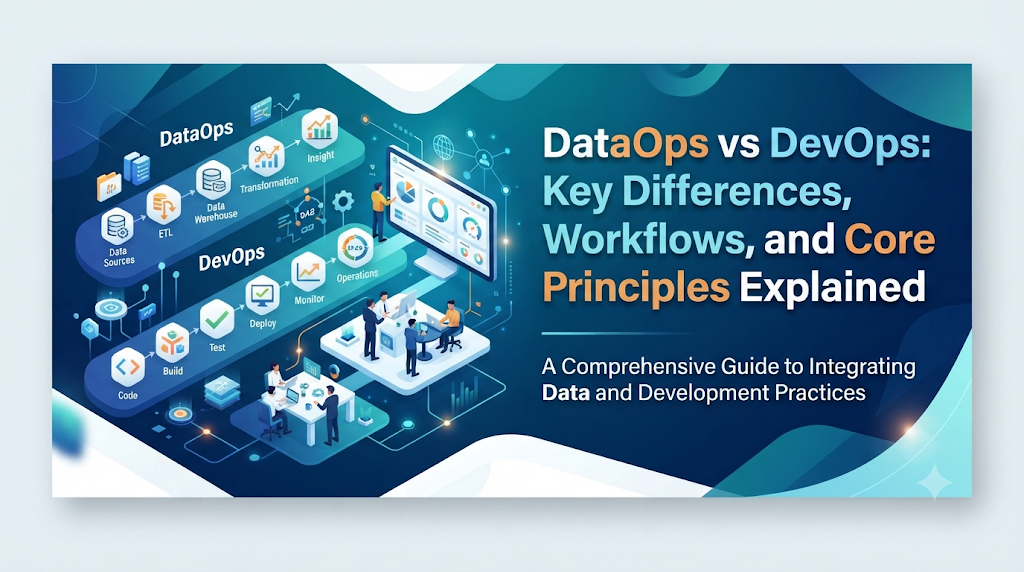
While DataOps uses DevOps concepts like automation and Git version control, the two frameworks diverge across several operational dimensions.
| Dimension | DevOps | DataOps |
| Primary Goal | Deliver reliable software applications quickly | Deliver accurate, trusted data products continuously |
| Core Artifact | Application code, binaries, compiled containers | Pipeline code plus dynamic, stateful data |
| Primary Users / Team | Software engineers, QA testers, site reliability engineers | Data engineers, data scientists, analytics engineers, business analysts |
| Nature of Testing | Unit tests, integration tests, UI regression tests | Code tests plus data quality, schema drift, and data distribution tests |
| Environment Replication | Easy (spin up identical staging containers with dummy mocks) | Difficult (production data contains privacy risks, huge volumes, and state) |
| Primary Root Cause of Failure | Code bugs, hardware outages, bad configurations | Upstream schema changes, data corruption, volume anomalies, semantic drift |
| Handling Failures | Roll back the code to the last working commit | Pause pipeline, isolate corrupted data, fix pipeline/data, backfill history |
The Four Core Differences Broken Down
1. Code-Centric vs. Data-and-Code Centric
In DevOps, code is king. The application logic dictates how the software behaves. If the code is correct, the software works. Once an application is deployed, it produces data as a secondary output (such as log files or user profile records).
In DataOps, code is only half the equation. You can write the cleanest, most efficient data transformation pipeline in the world, but if an upstream database administrator accidentally changes a date format from YYYY-MM-DD to DD/MM/YYYY, your pipeline will fail. DataOps treats data as a dynamic, volatile input that must be tested continuously throughout execution.
2. The Staging Environment Dilemma
In traditional DevOps, creating a realistic staging environment is straightforward. Developers spin up a lightweight virtual container, mock API calls with sample inputs, and run test suites. The environment is stateless and disposable.
In DataOps, staging is complicated:
- Scale: A production data warehouse may hold petabytes of records. Staging cannot duplicate petabytes of data without massive cloud storage costs.
- Privacy and Compliance: Regulations like GDPR and HIPAA prohibit developers from copying production databases—which contain customer names, credit card details, and health records—to unencrypted local testing environments.
- Data Skew: Synthetic “dummy data” rarely captures the bizarre anomalies, null values, and timing issues found in messy, real-world production streams.
DataOps requires advanced environment strategies, such as automated data masking, metadata virtualization, and synthetic data generation that accurately mimics production distributions.
3. Testing Logic vs. Testing Quality
Testing in DevOps asks: “Does this function do what the programmer intended?”
- Does the
login()function accept valid credentials? - Does the checkout button calculate sales tax correctly?
Testing in DataOps asks two separate questions:
- Logic Test: “Does this SQL query calculate moving averages correctly on clean inputs?”
- Data Quality Test: “Are the numbers flowing into this query today valid, complete, and within expected historical ranges?”
A DataOps test checks for:
- Completeness: Did all expected files arrive before 6:00 AM?
- Freshness: Has the data been updated within the last 15 minutes?
- Validity: Are user ages between 0 and 120?
- Schema Drift: Did a source database add or drop a column without telling us?
4. How Teams Handle Failures
When a DevOps deployment introduces a severe bug, the resolution is clear: roll back the code release to the previous version. The system immediately returns to a working state while developers debug the issue locally.
In DataOps, a simple rollback rarely solves the problem. If a pipeline runs with a silent flaw for three days, bad data has already populated downstream marketing tables, executive dashboards, and machine learning models.
A DataOps remediation involves:
- Identifying exactly when the bad data entered the system.
- Isolating or purging the corrupted records.
- Patching the transformation code or alerting upstream data providers.
- Backfilling: Re-running the pipeline on historical data to recalculate the affected metrics accurately.
Practical Examples: Walking Through Real-World Scenarios
To see the operational differences clearly, let’s examine two everyday technical scenarios.
Scenario A: Deploying a New Feature
The DevOps Workflow
A software team wants to add discount code functionality to an e-commerce website.
- A developer writes the code in a local Git branch.
- They push the code to a repository, triggering an automated CI/CD pipeline.
- Automated unit tests verify that valid discount codes reduce the cart total and invalid codes show an error message.
- The code automatically deploys to a staging server for visual testing.
- Once approved, the changes deploy to the live site using a “blue-green” deployment strategy, ensuring zero customer downtime.
The DataOps Workflow
An analytics team needs to add customer lifetime value (LTV) calculations to an executive marketing dashboard.
- An analytics engineer writes the SQL transformation model in a version-controlled tool.
- The code runs against a development schema containing sampled, masked data to verify syntax and join accuracy.
- The pull request triggers continuous integration to ensure the new query does not break existing downstream views or dependencies.
- The query deploys to production, but automated monitors remain active:
- They verify that execution time does not exhaust warehouse compute limits.
- They check that calculated LTV values are not negative numbers.
- They ensure that no customers were dropped due to an unintended inner join.
- If anomalous numbers appear, alerts notify the analytics engineer before the dashboard refreshes for the Chief Marketing Officer.
Scenario B: Responding to a Production Incident
The DevOps Incident
At 2:00 PM, a software service crashes because a newly deployed update contained a memory leak.
- Detection: Monitoring tools (like Prometheus) detect high server memory usage and HTTP 500 error spikes.
- Action: The automated deployment system rolls back the application to the previous container image.
- Result: The service stabilizes within three minutes. Engineers debug the leak locally.
The DataOps Incident
At 7:00 AM, a daily revenue dashboard reports that company revenue dropped by 95% yesterday.
- Detection: Data observability monitors flag a volume anomaly: the transaction table received 1,000 rows instead of the expected 50,000.
- Investigation: The pipeline code is working perfectly. However, an upstream third-party payment gateway changed its webhook payload format overnight without warning. The ingestion script discarded the unrecognized payloads.
- Action: The team updates the ingestion script to parse the new payload format, tests the code, and redeploys it.
- Recovery: The team triggers an API backfill to fetch yesterday’s missing transaction records, re-runs the daily aggregation pipeline, and updates the revenue table.
- Result: Executives receive corrected revenue figures alongside an incident report explaining the upstream data provider issue.
Common Operational Mistakes
Transitioning from software engineering to data management often leads teams into common operational traps:
- Assuming clean code guarantees clean output.
- What people do: Teams build sophisticated automated CI/CD pipelines for their SQL and Python scripts, but include zero tests for incoming data values.
- Why it causes problems: The pipeline runs without a single software error, yet produces completely wrong metrics because source data was missing or malformed.
- What to do instead: Implement automated data quality frameworks (like Great Expectations or dbt tests) directly inside your pipeline to validate incoming rows.
- Treating data pipelines as stateless applications.
- What people do: Teams attempt to destroy and recreate data environments on the fly, just like stateless web servers.
- Why it causes problems: Data has historical state, dependencies, and volume. Rebuilding a multi-terabyte data model from scratch during every test run consumes enormous time and budget.
- What to do instead: Use modern data warehousing features like zero-copy cloning, data virtualization, or smart partition testing to test against production-like environments efficiently.
- Isolating data engineers from business consumers.
- What people do: Technical data teams treat data delivery as a purely backend infrastructure job, ignoring how end-users interpret business definitions.
- Why it causes problems: The pipeline works technically, but the definition of “churned customer” used by engineering conflicts with the definition used by the finance department.
- What to do instead: Involve business analysts and domain experts in the definition of data contracts and pipeline validation rules.
Implementation Checklist
Before building or redesigning your data operations, use this checklist to ensure you cover both code and data stability:
- Version Control: Are all pipeline definitions, SQL transformation models, and infrastructure configurations managed in Git?
- Environment Isolation: Do developers have dedicated development environments that do not overwrite production tables?
- Data Privacy: Is all sensitive customer data (PII) masked or removed before data is used in non-production environments?
- Pre-Deployment Code Testing: Does your CI pipeline verify SQL syntax, linting, and basic logic before code merges to main?
- Schema Drift Protection: Does your ingestion layer automatically detect when an upstream source alters its column names or types?
- Volume and Freshness Monitoring: Do you have automated alerts that fire if incoming data is delayed or drastically differs in row count?
- Null and Boundary Checks: Are critical columns (such as IDs, dates, and currency values) actively validated for missing values or unrealistic ranges?
- Documented Lineage: Can your team trace where a metric originated, what transformations it underwent, and which dashboards consume it?
- Idempotent Pipelines: Can your data transformations be safely re-run over historical dates without creating duplicate records?
Key Terms Explained
- CI/CD (Continuous Integration / Continuous Delivery): An automated method of writing, testing, packaging, and deploying code updates with minimal manual steps.
- Data Pipeline: A series of automated steps that collect raw data from various sources, clean and transform it, and load it into a storage destination for analysis.
- Schema Drift: Unexpected changes in the structure of incoming data, such as a source database renaming a column or altering a data type.
- Data Observability: The practice of monitoring data health across an entire system using metrics like data freshness, volume, distribution, schema, and lineage.
- Data Contract: An agreement between an upstream software team generating data and downstream data teams consuming it, specifying schema formats, update frequencies, and quality expectations.
- Idempotence: A property of a pipeline step where running it multiple times with the same input produces the exact same result without duplicate or corrupt records.
- Data Lineage: The visual map showing the complete lifecycle of data—where it originated, how it moved through transformations, and where it is currently used.
- Backfilling: The process of running a pipeline on historical data to recalculate metrics, often after fixing an error or introducing a new metric definition.
Frequently Asked Questions
Can a team use DevOps tools for DataOps?
Yes, but only for the code side of the workflow. Tools like Git, Docker, and GitHub Actions are foundational to both disciplines. However, DataOps requires additional specialized tools to monitor data quality, manage table schemas, and track pipeline lineage.
Does a company need DevOps before implementing DataOps?
Not necessarily, but having basic DevOps maturity helps significantly. Teams that already understand version control, automated testing, and CI/CD pipelines will learn DataOps concepts much faster than teams accustomed to manually running ad-hoc scripts.
Who is responsible for DataOps?
DataOps is a shared responsibility across the data team. Data engineers typically build the automation pipelines and monitoring infrastructure, while analytics engineers and data analysts define data validation rules and verify metric accuracy.
Is DataOps just another name for MLOps?
No. DataOps focuses on delivering clean, reliable data for general analytics, dashboards, and reporting. MLOps (Machine Learning Operations) focuses specifically on the lifecycle of machine learning models, including model training, feature stores, model drift, and automated retraining.
What is the biggest challenge when adopting DataOps?
The biggest challenge is cultural rather than technical. Software developers and database administrators must coordinate across department boundaries to treat data as a shared product rather than an afterthought.
How does DataOps handle data security?
DataOps incorporates automated access controls, data anonymization, and encryption checks directly into the pipeline. This ensures that sensitive information is stripped before data reaches downstream analytics or non-production test environments.
Why can’t we just test data pipelines on production databases?
Testing directly in production risks overwriting live tables, corrupting historical data, and consuming expensive database compute resources that slow down critical business operations.
What is data freshness, and why does it matter?
Data freshness measures how recently data was updated. If an inventory dashboard updates every 24 hours instead of every 15 minutes, warehouse managers may sell items that are already out of stock.
Conclusion
DevOps and DataOps share a common goal: eliminating slow manual work through automation, continuous testing, and cross-functional teamwork.
The critical difference lies in what they deliver. DevOps standardizes how code moves from a developer’s computer to live servers. DataOps accepts that even the best code will break if the data flowing through it is dirty, delayed, or poorly understood.
Organizations that attempt to solve data problems using software tools alone will continue to struggle with untrustworthy metrics and unexpected pipeline breaks. By combining the rigorous code automation of DevOps with the real-time quality monitoring of DataOps, teams build digital systems that deliver both dependable applications and trustworthy insights.

