
Introduction
A developer may finish writing a feature in a few hours, but delivering that feature safely to users can take much longer when testing, approvals, configuration, and deployment are handled manually. This is where CI/CD becomes important. Many beginners hear terms such as build server, deployment pipeline, automated testing, artifacts, runners, and production environments without understanding how they connect. That confusion can lead to unreliable releases, repeated errors, and unnecessary fear of automation. Learning CI/CD pipeline basics helps DevOps learners understand how software moves from a developer’s computer to real users. It also builds practical knowledge of teamwork, quality control, security, deployment safety, and operational responsibility.
What is CI/CD Pipelines ?
A CI/CD pipeline is an automated process that helps teams build, test, check, package, and deliver software.
The abbreviation CI/CD commonly refers to:
- Continuous Integration
- Continuous Delivery
- Continuous Deployment
Continuous integration focuses on regularly combining code changes from different developers into a shared repository. Every change is automatically checked through builds, tests, and quality controls.
Continuous delivery ensures that successfully tested software remains ready for release. A person may still approve the final production deployment.
Continuous deployment goes one step further. Every change that passes the required checks is automatically released to production without manual approval.
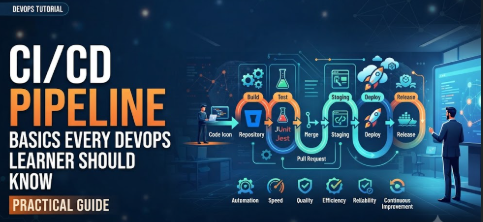
A simple CI/CD workflow may look like this:
- A developer writes code.
- The developer pushes the code to a Git repository.
- The pipeline starts automatically.
- The application is built.
- Automated tests run.
- Security and quality checks are performed.
- A deployable package is created.
- The application is deployed to an environment.
- Monitoring tools check its health.
A Beginner-Friendly Example
Imagine a team developing an online shopping application. One developer changes the login page, while another adds a payment feature.
Without continuous integration, both developers may work independently for several days. When their code is finally combined, the application may fail because the changes conflict.
With continuous integration, each developer pushes small changes regularly. The pipeline automatically builds and tests those changes. Problems are identified earlier, when they are usually easier to correct.
A Common Misunderstanding
Some beginners think CI/CD means deploying every code change directly to production.
That is not always true.
A team may use continuous integration without automatic production deployment. It may also use continuous delivery, where the software is always deployable but requires approval before release.
Practical Takeaway
CI/CD is not simply a deployment tool. It is a complete software-delivery practice that connects development, testing, security, release management, infrastructure, and operations.
Why CI/CD Pipelines Are Important
Modern software changes frequently. Customers expect applications to remain available while teams introduce new features, security fixes, and performance improvements.
A CI/CD pipeline helps teams make these changes more consistently.
Faster Feedback
Developers receive early feedback when a build fails, a test does not pass, or a security rule is violated. This prevents defective code from moving further through the release process.
Consistent Software Builds
Manual build processes can produce different results depending on who performs them. An automated pipeline follows the same defined steps every time.
Reduced Deployment Risk
Small, regular releases are generally easier to understand and troubleshoot than large releases containing months of accumulated changes.
Better Team Collaboration
Developers, testers, security teams, and operations teams work through a shared delivery process. This reduces confusion about responsibilities and release status.
Improved Software Quality
Automated unit tests, integration tests, code-quality checks, and security scans help identify problems before users experience them.
Clear Audit Trail
Pipeline logs show what changed, who initiated it, which checks were performed, what artifact was produced, and where it was deployed.
Practical Scenario
A team manually deploys an application by copying files to a server. One engineer forgets to update a configuration file, causing the application to fail.
After implementing a pipeline, the team defines the configuration process as code. Each deployment follows the same steps, reducing dependence on individual memory.
The Real Problems Readers Face with CI/CD
Beginners often understand the basic definition of CI/CD but struggle when trying to apply it.
Too Many Tools
The CI/CD ecosystem includes source-control platforms, automation servers, container tools, cloud services, security scanners, artifact repositories, and monitoring platforms.
A learner may spend too much time comparing tools without understanding the underlying workflow.
The better approach is to learn the pipeline stages first. Tools should support the process rather than define it.
Confusing Terminology
Terms such as jobs, stages, workflows, runners, agents, executors, artifacts, environments, triggers, and gates may vary across platforms.
Learners should understand the purpose behind each term instead of memorizing a single tool’s interface.
Overcomplicated Examples
Many public examples combine containers, Kubernetes, infrastructure as code, multiple cloud platforms, security scanning, and advanced deployment strategies.
These examples may be realistic, but they can overwhelm a beginner.
A basic pipeline that builds, tests, packages, and deploys a small application is a better starting point.
Fear of Production Deployment
New learners may assume automation removes human control.
A well-designed pipeline can include approvals, checks, limited permissions, rollback procedures, and protected environments.
Automation should increase control by making actions visible and repeatable.
Weak Testing Practices
A pipeline cannot create quality automatically when the project has no useful tests.
Automation makes existing checks faster and more consistent, but teams must still design meaningful tests.
Copying Configuration Without Understanding It
Beginners frequently copy pipeline configuration files from repositories or online examples.
The pipeline may work temporarily, but the learner may not understand:
- Why each stage exists
- Which credentials are used
- Where the artifact is stored
- What happens when a command fails
- How production access is controlled
The better approach is to add one stage at a time and understand its inputs, outputs, and failure conditions.
How a CI/CD Pipeline Works Step by Step
Step 1: Plan and Create a Small Code Change
The pipeline begins with a clear development task. A developer creates a branch, changes the application, and checks the work locally. This matters because automation cannot replace basic development discipline. For example, a developer may add validation to a registration form and test it locally before pushing the change. A common mistake is combining many unrelated changes in one branch. A better approach is to make small, focused changes that are easier to test, review, and reverse.
Step 2: Commit and Push Code to Version Control
The developer commits the change and pushes it to a shared Git repository. This action may trigger the CI/CD pipeline automatically. Version control provides a history of changes and allows teams to review, compare, restore, and collaborate on code. A common mistake is using unclear commit messages such as “update” or “fix.” A better approach is to write a concise message describing the purpose of the change, such as “Add email validation to registration form.”
Step 3: Start the Pipeline Through a Trigger
A trigger tells the automation platform when to run. Common triggers include a push, pull request, merge, tag, scheduled job, or manual request. Triggers matter because not every action requires the same workflow. A pull request may run tests and code checks, while a release tag may begin production delivery. A common mistake is triggering expensive deployment jobs for every minor branch change. A better approach is to define different pipeline behaviour for feature branches, main branches, tags, and production releases.
Step 4: Build the Application
The build stage converts source code into a usable software package. Depending on the technology, this may involve compiling code, installing dependencies, generating static files, or building a container image. A successful build confirms that the application can be packaged in a consistent environment. A common mistake is relying on tools or dependencies installed only on a developer’s laptop. A better approach is to define the required runtime, dependency versions, and build commands inside the pipeline.
Step 5: Run Automated Tests and Quality Checks
The pipeline runs tests to confirm that the application behaves as expected. These may include unit tests, integration tests, API tests, code-style checks, dependency checks, and security scans. A common mistake is treating all tests as one large stage that takes too long and provides unclear feedback. A better approach is to organize checks logically, run independent tests in parallel where appropriate, and provide clear failure reports.
Step 6: Package and Store the Artifact
After the software passes its checks, the pipeline creates an artifact. An artifact may be a compiled package, archive, binary file, library, container image, or deployment bundle. It should be stored in an artifact repository or container registry. A common mistake is rebuilding the application separately for testing and production. That can create differences between environments. A better approach is to build once, verify that artifact, and promote the same version through testing, staging, and production.
Step 7: Deploy to a Controlled Environment
The verified artifact is deployed to a development, testing, or staging environment. Additional checks may confirm that the application starts correctly and can communicate with required services. A common mistake is assuming that a successful build guarantees a successful deployment. Infrastructure, configuration, network access, database changes, and secrets may still cause problems. A better approach is to include deployment verification and environment-specific health checks.
Step 8: Release, Monitor, and Improve
After approval and validation, the application is released to production. Monitoring then checks availability, errors, performance, logs, and user-impact indicators. A common mistake is considering the pipeline complete when deployment finishes. A release may technically succeed while the application performs poorly. A better approach is to define post-deployment checks, alerts, rollback conditions, and a process for improving the pipeline after incidents.
Key Factors That Influence CI/CD Pipeline Performance
Pipeline Design
A pipeline should reflect the actual software-delivery process. Too few checks can allow defects to pass, while too many unnecessary stages can slow development.
Teams should identify which checks provide meaningful protection and when they should run.
Build Speed
Slow builds reduce productivity because developers wait longer for feedback.
Build speed can often be improved through dependency caching, parallel jobs, smaller test groups, reusable build images, and efficient scripts.
Speed should not come from removing important checks without understanding the risk.
Test Quality
A large number of tests does not automatically create a reliable pipeline.
Tests should be:
- Relevant
- Repeatable
- Independent where possible
- Easy to understand
- Stable across runs
- Fast enough for their pipeline stage
Unstable tests create false failures and reduce trust in automation.
Environment Consistency
Development, testing, staging, and production environments should be reasonably consistent.
Containers, infrastructure as code, configuration management, and version-controlled deployment files can reduce unexpected differences.
Security Controls
Pipelines frequently access source code, cloud platforms, servers, registries, and sensitive configuration.
Access must follow least-privilege principles. Credentials should be stored in approved secret-management systems rather than written directly in pipeline files.
Artifact Management
Every release artifact should have a clear version and traceable source commit.
Teams should know:
- When it was built
- Which code produced it
- Which tests it passed
- Where it was deployed
- Whether it has known vulnerabilities
Deployment Strategy
The chosen deployment method affects availability and recovery.
A basic replacement deployment may be sufficient for a development environment. A production service may require rolling, blue-green, or canary deployment.
Monitoring and Feedback
A pipeline should provide useful feedback, not just a success or failure symbol.
Logs, test reports, deployment events, health checks, and alerts should help teams understand what happened and what action is required.
Detailed Breakdown of CI/CD Pipeline Components
Source-Code Repository
The source repository stores application code, pipeline configuration, documentation, and sometimes infrastructure definitions.
Git-based workflows commonly use branches and pull requests to separate work and support review.
The repository is normally the starting point for pipeline automation.
A good repository structure makes the pipeline easier to maintain. Teams should avoid hiding important deployment logic in undocumented manual scripts.
Pipeline Configuration
Pipeline configuration defines the automated workflow.
It may describe:
- Triggers
- Stages
- Jobs
- Commands
- Dependencies
- Environment variables
- Artifacts
- Approval rules
- Deployment targets
Many systems use YAML-based configuration, although syntax differs between platforms.
Learners should treat pipeline configuration as software. It should be reviewed, tested, versioned, and improved carefully.
Runner or Build Agent
A runner, agent, or executor is the system that performs pipeline jobs.
It may run on:
- A shared cloud-hosted machine
- A dedicated virtual machine
- A container
- An on-premises server
- A Kubernetes cluster
The runner needs the correct tools and permissions to perform its work.
Giving every runner unrestricted production access is risky. Different jobs should use different permissions based on their responsibilities.
Build System
The build system prepares the application for use.
Examples include dependency installation, compilation, minification, packaging, and container-image creation.
The build should be reproducible. The same source and controlled dependencies should produce the expected output consistently.
Uncontrolled dependency versions can cause a pipeline to behave differently over time.
Automated Testing
Automated tests provide evidence that the software still meets expected requirements.
Unit Tests
Unit tests check small pieces of application logic.
They are usually fast and should run early.
Integration Tests
Integration tests check whether multiple components work together, such as an application connecting to a database.
They may require more setup and take longer.
End-to-End Tests
End-to-end tests simulate complete user workflows.
They provide broad confidence but may be slower and more difficult to maintain.
Smoke Tests
Smoke tests confirm that essential functions work after deployment.
For example, the pipeline may check whether the application’s health endpoint responds successfully.
Code-Quality Checks
Code-quality tools can check formatting, coding standards, complexity, duplication, and common defects.
These tools help teams maintain consistency, but they should support engineering judgement rather than replace it.
Rules should be reviewed so that they identify meaningful issues instead of creating unnecessary noise.
Security Scanning
Security can be integrated throughout the pipeline.
Common checks include:
- Static application security testing
- Dependency vulnerability scanning
- Container-image scanning
- Secret detection
- Infrastructure configuration scanning
- License-policy checks
A common mistake is adding scanning tools without defining how findings will be reviewed.
Teams need clear severity levels, ownership, exception procedures, and remediation expectations.
Artifact Repository
An artifact repository stores versioned build outputs.
This allows teams to promote a verified artifact rather than rebuilding the software for every environment.
Artifact repositories also support access control, retention rules, metadata, and vulnerability analysis.
Deployment Automation
Deployment automation transfers and configures the application in a target environment.
It may:
- Update a service
- Replace a container image
- Apply infrastructure changes
- Run database migrations
- Update configuration
- Restart processes
- Verify service health
Deployment logic should be safe to run repeatedly where possible.
Environment Management
Most teams use multiple environments, such as:
- Development
- Testing
- Staging
- Production
Each environment may have different capacity, credentials, integrations, and approval rules.
Pipeline configuration should clearly separate shared logic from environment-specific settings.
Approval Gates
An approval gate pauses the pipeline before a sensitive action.
For example, production deployment may require approval from an authorised engineer or release manager.
Approvals are useful when they represent a meaningful decision. They become harmful when everyone approves automatically without reviewing evidence.
Observability and Monitoring
Observability helps teams understand application behaviour after release.
The pipeline may connect deployment events with:
- Logs
- Metrics
- Traces
- Error reports
- Availability checks
- Business indicators
This connection helps teams determine whether a change improved or harmed the service.
Rollback and Recovery
A reliable pipeline needs a recovery plan.
Rollback may involve redeploying the previous artifact, shifting traffic back to an earlier environment, or disabling a feature.
Not every change can be reversed easily. Database schema changes and external integrations require careful planning.
The best time to define recovery steps is before a production problem occurs.
Common Mistakes Beginners Make with CI/CD
Building an Advanced Pipeline Too Early
Beginners may try to include every possible tool from the beginning.
This increases configuration complexity and makes failures harder to understand.
Start with source control, build, test, artifact creation, and one controlled deployment. Add other controls when their purpose is clear.
Ignoring Local Validation
A pipeline should not become the first place where basic syntax or unit tests are checked.
Developers should perform fast local validation before pushing code.
This reduces unnecessary pipeline runs and provides faster feedback.
Hard-Coding Credentials
Credentials written in a repository or pipeline file may be exposed through source history or logs.
Use a secret store, protected variables, short-lived credentials, and limited permissions.
Using the Same Permissions Everywhere
A test job does not normally need production-deployment access.
Separate permissions by job, environment, and responsibility.
Rebuilding for Every Environment
Rebuilding can create different outputs due to dependency or environment changes.
Build once, verify the artifact, and promote the same version through environments.
Ignoring Failed Tests
Teams sometimes rerun a pipeline until an unstable test passes.
This hides the real problem.
Unstable tests should be investigated, repaired, isolated, or removed if they provide no useful assurance.
Making the Pipeline Too Slow
A slow pipeline encourages developers to submit larger changes or avoid running checks.
Analyse job duration, cache reusable dependencies, parallelise independent work, and move longer checks to appropriate stages.
Treating Deployment as the Final Step
A successful deployment command does not prove that users can use the application.
Add health checks, smoke tests, monitoring, and rollback criteria.
Allowing Unreviewed Production Changes
Production pipelines should have protected branches, controlled credentials, approved workflows, and clear ownership.
Direct production changes outside the pipeline should be limited and documented.
Ignoring Pipeline Maintenance
Tool versions, operating systems, dependencies, secrets, and security requirements change.
The pipeline requires regular review like any other production system.
“Don’t Do This” Checklist
- Do not place passwords or access keys directly in code.
- Do not give every pipeline job production administrator access.
- Do not skip tests merely to make the pipeline appear faster.
- Do not deploy an artifact that cannot be traced to a commit.
- Do not copy pipeline files without understanding their commands.
- Do not ignore repeated or intermittent test failures.
- Do not make large production changes without recovery planning.
- Do not use uncontrolled dependency versions.
- Do not rely only on manual testing.
- Do not treat monitoring as separate from deployment.
- Do not remove approval controls without reviewing the risk.
- Do not allow pipeline logs to expose sensitive information.
Practical Real-Life Examples of CI/CD Pipelines
Example 1: Student Building a Portfolio Application
A student creates a simple web application and manually checks it before every update. Small errors frequently reach the hosted website. The student adds a pipeline that installs dependencies, runs unit tests, and builds the application. The main learning is that even a small project benefits from repeatable validation.
Example 2: Development Team Facing Merge Conflicts
A team combines several weeks of work shortly before release and discovers many conflicting changes. The team adopts smaller branches, pull requests, and automated integration checks. The learning is that continuous integration works best when developers integrate small changes frequently.
Example 3: Startup Experiencing Deployment Errors
A startup deploys its application by running commands manually on a server. Different engineers use slightly different steps. The team converts the process into a pipeline and stores deployment configuration in version control. The learning is that automation reduces dependence on memory and individual habits.
Example 4: Application with an Unstable Test Suite
A pipeline fails randomly because several tests depend on shared data. Developers repeatedly rerun the jobs until they pass. The team isolates test data and improves cleanup procedures. The learning is that unreliable tests weaken confidence in the entire pipeline.
Example 5: Production Release with No Monitoring
A release completes successfully, but users begin receiving errors several minutes later. The team had no automated post-deployment checks. It adds health checks, error monitoring, and rollback conditions. The learning is that release verification must continue after deployment.
Table 1: Continuous Integration, Delivery, and Deployment
| Practice | Main Purpose | Production Release | Beginner Takeaway |
|---|---|---|---|
| Continuous Integration | Combine and validate code changes frequently | Not required | Build and test every important code change |
| Continuous Delivery | Keep validated software ready for release | Usually requires approval | Automate preparation while keeping controlled release decisions |
| Continuous Deployment | Release every qualifying change automatically | Fully automated | Use only when tests, monitoring, and recovery are highly reliable |
Table 2: Common Pipeline Mistakes and Better Approaches
| Common Mistake | Possible Result | Better Approach |
|---|---|---|
| Hard-coded credentials | Secret exposure or unauthorised access | Use protected secrets and short-lived credentials |
| Rebuilding for production | Different artifact from the tested version | Build once and promote the verified artifact |
| One large pipeline job | Slow feedback and unclear failures | Separate work into logical stages and jobs |
| No post-deployment checks | Failed releases may remain unnoticed | Add health checks, smoke tests, and monitoring |
| Excessive permissions | Larger security impact if compromised | Apply least privilege to every job |
| Ignoring unstable tests | Loss of confidence in automation | Investigate and repair flaky tests |
| No rollback process | Longer recovery during incidents | Define and test recovery procedures |
| Copying configurations blindly | Unsafe or misunderstood behaviour | Build incrementally and document every stage |
Tools, Methods, and Frameworks Readers Can Use
Version-Control Workflow
A version-control workflow defines how code is branched, reviewed, merged, and released.
Beginners can start with:
- A main branch
- Short-lived feature branches
- Pull requests
- Required review
- Automated checks before merging
This method helps avoid uncontrolled changes and makes integration easier to understand.
Pipeline-as-Code
Pipeline-as-code means storing the pipeline definition in version control.
It helps because teams can:
- Review changes
- Track history
- Restore earlier versions
- Test modifications
- Share knowledge
It prevents important automation from existing only inside an undocumented graphical interface.
Build Checklist
A build checklist can verify that the pipeline:
- Uses a defined runtime version
- Installs controlled dependencies
- Fails when compilation fails
- Produces a versioned artifact
- Records the source commit
- Removes unnecessary files
This helps beginners avoid incomplete or inconsistent packages.
Test-Pyramid Method
The test pyramid encourages teams to maintain many fast unit tests, fewer integration tests, and a limited number of broader end-to-end tests.
It helps balance speed and confidence.
The mistake it helps prevent is depending entirely on slow user-interface tests.
Artifact Promotion Method
Artifact promotion means moving the same verified package through testing, staging, and production.
Beginners can label or version artifacts and record which environment received each version.
This prevents differences created by repeated builds.
Environment Checklist
Before deployment, the learner can check:
- Configuration
- Credentials
- Network access
- Database readiness
- Storage
- Service dependencies
- Capacity
- Monitoring
This helps identify environment-related failures that application tests may not detect.
Deployment Readiness Review
A deployment readiness review asks whether:
- Required tests passed
- Security findings were addressed
- The artifact is traceable
- Changes were reviewed
- Rollback steps exist
- Monitoring is active
- Stakeholders understand the change
This framework is useful for controlled releases without creating unnecessary bureaucracy.
Failure Analysis Method
When a pipeline fails, learners should identify:
- Which stage failed
- Which command failed
- Whether the problem is repeatable
- What changed since the last success
- Whether the failure is related to code, infrastructure, configuration, credentials, or dependencies
- What evidence the logs provide
This prevents random changes and repeated reruns without investigation.
Pipeline Review Routine
Teams should periodically review pipeline speed, reliability, permissions, dependency versions, unused jobs, secret handling, test quality, and recovery procedures.
This helps prevent gradual complexity and outdated controls.
Expert Tips to Make Better CI/CD Decisions
1. Start with a Small Working Pipeline
Begin with build, test, and artifact creation. A simple pipeline is easier to understand and troubleshoot. Add security, deployment, and advanced testing after the foundation works reliably.
2. Keep Code Changes Small
Small changes produce clearer pipeline feedback. When a test fails, the team has fewer modifications to investigate. Encourage short-lived branches and regular integration.
3. Fail Early
Run quick and important checks near the beginning. Syntax checks, formatting checks, compilation, and unit tests should normally happen before expensive deployment tasks.
4. Build Once
Create one versioned artifact and promote it through environments. This improves traceability and reduces the chance that production receives something different from the tested package.
5. Protect Secrets Carefully
Use approved secret stores or protected pipeline variables. Avoid displaying sensitive values in commands, logs, error messages, and generated files.
6. Apply Least Privilege
Give each job only the access it needs. A unit-test job should not normally have permission to change production infrastructure.
7. Make Failures Easy to Understand
Use clear job names, structured logs, test reports, and useful error messages. A pipeline should tell the team where to investigate.
8. Treat Flaky Tests as Defects
Repeatedly rerunning unstable tests hides quality problems. Track their causes and improve test isolation, data management, timing, and environment consistency.
9. Separate Validation from Deployment
A code check and a production deployment have different risks. Use different jobs, permissions, triggers, and approval rules.
10. Add Security Throughout the Pipeline
Do not wait until the final release stage. Check source code, dependencies, container images, infrastructure definitions, and secrets at suitable points.
11. Define Ownership
Every pipeline should have people responsible for its reliability and security. Without ownership, outdated jobs and recurring failures may remain unresolved.
12. Monitor Release Outcomes
Connect deployments to application metrics, logs, traces, and alerts. This helps teams understand whether a technically successful release actually served users correctly.
13. Test the Recovery Process
A written rollback command is not enough. Teams should verify that recovery procedures work and understand situations where rollback may not be safe.
14. Document Important Decisions
Document why a stage exists, what it protects, who owns it, and how failures should be handled. Good documentation helps new team members learn more quickly.
15. Improve the Pipeline Gradually
Pipeline maturity develops through regular learning. Review incidents, delays, repeated failures, and manual steps to identify the next useful improvement.
Case Studies: How Better Understanding Changes Decisions
Case Study 1: DevOps Student Building a First Pipeline
Profile: A student learning Git, Linux, cloud computing, and DevOps automation.
Situation: The student creates a small application and wants to demonstrate CI/CD skills in a portfolio.
Problem: The first pipeline contains build, deployment, container scanning, infrastructure provisioning, Kubernetes delivery, and monitoring in one configuration.
Wrong approach: The student copied several public examples and could not explain why the deployment failed.
Better approach: The student rebuilt the pipeline gradually. The first version checked out the code and ran tests. The next version created a container image. Later, the student added a controlled test deployment and health check.
Result or learning: The student developed a clearer understanding of inputs, outputs, credentials, artifacts, and failure points.
Key takeaway: A smaller pipeline that the learner can explain is more valuable than a complex pipeline copied without understanding.
Case Study 2: Small Team Reducing Manual Releases
Profile: A small software team maintaining an internal business application.
Situation: Releases were performed by one experienced administrator using a personal checklist.
Problem: Deployments were delayed whenever that administrator was unavailable.
Wrong approach: The team initially planned to give every developer administrator access to the production server.
Better approach: The team documented the release steps, converted them into controlled automation, stored credentials securely, and required approval before production deployment.
Result or learning: Releases became repeatable and less dependent on one person. Access also became easier to review.
Key takeaway: CI/CD can improve both continuity and security when automation replaces undocumented manual access.
Case Study 3: Product Team Improving Release Reliability
Profile: A product team releasing frequent updates to a customer-facing application.
Situation: The pipeline completed successfully, but some releases caused performance problems.
Problem: The team measured pipeline success only by whether deployment commands finished.
Wrong approach: Engineers manually checked dashboards after users reported issues.
Better approach: The team added automated smoke tests, deployment markers, error-rate monitoring, performance checks, and rollback criteria.
Result or learning: The team identified harmful releases earlier and reduced the time required to understand the cause.
Key takeaway: A reliable CI/CD pipeline must verify the operational result, not only the deployment action.
Risk Awareness: What Readers Must Check First
Credential Risk
Pipelines often use credentials for repositories, registries, cloud accounts, servers, and databases.
Exposed credentials may allow unauthorised access.
Reduce this risk by using protected secret systems, short-lived tokens, access rotation, masked logs, and least privilege.
Supply-Chain Risk
Applications depend on third-party packages, base images, plugins, and build tools.
A compromised dependency may enter the software through the pipeline.
Reduce this risk by controlling versions, reviewing dependency sources, scanning components, maintaining software inventories, and updating responsibly.
Pipeline Modification Risk
An attacker or unauthorised user may attempt to change pipeline configuration.
Protected branches, mandatory reviews, signed changes where appropriate, and restricted administration can reduce this risk.
Runner Risk
A compromised runner may expose source code, credentials, artifacts, or network access.
Use isolated jobs, regularly updated environments, limited permissions, controlled networks, and safe cleanup processes.
Deployment Risk
A technically valid build may still fail due to environment configuration, database changes, traffic patterns, or service dependencies.
Use staging environments, deployment checks, gradual release strategies, monitoring, and recovery plans.
Data-Migration Risk
Database changes may be difficult to reverse.
Teams should test migrations, back up important data, maintain compatibility where possible, and separate risky schema changes from unrelated application changes.
Availability Risk
A deployment may interrupt a service.
Rolling, blue-green, or canary strategies may reduce interruption for suitable applications. The chosen method should match the system’s complexity and importance.
Security-Scanning Risk
Security tools may generate false positives or miss problems.
Scanning should support a broader security process that includes review, ownership, threat awareness, patching, testing, and incident response.
Misinformation Risk
Beginners may follow copied configurations or incomplete advice without understanding the consequences.
Validate examples in a safe environment, read official documentation for the chosen tools, and review sensitive production decisions with experienced professionals.
Human-Decision Risk
Automation can execute an incorrect instruction quickly and consistently.
Use reviews, approval gates, protected environments, limited permissions, testing, and monitoring for high-impact actions.
Checklist Before Building or Changing a CI/CD Pipeline
- The application build process is clearly documented.
- The source repository and branching workflow are understood.
- Pipeline triggers match the intended actions.
- Runtime and dependency versions are controlled.
- Fast validation runs early in the pipeline.
- Automated tests provide meaningful coverage.
- Security checks have defined owners and response rules.
- Credentials are stored outside the repository.
- Every job follows least-privilege access.
- Artifacts have unique and traceable versions.
- The same verified artifact moves through environments.
- Environment-specific configuration is separated safely.
- Production deployments use protected controls.
- Health checks and smoke tests run after deployment.
- Monitoring can identify release-related problems.
- Rollback or recovery steps are documented.
- Database changes have a separate safety review.
- Logs avoid exposing confidential information.
- Pipeline failures produce understandable feedback.
- Pipeline ownership and maintenance responsibilities are clear.
Use this checklist before adding a new pipeline and whenever an existing workflow changes. Not every project requires the same controls, but each omitted control should be a deliberate decision rather than an oversight.
Strategic Insights for Better CI/CD Decision-Making
Pipeline Speed Versus Confidence
A fast pipeline is valuable, but speed should not be achieved by removing checks blindly.
Teams can organise checks by feedback urgency:
- Fast checks during pull requests
- Broader integration checks after merging
- Deployment checks before release
- Longer performance or security assessments on suitable schedules
This keeps developer feedback fast while maintaining appropriate assurance.
Trunk-Based Development and Short-Lived Branches
Long-lived branches increase the amount of unintegrated work.
Short-lived branches or trunk-based development encourage regular integration and smaller changes.
The practical benefit is not the branch name. It is reducing the distance between the developer’s code and the shared codebase.
Feature Flags
A feature flag separates code deployment from feature release.
A team can deploy code while keeping a feature disabled. It can then enable the feature for selected users or environments.
Feature flags can improve control, but old flags should be removed. Too many permanent flags make the application difficult to understand.
Deployment Frequency
Frequent deployment is useful only when the delivery system is reliable.
A team should not increase release frequency before improving testing, observability, artifact traceability, and recovery.
The correct frequency depends on business needs, technical risk, team capacity, and application architecture.
Pipeline Standardisation
Organisations may create reusable templates for common build, security, and deployment tasks.
Standardisation can reduce duplicated effort and improve control.
However, a template should allow justified differences. Forcing every application into an unsuitable workflow creates hidden workarounds.
Progressive Delivery
Progressive delivery releases a change gradually rather than exposing it to every user immediately.
Common approaches include canary releases, limited traffic percentages, selected user groups, and regional rollout.
This can reduce impact, but it requires reliable traffic control, monitoring, and decision criteria.
Infrastructure as Code
Infrastructure as code stores infrastructure definitions in version control.
This supports review, repeatability, automation, and environment consistency.
Infrastructure changes should have validation, security checks, approval controls, and state-management protection.
GitOps
GitOps uses version-controlled declarations as the desired state for systems, often with automated reconciliation.
It can improve auditability and consistency, especially for container platforms.
Beginners should first understand version control, deployment declarations, environment state, and access controls before adopting GitOps tools.
Pipeline Metrics
Useful measurements may include:
- Pipeline success rate
- Average duration
- Queue time
- Test stability
- Deployment frequency
- Change failure rate
- Recovery time
- Manual intervention frequency
Metrics should guide improvement rather than become targets that teams manipulate.
Continuous Improvement
A pipeline is never permanently finished.
Teams should use failed releases, recurring delays, security findings, developer feedback, and operational incidents to improve it.
The strongest CI/CD culture treats failure evidence as a learning opportunity rather than a reason to hide problems.
Key Terms Explained for Beginners
- Continuous Integration: A practice in which developers merge small code changes regularly and automatically validate them through builds and tests.
- Continuous Delivery: A practice that keeps software tested and ready for release while allowing a person or process to approve production deployment.
- Continuous Deployment: A practice in which every qualifying change is automatically released to production after passing required checks.
- Pipeline: A defined sequence of automated stages that moves software from source code toward testing, packaging, deployment, and verification.
- Stage: A logical section of a pipeline, such as build, test, security, package, or deploy.
- Job: A specific unit of work performed by a pipeline runner, such as running unit tests or building a container image.
- Runner: A machine, container, or service that executes pipeline jobs.
- Trigger: An event that starts a pipeline, such as a code push, pull request, tag, schedule, or manual action.
- Artifact: A versioned output produced by a build, such as a binary, archive, package, or container image.
- Repository: A controlled location where source code and related configuration are stored and versioned.
- Environment: A target location where software runs, such as development, testing, staging, or production.
- Deployment: The process of making an application version available in a target environment.
- Rollback: The process of returning to an earlier stable application version or system state after a problem.
- Approval Gate: A control that pauses a pipeline until an authorised person or system approves the next action.
- Smoke Test: A small group of checks that confirms the application’s most important functions work after deployment.
Who Should Read This Blog
DevOps Beginners
New learners can use this guide to understand how CI/CD concepts connect before choosing a particular automation platform.
Students
Students can build stronger practical projects by creating small pipelines they can explain clearly.
Software Developers
Developers can learn how their commits, branches, tests, and pull requests influence software delivery.
Test Engineers
Test professionals can understand where different test types fit and how pipeline feedback supports faster defect detection.
System Administrators
Administrators can learn how deployment automation reduces repeated manual work while preserving access control.
Cloud Learners
Cloud learners can understand how pipelines interact with cloud infrastructure, registries, environments, and managed services.
Security Learners
Security learners can explore secret management, dependency risk, code scanning, runner security, and controlled production access.
Small Business Owners
Technology-focused business owners can understand why reliable software delivery requires more than simply writing application code.
Technical Managers
Managers can use the guide to evaluate pipeline reliability, ownership, release risk, and team workflow.
Platform Engineers
Future platform engineers can use these basics as a foundation for reusable pipelines, internal developer platforms, and delivery standards.
Site Reliability Learners
SRE learners can understand the connection between deployment automation, observability, failure detection, and recovery.
Anyone Preparing for a DevOps Role
The concepts provide a practical foundation for technical interviews, hands-on labs, project discussions, and entry-level responsibilities.
Frequently Asked Questions
1. What are the CI/CD pipeline basics every DevOps learner should know?
A beginner should understand source control, triggers, builds, automated tests, artifacts, environments, deployments, monitoring, and rollback. It is also important to understand how continuous integration differs from continuous delivery and continuous deployment.
2. Why is CI/CD important for DevOps beginners?
CI/CD shows how development and operations responsibilities connect. It helps beginners understand that software delivery includes testing, security, infrastructure, configuration, deployment, monitoring, and recovery rather than only writing code.
3. Is CI/CD only used for large software companies?
No. Small teams and individual learners can also benefit from automated builds and tests. A small project may need only a simple pipeline, while a large production system may require stronger controls, multiple environments, and advanced deployment strategies.
4. Which CI/CD tool should a beginner learn first?
Choose one tool that integrates with a Git repository and supports basic build, test, and deployment jobs. Focus on learning pipeline concepts because triggers, jobs, artifacts, environments, and approvals appear in many platforms under different names.
5. What is the difference between continuous delivery and continuous deployment?
Continuous delivery keeps software ready for release but usually retains an approval before production. Continuous deployment automatically releases every change that passes the required controls. The appropriate choice depends on system risk and team maturity.
6. Does a CI/CD pipeline replace developers or testers?
No. The pipeline automates repeatable work and provides faster feedback. Developers, testers, security professionals, and operations teams still design the checks, investigate failures, review risk, and improve the delivery process.
7. What is the biggest CI/CD mistake beginners should avoid?
One major mistake is building an overly complex pipeline by copying configurations without understanding them. Start with a small workflow, learn what every command does, and add new stages only when their purpose is clear.
8. How many stages should a beginner’s pipeline contain?
There is no fixed number. A useful first pipeline may include build, test, package, and deployment stages. The structure should remain simple enough to understand while providing meaningful feedback and control.
9. Should production deployment be fully automatic?
Not necessarily. Full automation is suitable only when testing, monitoring, permissions, recovery, and operational confidence are strong. Many teams use manual approval before production while automating the preparation and validation steps.
10. How can I practise CI/CD pipeline basics safely?
Use a small sample application, a Git repository, automated tests, and a non-production deployment environment. Add one pipeline stage at a time and intentionally observe how failures, logs, artifacts, and recovery behave.
11. How often should a CI/CD pipeline be reviewed?
Review it whenever the application, infrastructure, security requirements, or delivery process changes. Regular reviews should also examine speed, unstable tests, outdated dependencies, unused jobs, credentials, permissions, and recovery procedures.
12. What should I learn after understanding CI/CD pipeline basics?
Continue with containers, infrastructure as code, cloud deployment, secret management, security scanning, observability, Kubernetes, GitOps, progressive delivery, and reliability practices. Learn these gradually through practical projects rather than only theory.
Conclusion
Understanding CI/CD pipeline basics every DevOps learner should know creates a strong foundation for modern software engineering. A pipeline connects source control, builds, testing, security, packaging, deployment, monitoring, and recovery into a repeatable delivery process. Beginners should remember that CI/CD is not defined by one tool and does not automatically mean releasing every change directly to production. The real objective is to create faster, clearer, safer, and more consistent feedback. Start with a small application and build a basic workflow that checks out the code, installs dependencies, runs tests, produces a versioned artifact, and deploys to a controlled environment. Study each command, permission, input, output, and failure condition before adding more complexity. As your understanding improves, introduce security scans, protected environments, approval gates, health checks, monitoring, and rollback processes. Keep secrets outside the repository, apply least privilege, avoid uncontrolled dependencies, and promote the same tested artifact through environments. Most importantly, treat CI/CD as an evolving engineering practice. Review failures, release incidents, slow jobs, unstable tests, manual steps, and developer feedback regularly. A dependable pipeline is not the one with the largest number of tools. It is the one that teams understand, trust, maintain, and use to deliver software responsibly.

