
Introduction
Modern websites, mobile apps, and cloud systems are massive and complex. They run on thousands of digital servers and rely on endless software connections behind the scenes. When something goes wrong—like a slow checkout page or a crashed database—finding out why can feel like searching for a single needle in a giant haystack.
Traditional monitoring tools send out thousands of warning messages every single day. Most of these warnings are false alarms or minor issues, which causes “alert fatigue.” IT workers get so overwhelmed by notifications that they might miss a real emergency.
To solve this problem, organizations turn to AIOps. By applying smart data science to system logs and metrics, AIOps cuts through the noise, spots hidden warning signs early, and helps engineers fix problems before customers even notice.
What Is AIOps?
AIOps stands for Artificial Intelligence for IT Operations.
To break that down into simple terms:
- Artificial Intelligence (AI): Software that can learn from data, spot patterns, and make smart decisions like a human would.
- IT Operations: The team and tools responsible for keeping computer systems, networks, and software running day and night.
Put them together, and AIOps is technology that uses machine learning and data analytics to automate how IT problems are found and fixed.
Why It Matters
Old software monitoring tools only tell you when something is already broken. AIOps goes a step further by predicting when something is about to break. It looks at historical data and current system behavior to warn engineers ahead of time, preventing costly downtime for online businesses.
How AIOps Works
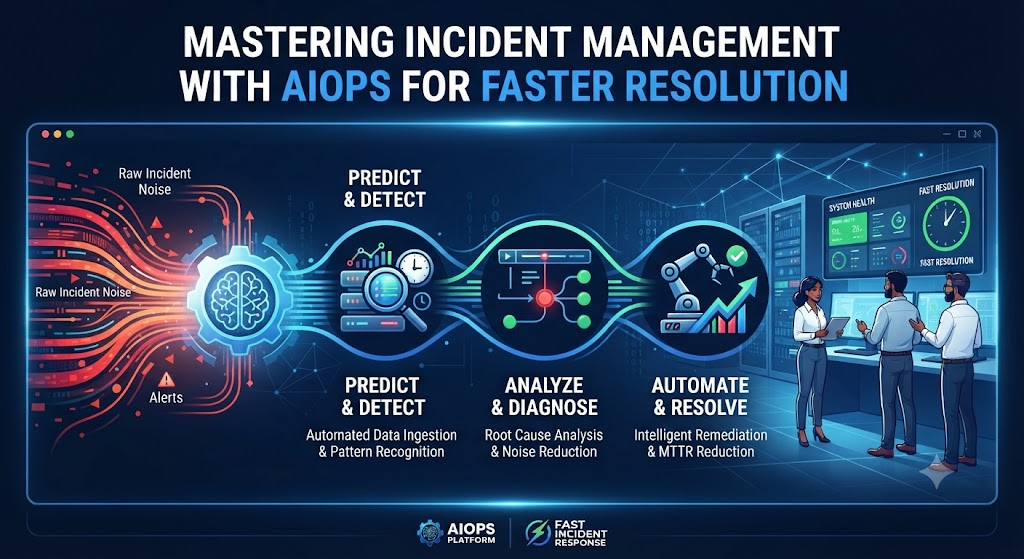
AIOps does not rely on a single piece of software. It acts like a digital brain that connects to all your existing IT tools. Here is how the process works step-by-step:
- Data Gathering: The AIOps platform collects all data generated by your servers, applications, and networks. This includes system logs, performance metrics, and error alerts.
- Aggregation: It pulls all this separate data into one central place. Instead of looking at twenty different dashboards, engineers look at one unified view.
- Pattern Matching and Analysis: Machine learning algorithms study normal system behavior. When something unusual happens—like a sudden spike in memory usage—the system recognizes the deviation.
- Noise Reduction: If ten different servers crash because of one main network switch failure, old tools send ten separate alerts. AIOps groups these related alerts into a single incident ticket.
- Automation and Action: The system either suggests the exact fix to an engineer or runs an automated script to solve the problem instantly.
Why Traditional Monitoring Falls Short
To understand why AIOps is helpful, it helps to look at how IT teams used to manage systems.
Traditional tools rely on static thresholds. For example, an engineer sets a rule: If server CPU usage goes above 80%, send an alert.
This approach creates two major problems:
- False Alarms: A server might spike to 85% CPU for ten seconds during a routine backup, triggering an unnecessary emergency page at 3:00 AM.
- Blind Spots: Complex problems often happen when multiple metrics interact in strange ways, even if no single metric crosses a hard threshold.
AIOps replaces rigid rules with dynamic machine learning. It learns what “normal” looks like for every specific day and time, dramatically reducing false alarms.
Key Benefits of Using AIOps
Adopting AIOps brings several direct advantages to technical teams and business operations:
- Faster Detection: Problems are caught in minutes instead of hours.
- Less Alert Fatigue: Engineers stop wasting time chasing false alarms and focus on real threats.
- Quicker Root Cause Analysis: The system points directly to the origin of an issue, saving hours of manual investigation.
- Proactive Prevention: Teams can fix small system flaws before they turn into major outages.
Practical Example: A Retail Website Outage
Imagine a popular online clothing store during a major holiday sale.
- The Old Way: Thousands of shoppers flood the site. A database slow-down causes the payment page to freeze. Five different monitoring tools blast 500 alerts to the IT team. Engineers waste 45 minutes figuring out which alert matters while angry customers abandon their shopping carts.
- The AIOps Way: The AIOps platform ingests the incoming data, recognizes that the payment gateway timeout is linked to a specific database query, and groups all 500 alerts into one single incident notification. It alerts the database team and automatically runs a script to restart the bogged-down database cache. The site recovers in two minutes, and customers barely notice a hiccup.
Real-World Considerations and Challenges
While AIOps offers powerful advantages, it is not a magical button that you turn on and instantly forget about. Organizations face several operational realities when adopting it:
- Data Quality: AIOps relies entirely on good data. If your existing system logs are messy, incomplete, or disorganized, the AI will struggle to find accurate patterns.
- Cultural Shift: IT teams used to manual troubleshooting must learn to trust automated insights and workflows.
- Initial Setup Time: Training machine learning models takes time. The system needs weeks of baseline operational data to understand what normal system behavior looks like.
Common Mistakes to Avoid
Organizations jumping into AIOps often make a few avoidable errors:
- Expecting Instant Results: Expecting the AI to solve every problem on day one without proper training data leads to disappointment.
- Feeding the AI Everything: Dumping raw, unorganized log data into an AIOps tool creates noise instead of clarity. Teams must curate what data sources matter most.
- Ignoring Human Oversight: Completely removing human judgment too early can lead to automated scripts making incorrect changes during an outage.
Risks and Limitations
Every technology has trade-offs. AIOps is no exception:
- Blind Trust Risk: If an engineer blindly accepts an AI-suggested fix without understanding it, they might make a system configuration worse.
- Complexity: Setting up and maintaining machine learning pipelines requires specialized data engineering skills within the IT team.
- Cost: Enterprise AIOps platforms can involve significant licensing and infrastructure costs, which smaller organizations must weigh carefully against potential downtime savings.
Decision Framework: Is Your Organization Ready for AIOps?
Before investing time and money into an AIOps platform, walk through this quick evaluation framework:
- Assess Alert Volume: Do your engineers deal with hundreds or thousands of daily alerts that cause burnout and missed issues?
- Check Data Maturity: Are your application logs, metrics, and infrastructure events centralized and reasonably clean?
- Evaluate Incident Costs: Does system downtime cost your business significant revenue or customer trust?
- Review Team Readiness: Do you have staff members willing to learn machine learning-driven workflows and automation?
If you answered yes to most of these questions, exploring AIOps is a logical next step for your operations strategy.
Checklist for AIOps Implementation
Use this practical checklist to guide your team through a successful rollout:
- Audit current monitoring tools and identify data silos.
- Clean up and standardize log formats across key applications.
- Define clear business goals (e.g., reducing mean time to resolve incidents).
- Start with a pilot project on a single non-critical application or service.
- Train team members on how to interpret AI-driven recommendations.
- Measure incident response times before and after implementation.
- Gradually expand automation scripts only after manual validation.
Key Terms
- Alert Fatigue: Mental exhaustion and desensitization experienced by IT staff when flooded with constant false or minor warning alarms.
- Machine Learning: A branch of artificial intelligence where computer systems learn from data and improve over time without being explicitly programmed for every scenario.
- Metrics: Numerical measurements that track the health and performance of a system over time, such as CPU temperature or memory usage.
- Logs: Recorded chronological text files detailing events, errors, and actions happening inside software applications and servers.
- Root Cause Analysis: The problem-solving process used to identify the core underlying reason for an IT failure rather than just treating its symptoms.
- Telemetry: The automated collection and transmission of data from remote or internal IT sources for monitoring purposes.
- Incident: An unplanned interruption to an IT service or a reduction in its quality.
- Threshold: A pre-set numerical limit that, when crossed by a system metric, triggers a warning or alert.
FAQs
What is the main difference between traditional monitoring and AIOps?
Traditional monitoring tells you when a rule is broken or a system crashes. AIOps uses machine learning to analyze massive amounts of operational data together, spotting hidden patterns, filtering out noise, and predicting issues before they cause outages.
Does AIOps completely replace human IT engineers?
No. AIOps handles repetitive data analysis, noise reduction, and routine fixes. Human engineers are still essential for strategic planning, handling complex edge cases, and making final decisions on major architectural changes.
How long does it take for an AIOps tool to start working effectively?
Most AIOps platforms require a training period of two to four weeks to gather enough historical data to learn what normal system behavior looks like for your specific environment.
Can small businesses benefit from AIOps?
While enterprise-grade AIOps platforms are built for massive cloud environments, many modern monitoring tools now include built-in AI features that smaller teams can use to reduce alert noise without massive budgets.
Is AIOps secure?
AIOps tools process sensitive system logs and operational data, so security depends entirely on how the platform is deployed. Organizations must ensure that data is encrypted in transit and at rest, and that access permissions are strictly managed.
What is Mean Time to Resolution (MTTR)?
MTTR is a standard operational metric that measures the average time it takes to fix a system problem from the moment it occurs until service is fully restored. AIOps directly helps lower this number.
Conclusion
Managing modern digital infrastructure is too complex for manual checks and rigid warning rules. AIOps brings order to the chaos by turning massive streams of system data into clear, actionable insights. By cutting through alert noise, pinpointing root causes quickly, and automating routine fixes, AIOps helps IT teams detect and resolve incidents faster. Start small, focus on clean data, and let smart automation lighten the load for your engineering staff.

