
Introduction
Modern companies run on complex software systems. Applications live across multiple cloud platforms, physical servers, and container networks. Every second, these systems generate millions of status updates, error warnings, and performance metrics.
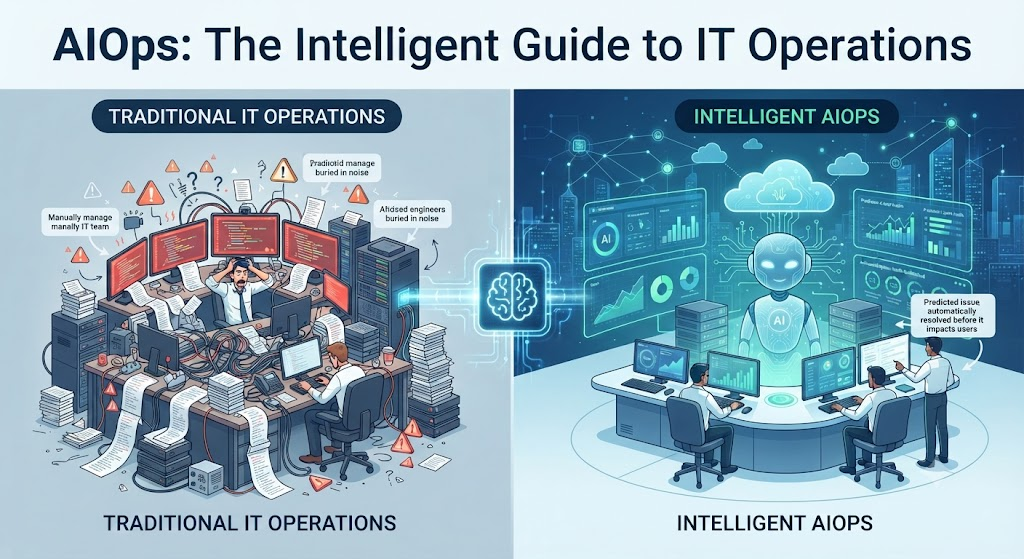
When a website slows down or goes offline, IT teams face a mountain of data. Finding the actual problem feels like searching for a single needle in a massive haystack. Traditional monitoring tools send out separate alerts for every small symptom. This overwhelms engineers with noise, leading to delayed response times and frustrated users.
AIOps solves this overload by bringing data science to system management. This guide explains how AIOps works, why it matters for modern tech teams, what risks to watch out for, and how to choose the right strategy.
What Is AIOps?
AIOps is the practice of using artificial intelligence and machine learning to improve how IT infrastructure is managed.
Think of traditional IT monitoring as a smoke detector that rings loudly every time someone burns toast. Engineers have to run to every room to check what happened. AIOps acts like an intelligent safety system that understands the difference between burnt toast and a real fire, turns off the nuisance noise, and alerts the kitchen staff immediately.
Core Components of AIOps
An AIOps platform brings together two major capabilities that used to live separately:
- Big Data Management: The platform collects all operational data in one place. This includes log files, metrics, performance counters, ticket histories, and event logs.
- Machine Learning and Analytics: The platform analyzes this historical and real-time data to find hidden patterns, predict future failures, and automate routine fixes.
Why AIOps Matters
IT environments grow larger every day. Human brains cannot keep up with the volume of system logs generated by modern applications. AIOps matters because it shifts IT teams from a reactive stance to a proactive one.
Without AIOps, teams spend most of their workday putting out fires and responding to user complaints. With AIOps, systems flag abnormal behavior before users notice any slowdown. This leads to higher uptime, lower stress for on-call engineers, and better experiences for customers.
How AIOps Works
Understanding how an AIOps pipeline functions helps clarify its value. The workflow generally follows four main steps:
Step 1: Data Ingestion
The platform pulls data from every part of the technology stack. This includes cloud servers, databases, network switches, security tools, and application code.
Step 2: Noise Reduction and Correlation
Raw data contains thousands of duplicate or useless alerts. The AIOps engine groups related alerts together. If a main database fails and causes fifty connected apps to throw errors, the tool bundles those fifty errors into one single incident ticket.
Step 3: Analysis and Root Cause Detection
Using machine learning models, the system compares current behavior against historical patterns. It identifies anomalies and pinpoints the exact component that triggered the failure.
Step 4: Remediation
Once the problem is identified, the system can either suggest a fix to the engineer or trigger an automated script to resolve the issue instantly, such as restarting a frozen service or adding more server capacity.
Practical Example
Imagine an online clothing store during a busy holiday sale. Thousands of shoppers visit the site simultaneously.
- Without AIOps: The payment gateway slows down. The monitoring tool fires off eight hundred alert emails to the on-call team. Engineers waste twenty precious minutes reading through logs to figure out which server is failing. During this delay, customers abandon their shopping carts, and the business loses revenue.
- With AIOps: The platform ingests the telemetry data, recognizes that payment API response times are climbing due to memory exhaustion, and correlates the symptom with a specific microservice. It bundles the noise into one clear alert and automatically scales up the server memory before the checkout page crashes.
Real-World Considerations
Deploying AIOps is not a magic fix that works on day one. Organizations must prepare for several operational realities:
- Data Quality: Machine learning models require clean data. If your current logs are messy, inconsistent, or incomplete, the AIOps tool will deliver inaccurate insights.
- Cultural Shift: IT teams must learn to trust automated recommendations and move away from manual alert-checking habits.
- Initial Configuration: Setting up thresholds, defining normal behavior, and integrating various data sources takes time and planning.
Common Mistakes
Here are common errors teams make when adopting AIOps, along with better approaches:
- Mistake: Feeding every single log file into the tool without filtering.
- Why it happens: Teams think more data always equals better intelligence.
- Why it causes problems: It overwhelms the machine learning models and drives up storage costs.
- What to do instead: Start by ingesting critical metrics and high-value application logs, then expand gradually.
- Mistake: Expecting complete automation on day one.
- Why it happens: Vendors promise fully autonomous IT operations immediately.
- Why it causes problems: Unsupervised automation can accidentally shut down critical services if the model misinterprets a rare event.
- What to do instead: Begin with “human-in-the-loop” mode, where the system suggests fixes for engineers to approve before moving to full automation.
Risks and Limitations
While AIOps offers major advantages, it also introduces specific risks that teams must manage:
| Risk | Why It Matters | How to Reduce It |
| False Positives | Machine learning models can sometimes flag normal system spikes as critical failures, causing alert fatigue. | Continuously retrain models using updated operational baselines and feedback from engineers. |
| Black Box Problem | Complex algorithms may suggest a fix without explaining why, making it hard for engineers to audit. | Choose tools that provide clear explanations or decision trails alongside their recommendations. |
| Privacy and Security | Operational logs often contain sensitive user data, API keys, or personal information. | Sanitize and redact logs before sending them to the AIOps analytics engine. |
Decision Framework for Adopting AIOps
Use this step-by-step framework to evaluate whether your organization is ready for AIOps:
- Evaluate Alert Volume: Count how many alerts your team receives daily. If alert fatigue is high and incidents take too long to diagnose, AIOps is worth exploring.
- Audit Data Readiness: Check if your logs, metrics, and tracing data are centralized or scattered across incompatible systems.
- Define Clear Goals: Decide what you want to fix first—is it reducing mean time to resolution (MTTR), cutting down alert noise, or predicting capacity bottlenecks?
- Start Small: Run a pilot program on a single non-critical application or service before rolling the platform out company-wide.
- Measure Success: Track key metrics like incident response times and engineer burnout levels before and after implementation.
Key Terms
- Anomaly Detection: The automated process of identifying unexpected changes or unusual behavior in system metrics.
- Event Correlation: Grouping related alerts together to show a single underlying incident instead of hundreds of separate warnings.
- MTTR (Mean Time to Resolution): The average time it takes to fix a broken service and restore normal operations.
- Telemetry: The automated collection and transmission of data from remote systems and applications.
- Noise Reduction: Filtering out useless or duplicate alerts so engineers only see actionable information.
FAQs
What is the difference between DevOps and AIOps?
DevOps is a culture and set of practices that unites software development and IT operations to release code faster. AIOps is a technology approach that uses artificial intelligence to manage and automate the operational side of those software systems.
Does AIOps replace human system administrators?
No. AIOps removes repetitive manual tasks and filters out noise, allowing engineers to focus on architecture, complex problem-solving, and strategic planning.
How long does it take for an AIOps tool to start working effectively?
Most machine learning models need between two to four weeks of historical data to learn normal system behavior and deliver accurate predictions.
Can small businesses use AIOps?
While traditional enterprise AIOps platforms can be expensive, many cloud-native monitoring tools now include built-in machine learning features that smaller teams can use affordably.
What data sources do AIOps platforms need?
They typically ingest log files, performance metrics, network traffic data, tracing data, and past incident tickets from your service desk.
Conclusion
AIOps transforms how IT operations teams handle modern system complexity. By replacing manual alert-checking with intelligent automation, organizations can cut through noise, solve problems faster, and prevent outages before they happen. Success depends on clean data, realistic expectations, and starting with a focused pilot project rather than trying to automate everything at once.

