
Introduction
Many businesses start with energy, ideas, and hardworking people, but execution becomes difficult when work is scattered across emails, spreadsheets, phone calls, manual approvals, disconnected tools, and unclear responsibilities. A sales lead may not reach the delivery team on time. A customer complaint may remain unresolved because no one owns it. A finance report may be delayed because data is collected manually from different departments. This is where understanding How End-to-End Digital Services Improve Business Execution becomes important. End-to-end digital services connect planning, operations, communication, customer service, finance, reporting, and automation into one smoother flow. For beginners, the topic may sound technical, but the idea is simple: better systems help people complete work faster, with fewer mistakes and better visibility. This blog explains the concept in practical language so business owners, managers, employees, and digital learners can make smarter execution decisions.
Understanding How End-to-End Digital Services Improve Business Execution in Simple Words
End-to-end digital services mean using connected digital solutions to manage a business process from the beginning to the final result. Instead of using separate tools for every department, businesses use integrated systems that help teams work together.
For example, when a customer places an order, an end-to-end digital system can connect the sales team, inventory team, delivery team, finance team, and customer support team. Everyone gets the right information at the right time.
People search for this topic because many businesses struggle with slow execution. They may have good plans, but their work gets delayed because teams do not have clear data, proper tracking, or shared workflows.
End-to-end digital services are used in many real-life areas, such as:
- Customer relationship management
- Online sales and order processing
- Finance and billing
- HR and payroll
- Inventory and supply chain
- Project management
- Customer support
- Reporting and analytics
- Marketing automation
- Compliance and documentation
This topic also connects with money and financial planning because poor execution can increase costs, delay collections, create billing errors, weaken customer trust, and reduce business efficiency.
A beginner-friendly example is a small business using one digital platform to track leads, send quotations, manage invoices, assign delivery tasks, and follow up with customers. This reduces confusion and saves time.
A common misunderstanding is that end-to-end digital services mean buying expensive software. In reality, it means designing a connected process. The software is only one part of the solution.
The practical takeaway is simple: digital services work best when they solve a real business problem, connect people properly, and improve execution discipline.
Why How End-to-End Digital Services Improve Business Execution Is Important
End-to-end digital services are important because execution decides whether a business plan succeeds or fails. A company may have a strong product, skilled team, and good market opportunity, but weak execution can damage growth.
In daily business, execution affects savings, borrowing, investing, tax planning, customer satisfaction, and long-term financial discipline. When work is manual and disconnected, teams may spend more time fixing errors than serving customers.
For example, a business may borrow money to expand operations. But if order management, inventory, billing, and cash flow tracking are not connected, the borrowed money may not be used efficiently. Poor execution can increase repayment pressure.
End-to-end digital services help businesses:
- Reduce repeated manual work
- Improve customer response time
- Track expenses and revenue better
- Make informed investment decisions
- Avoid missed invoices and delayed payments
- Improve tax and compliance preparation
- Reduce emotional decision-making
- Support long-term planning
- Build better accountability across teams
A short practical scenario can explain this clearly. Imagine a growing service company that receives customer inquiries through phone, website, email, and social media. Without a digital workflow, leads get missed. With an end-to-end digital system, every inquiry is captured, assigned, followed up, quoted, converted, billed, and reviewed.
The better approach is not to digitize randomly. Businesses should first understand their execution gaps, then choose digital services that solve those gaps.
The Real Problem Readers Face With End-to-End Digital Services
The real problem is not only technology. The real problem is confusion, weak planning, and poor process understanding.
Many beginners hear words like digital transformation, automation, ERP, CRM, cloud services, workflow management, and analytics. These words may sound complex. As a result, they either delay digital adoption or buy tools without knowing how to use them properly.
Common problems include:
- Lack of awareness about digital systems
- Too much confusing advice online
- Poor comparison between tools and services
- Unrealistic expectations from software
- Depending only on social media opinions
- Not understanding business process gaps
- Ignoring training and adoption
- Not reading service terms and conditions
- Weak data security awareness
- No clear owner for digital execution
- Manual habits continuing after software adoption
- No proper review of return on effort
Some businesses think digital services will automatically fix execution. This is risky. A tool cannot fix an unclear process unless the process is reviewed and improved first.
For example, if a company has no clear approval system for purchase orders, buying software will not solve the issue unless the approval flow is defined.
The better approach is to ask:
- What is the current problem?
- Which team is affected?
- What delay or mistake happens repeatedly?
- What data is missing?
- Which process should be automated first?
- Who will own the digital workflow?
End-to-end digital services work best when people, process, data, and technology are aligned.
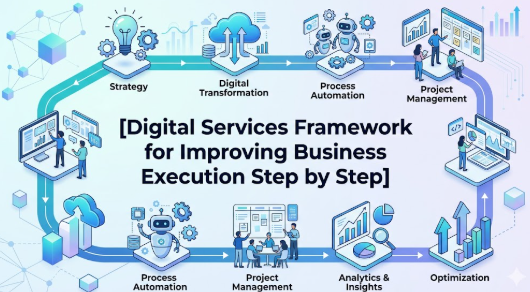
How End-to-End Digital Services Work Step by Step
Step 1: Identify the Business Execution Problem
What it means:
Start by finding where execution is slow, unclear, expensive, or error-prone.
Why it matters:
Without a clear problem, digital services may become an unnecessary expense.
How to apply it:
Review daily work across sales, operations, finance, customer service, HR, and reporting.
Practical example:
A company finds that customer quotations take three days because pricing approval is manual.
Common mistake:
Buying a tool before understanding the actual workflow problem.
Better approach:
Map the problem first, then choose the digital solution.
Step 2: Map the Complete Workflow
What it means:
A workflow map shows how work moves from one person or department to another.
Why it matters:
End-to-end services need visibility from start to finish.
How to apply it:
Write down every step from customer inquiry to final delivery or payment.
Practical example:
A service business maps lead capture, sales call, proposal, approval, delivery, invoice, and feedback.
Common mistake:
Only digitizing one department while ignoring the full business flow.
Better approach:
Understand the complete journey before automation.
Step 3: Choose the Right Digital Services
What it means:
Select tools or services that support the workflow, not just popular software names.
Why it matters:
Wrong tools create confusion and wasted money.
How to apply it:
Compare features, ease of use, integration, security, support, and cost.
Practical example:
A small business may start with CRM, invoicing software, shared documents, and task management before moving to a larger ERP.
Common mistake:
Choosing software only because a competitor uses it.
Better approach:
Choose based on business size, team skill, budget, and process need.
Step 4: Connect Data Across Departments
What it means:
Important business data should move smoothly between teams.
Why it matters:
Disconnected data causes repeated work, wrong reports, and poor decisions.
How to apply it:
Connect sales data with finance, inventory, delivery, and customer support.
Practical example:
When a deal is marked as confirmed, the finance team automatically receives billing details.
Common mistake:
Keeping separate spreadsheets for every department.
Better approach:
Use shared systems and proper access control.
Step 5: Automate Repeated Tasks Carefully
What it means:
Automation handles repeated work such as reminders, approvals, reports, and notifications.
Why it matters:
It saves time and reduces human error.
How to apply it:
Start with simple automation like invoice reminders, lead assignment, task alerts, and approval notifications.
Practical example:
A customer support system automatically assigns complaints based on category.
Common mistake:
Automating a broken process.
Better approach:
Improve the process first, then automate.
Step 6: Train Teams and Define Ownership
What it means:
People must know how to use the system and who is responsible for each task.
Why it matters:
Digital services fail when teams do not adopt them.
How to apply it:
Create simple training, user guides, roles, and escalation rules.
Practical example:
Sales executives update lead status daily, and managers review pending follow-ups every morning.
Common mistake:
Assuming employees will learn everything automatically.
Better approach:
Make training part of implementation.
Step 7: Track Performance and Improve Regularly
What it means:
Execution should be measured using clear indicators.
Why it matters:
Without review, digital services become unused systems.
How to apply it:
Track turnaround time, pending tasks, customer response time, billing delays, and team productivity.
Practical example:
A company reviews how many customer issues are resolved within agreed timelines.
Common mistake:
Only checking reports when something goes wrong.
Better approach:
Review performance weekly or monthly.
Step 8: Strengthen Security and Compliance
What it means:
Digital systems must protect business data, customer records, financial details, and user access.
Why it matters:
Poor security can cause data loss, fraud, legal issues, and trust damage.
How to apply it:
Use strong passwords, role-based access, backups, audit logs, and secure platforms.
Practical example:
Finance data should be accessible only to authorized users.
Common mistake:
Giving full access to every employee.
Better approach:
Use access control based on role and responsibility.
Key Factors That Influence End-to-End Digital Services
Process Clarity
A digital service can only improve execution when the process is clear. If teams do not know who does what, technology will only expose the confusion.
The better approach is to document workflows before choosing tools.
Integration Quality
Integration means different systems can share data. For example, CRM, billing, inventory, and support tools should work together where needed.
Poor integration creates duplicate work. Strong integration improves speed and accuracy.
Automation Readiness
Not every task should be automated immediately. Businesses should automate repetitive, rule-based, and low-risk tasks first.
The mistake is automating complex decisions without proper checks.
Team Adoption
Digital services work only when people use them properly. Even the best system fails if employees continue using old manual habits.
Training, leadership support, and simple usage rules are important.
Data Accuracy
Wrong data leads to wrong decisions. If sales numbers, inventory records, customer details, or payment data are inaccurate, execution suffers.
The better approach is to create data entry standards and review them regularly.
Security and Access Control
End-to-end digital services often handle sensitive business information. Access should be controlled based on role.
This reduces the risk of misuse, data leaks, and internal confusion.
Cost and Value Balance
Businesses should compare the cost of digital services with the value they create. The goal is not to buy the most expensive system. The goal is to improve execution.
A practical approach is to start small, measure results, and expand gradually.
Customer Experience
Digital execution affects customers directly. Faster response, accurate updates, smooth delivery, and better support improve customer trust.
The mistake is focusing only on internal efficiency and ignoring customer impact.
Reporting and Decision Support
Good digital services provide useful reports. These reports help managers understand delays, costs, performance, and risks.
Better reports lead to better business decisions.
Detailed Breakdown of End-to-End Digital Services and Business Execution
Business Process Automation
Business process automation means using digital systems to complete repeated tasks with less manual effort. It may include task reminders, approval flows, invoice generation, lead assignment, support ticket routing, and report creation.
The main benefit is consistency. Manual work depends heavily on memory and discipline. Automation creates a structured flow.
The mistake is using automation without reviewing the process. If the process has unnecessary steps, automation may only make the wrong process faster.
The better approach is to simplify first, then automate.
Digital Transformation Services
Digital transformation services help businesses move from manual, disconnected work to connected digital operations. This may include consulting, software setup, cloud migration, system integration, automation, analytics, and training.
For beginners, digital transformation should not be seen as a one-time project. It is a gradual improvement journey.
A small business may begin with online lead tracking. Later, it may add billing, customer support, dashboards, HR systems, and automated reporting.
Enterprise Workflow Management
Workflow management helps teams understand what needs to be done, who owns it, when it is due, and what happens next.
For example, a customer complaint may move through several stages: received, assigned, reviewed, resolved, confirmed, and closed.
Without workflow management, tasks may stay pending because no one has clear ownership.
The better approach is to define status, responsibility, escalation, and closure rules.
Integrated Digital Solutions
Integrated digital solutions connect different parts of the business. Sales data can support billing. Billing data can support cash flow. Support data can improve product quality. Marketing data can help sales planning.
This connection improves business execution because managers do not have to depend on scattered information.
The mistake is creating too many isolated tools. When every team uses a different system without integration, digital confusion increases.
Customer Experience Improvement
End-to-end digital services help customers receive faster responses, accurate updates, better service tracking, and smoother communication.
For example, when a customer asks about order status, the support team should not need to call three departments. A connected system should show the status clearly.
Good execution improves trust. Poor execution creates frustration.
Operational Efficiency
Operational efficiency means completing work with less waste, fewer delays, and better control. End-to-end digital services support this by reducing manual follow-ups, repeated data entry, and unclear communication.
This helps businesses save time and reduce avoidable costs.
However, efficiency should not mean rushing. The goal is controlled speed with quality.
Finance and Billing Execution
Finance execution is strongly connected with digital services. Delayed invoices, missed payments, incorrect billing, and weak expense tracking can harm cash flow.
A connected digital system can help with:
- Invoice creation
- Payment follow-up
- Expense approval
- Budget tracking
- Tax record preparation
- Financial reporting
The better approach is to keep finance workflows accurate, secure, and regularly reviewed.
Project and Delivery Management
Many businesses lose execution quality because projects are not tracked properly. End-to-end digital services help teams manage deadlines, owners, deliverables, dependencies, and client communication.
The practical benefit is visibility. Managers can see what is pending before it becomes a crisis.
Data-Driven Decision-Making
Digital services generate useful business data. This helps leaders move from guesswork to evidence-based decisions.
For example, if reports show that customer complaints increase after delivery delays, management can improve logistics or communication.
The mistake is collecting data but not reviewing it.
The better approach is to convert data into action.
Common Mistakes Beginners Make With End-to-End Digital Services
Following Random Advice
Beginners often follow tool recommendations from friends, social media, or competitors. This is risky because every business has different needs.
The better approach is to assess your own workflow before selecting tools.
Ignoring Risk
Some businesses focus only on speed and automation. They ignore security, privacy, compliance, and cost risks.
This can lead to data leaks, poor access control, and financial loss.
The better approach is to review risk before implementation.
Not Comparing Options
Choosing the first available software or service may create problems later. Features, pricing, support, scalability, and integration should be compared.
The better approach is to shortlist options and test them.
Trusting Unrealistic Claims
Some service providers may claim that digital transformation will solve everything quickly. This is misleading.
Digital services improve execution only when people, process, and technology work together.
Ignoring Hidden Costs
Costs may include setup, training, customization, migration, support, upgrades, and user licenses.
The better approach is to calculate total cost, not just monthly subscription.
Making Emotional Decisions
A business owner may buy expensive tools because they feel pressure to appear modern. This can waste money.
The better approach is to make decisions based on need, budget, and measurable value.
Not Reading Terms and Conditions
Service terms may include data storage rules, cancellation policy, support limits, and usage restrictions.
The better approach is to review terms carefully before commitment.
Sharing Sensitive Information Carelessly
Business data, customer details, payment records, and login credentials must be protected.
The better approach is to use secure systems, strong passwords, and role-based access.
Ignoring Compliance Responsibilities
Businesses may need to maintain records for tax, legal, financial, or customer protection reasons.
The better approach is to align digital systems with compliance needs.
Depending Only on Social Media Advice
Social media can provide ideas, but it should not replace proper evaluation.
The better approach is to combine research, expert advice, trials, and internal review.
Acting in Panic or Pressure
Some businesses adopt digital tools only after a crisis. This often leads to rushed decisions.
The better approach is to plan calmly and implement step by step.
Don’t Do This Checklist
- Do not buy software without mapping your process.
- Do not automate unclear workflows.
- Do not ignore data security.
- Do not give full access to everyone.
- Do not depend only on social media advice.
- Do not ignore training.
- Do not skip cost comparison.
- Do not believe guaranteed business improvement claims.
- Do not ignore customer experience.
- Do not forget regular review.
Practical Real-Life Examples of End-to-End Digital Services
Example 1: Small Business Managing Customer Orders
Situation: A small product business receives orders through phone, website, and social media.
Mistake or challenge: Orders are written manually, and delivery updates are often missed.
Better action: The business uses a connected order management system with automatic task assignment.
Learning: Digital services improve execution when they reduce confusion and create visibility.
Example 2: Service Company Handling Leads
Situation: A consulting company receives many inquiries but loses follow-ups.
Mistake or challenge: Salespeople track leads in personal notebooks and spreadsheets.
Better action: The company uses CRM software to capture, assign, and track every lead.
Learning: End-to-end lead tracking improves accountability and conversion discipline.
Example 3: Finance Team Reducing Billing Delays
Situation: A finance team prepares invoices after receiving manual delivery confirmation.
Mistake or challenge: Billing is delayed because delivery data is not shared on time.
Better action: Delivery status is connected with billing workflow.
Learning: Integrated digital solutions improve cash flow visibility and reduce delays.
Example 4: HR Team Managing Employee Requests
Situation: Employees send leave, reimbursement, and document requests through email.
Mistake or challenge: HR misses some requests due to high email volume.
Better action: HR uses a digital request system with status tracking and approval flows.
Learning: Workflow management improves internal service quality.
Example 5: Business Owner Reviewing Monthly Performance
Situation: A business owner waits until month-end to collect sales, expense, and customer data.
Mistake or challenge: Reports are delayed and decisions become reactive.
Better action: Dashboards are created using connected business data.
Learning: End-to-end digital services support faster and better-informed decisions.
Two Useful Tables for Better Understanding
Table 1: Manual Execution vs End-to-End Digital Execution
| Area | Manual Execution | End-to-End Digital Execution |
|---|---|---|
| Task tracking | Depends on memory and follow-up | Tasks are assigned and tracked digitally |
| Customer updates | Often delayed or inconsistent | Status can be updated clearly |
| Reporting | Manual and time-consuming | Reports can be generated faster |
| Data accuracy | Higher chance of duplicate entries | Shared data reduces repeated work |
| Team ownership | Often unclear | Roles and responsibilities are visible |
| Finance workflow | Billing may be delayed | Billing can connect with delivery status |
| Decision-making | Based on incomplete information | Based on connected business data |
Table 2: Beginner Mistake vs Better Digital Approach
| Beginner Mistake | Why It Creates Risk | Better Approach |
|---|---|---|
| Buying tools without process mapping | Software may not solve the real issue | Map workflow first |
| Ignoring team training | Employees may avoid using the system | Provide simple training |
| Using too many disconnected tools | Data becomes scattered | Choose integrated solutions |
| Giving full access to everyone | Sensitive data may be exposed | Use role-based access |
| Automating poor processes | Errors may happen faster | Improve process before automation |
| Not reviewing performance | Problems remain hidden | Track key execution metrics |
| Ignoring total cost | Budget pressure may increase | Review setup, support, and usage costs |
Tools, Methods, and Frameworks Readers Can Use
Workflow Mapping
Workflow mapping shows how work moves from one step to another. It helps beginners understand delays, ownership gaps, and repeated tasks.
It helps avoid the mistake of buying tools without knowing the real problem.
CRM System
A customer relationship management system helps businesses manage leads, customers, follow-ups, sales stages, and communication history.
Beginners can use it to avoid missed leads and weak follow-up discipline.
Project Management Tool
Project management tools help teams assign tasks, set deadlines, track progress, and review delivery.
They help avoid unclear responsibility and last-minute confusion.
Digital Approval System
Approval systems help manage purchase approvals, leave requests, expense claims, and document reviews.
They reduce delays caused by email-based approvals.
Business Dashboard
A dashboard shows important business information in one place. It may include sales, revenue, pending tasks, support tickets, or delivery status.
It helps avoid decision-making based on guesswork.
Expense and Budget Tracker
A budget tracker helps businesses monitor spending, cash flow, and financial planning.
It helps avoid uncontrolled expenses and poor cost visibility.
Customer Support Ticket System
A ticket system helps manage customer complaints, requests, and service issues.
It improves accountability because every issue has a status and owner.
Standard Operating Procedure Framework
A standard operating procedure explains how a task should be completed.
It helps avoid inconsistent execution across teams.
Risk Review Checklist
A risk checklist helps businesses review security, cost, compliance, data privacy, and operational risks before implementing digital services.
It helps avoid careless decisions.
Monthly Digital Review System
This method involves reviewing digital workflows every month. Teams check what is working, what is delayed, and what needs improvement.
It helps businesses improve continuously.
Expert Tips to Make Better Decisions
1. Understand the Problem Before Choosing Technology
This matters because technology should solve a real business problem. Beginners can apply this by listing the top three execution delays before selecting any digital service.
2. Start With One Important Workflow
Trying to digitize everything at once can confuse teams. Start with a workflow that creates visible value, such as lead management, billing, or customer support.
3. Keep Processes Simple
Complex workflows slow down adoption. Beginners should remove unnecessary steps before digitizing any process.
4. Compare Multiple Options
Different tools offer different strengths. Compare usability, cost, support, security, integration, and scalability before deciding.
5. Train Users Properly
A system is useful only when people know how to use it. Create short training sessions and simple usage rules.
6. Protect Business and Customer Data
Digital services often handle sensitive information. Use secure passwords, access control, backups, and trusted platforms.
7. Avoid Over-Automation
Automation is useful, but not every decision should be automated. Keep human review for sensitive, financial, legal, or customer-impacting decisions.
8. Review Costs Beyond Subscription Fees
Implementation, training, customization, support, and migration may add cost. Review the complete cost before committing.
9. Measure Execution Improvement
Track whether the digital service reduces delays, errors, repeated work, or customer complaints. Without measurement, improvement is difficult to prove.
10. Keep Emergency Manual Backup Plans
Digital systems may face downtime. Businesses should have backup plans for critical work like billing, customer support, and delivery.
11. Avoid Blindly Copying Competitors
A competitor’s tool may not fit your business. Choose based on your workflow, team size, budget, and goals.
12. Review Data Quality Regularly
Wrong data leads to poor decisions. Create rules for data entry, review, and correction.
13. Think Long Term
Digital services should support future growth. Choose systems that can scale as your business expands.
14. Involve Team Members Early
Employees who use the system daily can identify practical problems. Involving them early improves adoption.
15. Take Expert Advice When Needed
For complex integrations, cybersecurity, finance, tax, or compliance-related systems, professional advice can reduce risk.
Case Studies: How Better Understanding Changes Decisions
Case Study 1: Local Retail Business
Profile: A growing retail business with online and offline customers.
Situation: Orders came from multiple channels, including phone calls, walk-in customers, and website forms.
Problem: Staff manually recorded orders, and delivery updates were often missed. Customers repeatedly called for status updates.
Wrong approach: The owner first considered hiring more staff without reviewing the process.
Better approach: The business mapped the order journey and implemented a simple order tracking and customer update system.
Result or learning: The team gained better visibility, customers received clearer updates, and repeated follow-up pressure reduced.
Key takeaway: End-to-end digital services can improve execution when they solve a clear workflow problem.
Case Study 2: Professional Services Firm
Profile: A small consulting firm serving business clients.
Situation: The firm handled leads, proposals, delivery, billing, and support manually.
Problem: Some leads were not followed up, proposals were delayed, and invoices were prepared late.
Wrong approach: The firm tried using separate spreadsheets for every department. This created duplicate work.
Better approach: The firm adopted a connected CRM, task management system, and billing workflow.
Result or learning: Work ownership became clearer, follow-ups improved, and billing delays reduced.
Key takeaway: Integration is more useful than isolated tools.
Case Study 3: Growing Digital Startup
Profile: A startup offering digital services to clients.
Situation: The team used chat messages for project updates and email for approvals.
Problem: Deadlines were missed because tasks were not tracked properly. Clients received inconsistent updates.
Wrong approach: The team blamed employees without checking whether the process was clear.
Better approach: The startup created project stages, assigned task owners, used a dashboard, and reviewed progress weekly.
Result or learning: The team improved delivery control and reduced confusion.
Key takeaway: Better execution requires process clarity, ownership, and regular review.
Risk Awareness: What Readers Must Check First
Operational Risk
Operational risk means the chance of work failing due to weak processes, poor training, or unclear ownership.
It matters because digital services cannot help if teams do not follow the system.
Reduce this risk by defining workflows, roles, and review methods.
Data Privacy Risk
Data privacy risk means sensitive customer, employee, or business information may be exposed.
It matters because data misuse can damage trust and create legal problems.
Reduce this risk through access control, secure platforms, and careful data handling.
Cybersecurity Risk
Cybersecurity risk includes hacking, phishing, weak passwords, malware, and unauthorized access.
It matters because digital systems increase dependence on online tools.
Reduce this risk with strong passwords, multi-factor authentication, backups, and security training.
Financial Risk
Financial risk means spending money on tools that do not create enough value.
It matters because small businesses often work with limited budgets.
Reduce this risk by starting small, comparing costs, and measuring results.
Compliance Risk
Compliance risk means failing to maintain records, approvals, data protection practices, or tax-related documentation.
It matters because poor compliance can create penalties or disputes.
Reduce this risk by keeping proper records and consulting qualified professionals where required.
Vendor Risk
Vendor risk means depending too much on a service provider without understanding support, pricing, data control, or exit options.
It matters because changing systems later can be difficult.
Reduce this risk by reading terms, checking support, and planning data backup.
Integration Risk
Integration risk means tools may not connect smoothly with each other.
It matters because poor integration creates duplicate work and data errors.
Reduce this risk by checking compatibility before purchase.
Change Management Risk
Employees may resist new systems because they are comfortable with old methods.
It matters because poor adoption can make digital projects fail.
Reduce this risk through training, communication, and simple implementation.
Misinformation Risk
Businesses may follow incomplete or misleading advice online.
It matters because poor advice can lead to wrong investment in tools.
Reduce this risk by verifying details and seeking expert guidance where needed.
Readers should always verify service details, review contracts, compare options, and consult qualified professionals for financial, legal, tax, or technical matters.
Checklist Before Taking Action
Before adopting end-to-end digital services, review this checklist:
- Clear understanding of the business problem
- Workflow mapped from start to finish
- Current delays and mistakes identified
- Options compared properly
- Total cost reviewed
- Team skill level checked
- Training plan prepared
- Security and access control reviewed
- Customer data protection considered
- Integration needs checked
- Reporting requirements defined
- Compliance impact reviewed
- Vendor terms and support checked
- Backup plan prepared
- Emergency manual process available
- Success metrics defined
- Emotional or pressure-based decisions avoided
- Professional advice considered where needed
- Written implementation plan prepared
- Monthly review process planned
Use this checklist before making a decision. It helps you slow down, compare better, avoid careless spending, and choose digital services that improve real execution rather than only adding more tools.
Strategic Insights for Better Decision-Making
Execution Before Technology
Digital success starts with execution clarity. A business should first understand how work should move, then select technology to support that movement.
For example, before buying a CRM, define lead stages, follow-up rules, and sales ownership.
Process Standardization
Standardization means teams follow the same method for repeated tasks. This improves consistency.
For example, every customer complaint should have the same basic steps: receive, assign, investigate, resolve, confirm, and close.
Data Discipline
Data discipline means entering, updating, and reviewing information correctly.
A digital dashboard is useful only when the data behind it is accurate.
Customer Journey Thinking
End-to-end execution should be viewed from the customer’s side. Ask what the customer experiences from first contact to final support.
This helps businesses improve service quality, not just internal reporting.
Automation With Human Control
Automation should support people, not replace judgment in sensitive decisions.
For example, payment reminders can be automated, but serious customer disputes may need human review.
Scalable System Planning
Choose systems that can grow with the business. A tool that works for five users may not work for fifty users.
Beginners should check user limits, data limits, integration options, and support quality.
Cost-to-Value Thinking
Do not judge digital services only by price. A low-cost tool may become expensive if it creates confusion. An expensive tool may also be wasteful if the business does not need advanced features.
The better approach is to compare cost with actual execution value.
Continuous Improvement
Digital execution is not a one-time setup. Businesses should review workflows regularly and improve them based on real usage.
Monthly reviews help identify delays, unused features, training gaps, and process improvements.
Risk-Based Prioritization
Start with workflows where mistakes create the highest risk. This may include billing, customer complaints, compliance records, or delivery tracking.
This approach helps businesses protect important areas first.
Key Terms Explained for Beginners
- End-to-End Digital Services: These are connected digital solutions that support a business process from start to finish.
- Business Execution: Business execution means turning plans into real actions, results, deliveries, payments, and customer outcomes.
- Workflow: A workflow is the step-by-step movement of work from one person, team, or system to another.
- Automation: Automation means using technology to complete repeated tasks with less manual effort.
- Integration: Integration means connecting different tools or systems so they can share data.
- CRM: CRM means customer relationship management. It helps track leads, customers, follow-ups, and sales activity.
- ERP: ERP means enterprise resource planning. It helps manage core business areas like finance, inventory, HR, and operations.
- Dashboard: A dashboard shows important business information in one place for easier review.
- Access Control: Access control means deciding who can view, edit, or approve specific information.
- Data Accuracy: Data accuracy means business information is correct, updated, and reliable.
- Digital Transformation: Digital transformation means improving business operations using digital tools, processes, and systems.
- Scalability: Scalability means a system can support growth as users, customers, data, or transactions increase.
- Compliance: Compliance means following legal, tax, security, data, or industry-related requirements.
- Vendor Risk: Vendor risk means problems that can arise from depending on a software or service provider.
- Change Management: Change management means helping people adopt new systems, habits, and workflows smoothly.
Who Should Read This Blog
Beginners
Beginners can use this blog to understand digital services without technical confusion.
Students
Students learning business, technology, or management can understand how digital systems support real execution.
Salaried Employees
Employees can understand how digital workflows affect productivity, reporting, accountability, and teamwork.
Small Business Owners
Small business owners can learn how to reduce manual work, improve customer handling, and plan digital adoption carefully.
New Investors
New investors studying business performance can understand why execution quality matters.
Traders
Traders analyzing companies can learn how operational efficiency and digital systems may affect business discipline.
Loan Seekers
Loan seekers running businesses can understand why execution planning matters before borrowing for expansion.
Crypto Learners
Crypto learners can understand the importance of platform risk, data security, and digital process discipline.
Casino Content Creators
Casino content creators can learn how structured digital services support content planning, review, compliance-sensitive writing, and responsible publishing.
Finance Bloggers
Finance bloggers can use this topic to explain business efficiency, decision-making, digital planning, and risk awareness.
People Improving Money Awareness
Anyone trying to make better financial or business decisions can learn why planning, systems, and risk review matter.
People Trying to Avoid Financial Mistakes
This blog helps readers avoid rushed technology spending, poor tool selection, weak security, and unclear execution planning.
Frequently Asked Questions
1. What is How End-to-End Digital Services Improve Business Execution?
How End-to-End Digital Services Improve Business Execution means understanding how connected digital tools help businesses complete work faster, more clearly, and with fewer mistakes. It connects people, processes, data, and technology. The goal is better execution, not just more software.
2. Why is this topic important for beginners?
Beginners often think digital services are only about technology. In reality, they are about improving how work gets done. Understanding this helps beginners avoid random tool purchases and focus on real business problems.
3. How can a small business start safely?
A small business can start by mapping one important workflow, such as sales, billing, or customer support. Then it can choose a simple tool, train users, and review results. Starting small reduces cost and confusion.
4. What is the biggest mistake to avoid?
The biggest mistake is buying software before understanding the business process. If the workflow is unclear, digital tools may increase confusion. The better approach is to define the process first.
5. Is this useful for salaried people?
Yes, salaried people can use this knowledge to improve productivity, reporting, task tracking, and team coordination. It also helps them understand how digital systems affect workplace performance and decision-making.
6. What risks should businesses know first?
Businesses should check data privacy risk, cybersecurity risk, financial risk, vendor risk, compliance risk, and adoption risk. These risks can be reduced through planning, access control, training, and regular review.
7. How do end-to-end digital services help financial planning?
They improve financial planning by connecting billing, expenses, payments, reports, and approvals. This gives better visibility into cash flow and reduces missed records. However, financial decisions should still be reviewed carefully.
8. How can businesses compare digital service options?
Businesses should compare features, ease of use, integration, security, support, cost, scalability, and user adoption needs. The best option is not always the most expensive or most popular one.
9. Should professional advice be taken before implementation?
Professional advice is useful for complex systems, cybersecurity, legal, tax, compliance, and financial workflows. Expert review can help reduce mistakes and improve implementation quality.
10. How often should a digital workflow be reviewed?
A digital workflow should be reviewed monthly or at least regularly based on business needs. Reviews help identify delays, unused features, training gaps, and process improvements.
11. How End-to-End Digital Services Improve Business Execution in daily operations?
How End-to-End Digital Services Improve Business Execution in daily operations is seen through better task tracking, faster communication, improved reporting, and clearer ownership. Teams know what to do, when to do it, and how to close work properly.
12. What is the best next step after reading this blog?
The best next step is to identify one business process that creates delays or confusion. Map it clearly, list the problems, compare simple digital solutions, check risks, and create a small implementation plan.
Conclusion and Next Steps
Understanding How End-to-End Digital Services Improve Business Execution is important because modern businesses cannot depend only on manual follow-ups, scattered spreadsheets, disconnected tools, and unclear ownership. Good execution needs clear processes, connected data, trained teams, secure systems, practical automation, and regular review. Beginners should remember that digital services are not magic solutions. They work when a business first understands its workflow, identifies real problems, compares options carefully, protects data, and trains people properly. Whether the goal is better customer service, faster billing, stronger reporting, smoother delivery, improved finance control, or better decision-making, end-to-end digital services can create real value when implemented with discipline. The next step is not to rush into buying software. Start by reviewing one important process, writing down each step, identifying delays, checking risks, and selecting a digital solution that fits your actual need. Keep emergency funds and business budgets separate, avoid pressure-based decisions, read terms carefully, and consult qualified professionals when financial, legal, tax, or security issues are involved. Long-term success comes from careful planning, small improvements, consistent review, and responsible execution. A business that improves execution gradually becomes more organized, more transparent, and more prepared for growth.

