Introduction
For many years, security was treated as a final gate. Developers built the software, operations teams deployed it, and security specialists reviewed it near the end. When the review found serious problems, teams faced an unpleasant choice: delay the release or accept the risk. Fixes were expensive because the code was already written, tested, and scheduled.
DevSecOps changes this pattern. The idea is simple: bring security into every stage of building and running software, so that problems are found early, when they are cheapest to fix, and so that security is a shared responsibility instead of one team’s burden.
The idea is simple, but putting it into practice is not. Teams often buy scanning tools, switch them on, and then drown in alerts nobody has time to read. A DevSecOps implementation roadmap helps avoid this outcome by deciding what to do first, who owns what, and how to grow the practice without overwhelming people.
This article follows the software delivery journey from planning to production. At each stage, it explains what security work fits, what to watch out for, and how to start small. It then covers how to prioritize risk, build ownership, and measure progress. It is written in plain language for engineers, security professionals, and technology leaders, and it contains no code.
What DevSecOps Is, and Four Common Myths
DevSecOps is a way of working in which development, operations, and security share responsibility for secure delivery, supported by automation. It is not a single tool, a job title, or a certificate.
Four myths often slow teams down:
- “It means installing scanners.” Tools help, but without ownership and clear priorities, they create noise. Habits matter more than software.
- “It makes delivery slower.” Poorly planned controls can slow teams. Well-planned automation usually finds problems earlier and reduces late surprises.
- “Security teams do all the work.” In DevSecOps, security specialists guide and support, while engineering teams fix issues in their own code and systems.
- “We must do everything at once.” A phased approach is safer and more realistic.
The Delivery Journey, Stage by Stage
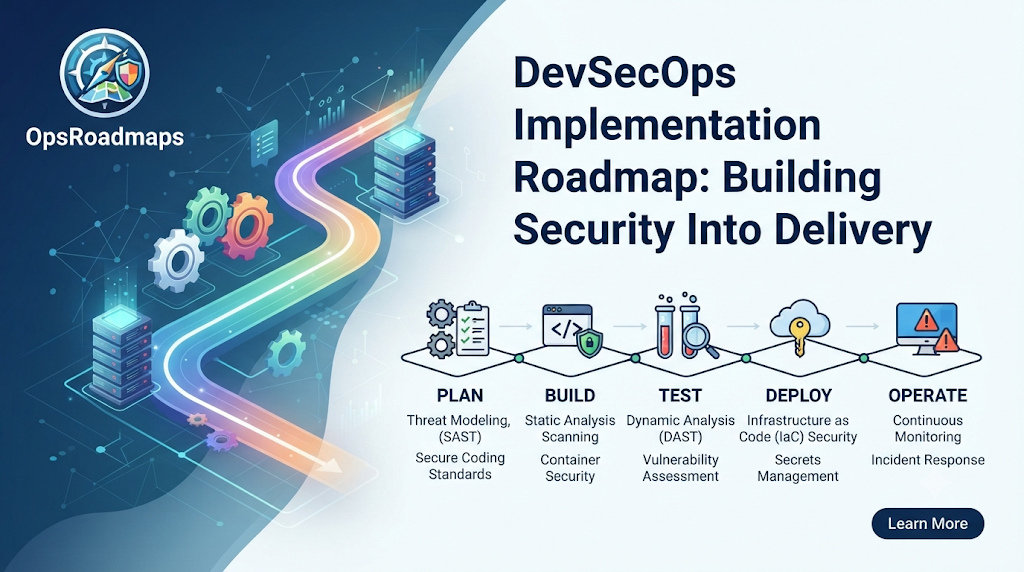
The sections below follow a typical path: plan, code, build, test, release, and run. Not every organization uses these exact stages, but the idea applies broadly.
Stage 1: Plan
Security work starts before any code is written. Teams can ask simple questions during design: What data will this feature handle? Who should be allowed to use it? What could go wrong? This practice is often called threat modeling, and it can be as light as a short conversation using a checklist.
Start small: Add a few security questions to the way you describe new features. Reserve deeper reviews for changes that touch sensitive data or critical systems.
Stage 2: Code
Developers write code, and this is where many problems begin. Useful checks at this stage include:
- Secret detection, which looks for passwords, keys, and tokens accidentally saved in code.
- Static analysis, which examines source code for patterns that often lead to weaknesses.
- Review habits, such as requiring a second person to approve changes.
Watch out for: false alarms. If a tool flags many harmless items, developers stop trusting it. Tune the rules and focus first on high-confidence findings.
Start small: Secret detection gives high value with low noise, so it is often the best first step.
Stage 3: Build
Modern software is mostly assembled from other people’s components. This makes the build stage a key place for security.
- Dependency scanning checks the libraries you use for known weaknesses.
- A software bill of materials is a list of the components inside a product, which helps you find out quickly whether you are affected when a new weakness is announced.
- Build integrity means the build process itself is protected, so no one can quietly change what gets built.
- Signing lets you prove that a software package really came from your build process.
Watch out for: the volume of dependency alerts. Many are not exploitable in your situation. Use prioritization, covered later in this article, so teams fix what matters first.
Stage 4: Test
Testing can include security checks that run against a working copy of the application. These tests try common attack patterns and look for weak spots that code review might miss. Infrastructure definitions can also be checked here, such as a storage setting that accidentally makes data public.
Watch out for: long test times. Run quick checks on every change and heavier scans on a schedule, so developers are not left waiting.
Stage 5: Release
At release time, teams decide what is allowed into production. Useful controls include:
- Checking that only approved, signed packages are deployed.
- Confirming that container images come from trusted sources.
- Applying policies, such as rules that block settings known to be risky.
For teams using Kubernetes, a Kubernetes production readiness checklist helps define baseline expectations, including secure settings and sensible permissions.
Watch out for: blocking too much too soon. A common path is to begin in report-only mode, where checks show warnings without stopping releases. Once teams understand the results and findings are reliable, move to blocking on a short list of serious issues.
Stage 6: Run
Security does not end at release. In production, teams need to see what is happening and respond to problems.
- Access control gives people and systems only the permissions they need.
- Monitoring and detection looks for unusual behavior. An observability maturity model can help describe how well you can see what your systems are doing, which is also the foundation for detecting security issues.
- Patching keeps systems updated as new weaknesses are announced.
- Incident response needs its own prepared procedures. An incident management maturity model can help you judge whether your team is ready for security events as well as outages.
A practical note: hardening measures can have side effects. For example, running a container with fewer permissions or a read-only file system is a good security habit, but an application that expects to write files may fail to start and enter a restart loop. Teams should know how to approach Kubernetes CrashLoopBackOff troubleshooting so that they can tell a security setting problem from other causes, and adjust the setting properly instead of removing the protection.
Prioritizing Risk: The Hardest Part
Scanners produce long lists. Teams cannot fix everything at once, and they should not try. Good prioritization asks several questions about each finding:
- How severe is the weakness? A published severity rating is a useful starting point, but it is not the whole story.
- Is it being exploited in the real world? Weaknesses known to be actively used by attackers deserve urgency.
- Is the affected system exposed? A weakness on an internet-facing service matters more than one deep inside a private network.
- How valuable is the asset? Systems that handle sensitive data or critical functions rank higher.
- Is the vulnerable code actually used? Sometimes a flawed library is present but never called.
- Are there other protections in place? Network limits or extra controls may reduce the risk.
Agree on target fix times by risk level, for example faster for critical, exposed issues and slower for low-risk ones. The exact numbers should come from your own risk appetite and any rules that apply to you.
Track exceptions openly. When a team cannot fix something quickly, record why, who accepted the risk, and when it will be reviewed.
Ownership and Culture
Tools do not change behavior alone. These practices help:
- Name owners. Every service should have an owner who receives its security findings.
- Use security champions. These are engineers within each team who take a special interest in security, acting as a bridge to specialists.
- Make the secure path the easy path. A platform engineering adoption roadmap can provide templates, pipelines, and defaults that already include security checks, so teams get safety without extra effort.
- Avoid blame. When a mistake is found, treat it as a lesson about the system, not a punishment.
- Share practices. An SRE adoption roadmap and a DevSecOps program often reinforce each other, since both rely on measurement, automation, and learning from incidents.
Measuring Progress
Choose a few signals that show whether security is improving without encouraging gaming. Examples include:
- How long serious findings stay open before they are fixed.
- The share of services with automated checks in their pipelines.
- How often secrets or similar issues reach the main code.
- How many releases include a component list.
- How quickly the team can find out whether it is affected by a newly announced weakness.
Use these as signals, not as targets to chase blindly. A count of findings can rise when you improve scanning, which can actually be a good sign.
Cost deserves attention too. Security data and tooling can be expensive at scale, so include security in your cloud cost optimization roadmap, while taking care never to reduce coverage for critical systems purely to save money.
A Four-Horizon Roadmap
Plans differ, but a phased path often looks like this:
Horizon 1: Foundations. Take stock of your systems, owners, and current practices. A DevOps maturity assessment or a production readiness assessment can show where security practices stand compared with delivery and operations. Turn on secret detection and basic dependency alerts in report-only mode.
Horizon 2: Visibility and habits. Add checks to main pipelines, set up a way to track findings, name owners, and agree on how to prioritize risk. Begin security champions.
Horizon 3: Enforcement and depth. Start blocking on a short list of serious, reliable findings. Add signing, component lists, release policies, and production detection.
Horizon 4: Refinement. Review results, remove noisy rules, extend coverage to more systems, and practice security incident response.
Dependencies set the order. You cannot prioritize findings without knowing your assets and owners. You cannot enforce rules until findings are reliable. You cannot detect issues in production without good visibility.
A Hypothetical Example
Imagine a company with 25 engineers and five product teams. A review shows no common security checks, unclear ownership, and a few old passwords stored in code. In the first month, the team enables secret detection and cleans up the exposed passwords. In the second month, they add dependency alerts in report-only mode and agree on how to rank findings. By the third month, each service has a named owner, and a short list of critical, exposed findings is blocked at release. Over the following months, they add signing and a simple security review for sensitive features.
The company is not perfectly secure, and nobody should claim that. But it has moved from invisible risk to managed risk, with owners and routines.
What an Assessment Can and Cannot Tell You
A self-assessment reflects what your team reports and can show. It is not an independent audit, a formal certification, or a promise of compliance with any standard or law. If your sector requires formal reviews, those are separate. No roadmap can guarantee that systems will be secure or free of incidents.
Where OpsRoadmaps Fits
OpsRoadmaps is an engineering operations assessment and improvement platform. According to its published description, it offers a free operational health scan that needs no account, plus more detailed production readiness and reliability assessments for signed-in users. It uses published, versioned scoring rules with explainable results, and it distinguishes self-reported maturity from independent audits or compliance certifications. Its library includes DevSecOps rollout planning, along with checklists, runbooks, templates, and roadmaps that cover related areas such as Kubernetes operations and incident response.
Common Mistakes
- Turning on every scanner at once. The flood of alerts leads to fatigue.
- Blocking releases too early. Start with reporting, then enforce a short list.
- Ranking only by severity score. Context decides real risk.
- Leaving findings without owners. Unowned issues do not get fixed.
- Weakening protections to fix a startup failure. Adjust the setting properly instead.
- Treating security as a project. It needs a steady routine.
- Chasing counts. Measure outcomes such as time to fix, not only the number of tools.
FAQs
1. Where should a team start with DevSecOps?
Start with an inventory of systems and owners, then add secret detection and dependency alerts in report-only mode.
2. Does DevSecOps need a dedicated security team?
Not necessarily. Smaller organizations may rely on shared responsibility, outside advice, and automation, while larger ones usually have specialists who guide the work.
3. How do we avoid alert fatigue?
Tune rules, focus on high-confidence findings, rank by real risk, and remove checks that nobody acts on.
4. Should security checks block releases?
Eventually, for serious and reliable findings. Begin in report-only mode and build trust before enforcing.
5. What is a software bill of materials?
It is a list of the components inside a piece of software. It helps teams find out quickly whether a newly announced weakness affects them.
6. How is DevSecOps different from DevOps?
DevOps focuses on collaboration between development and operations. DevSecOps adds security as a shared responsibility throughout the same workflow.
7. Can DevSecOps guarantee compliance?
No. It can support compliance work by providing evidence and consistent controls, but compliance depends on the specific rules and an appropriate review.
Conclusion
A DevSecOps implementation roadmap works best when it respects how people and delivery pipelines really operate. Start with visibility and ownership, add checks where they give the most value with the least noise, and prioritize findings by real risk instead of raw counts. Move from reporting to enforcement gradually, keep protections in place when fixing problems, and review results on a steady rhythm. Treat every assessment as a guide and every roadmap as a plan that will change. Teams that build security into delivery this way spend less time reacting to surprises and more time building software they can stand behind.