Introduction
In the past, building software was straightforward. Developers wrote code, testers checked it for bugs, and the security team reviewed the final product just before it launched. If the security team found a major flaw, the team had to pause everything, rewrite large parts of the code, and delay the release by weeks or months.
Today, software updates happen every day, sometimes every hour. Waiting until the end to check for security vulnerabilities no longer works. When applications move this fast, traditional security reviews create massive bottlenecks.
DevSecOps solves this problem by spreading security responsibilities across the entire development lifecycle. This guide explores how DevSecOps works, why it matters, and how teams can implement it effectively.
What Is DevSecOps?
DevSecOps stands for Development, Security, and Operations. It is a software delivery approach that builds security checks directly into automated pipelines from day one.
- Simple Meaning: Security is treated as a team effort throughout the entire building process rather than a final gatekeeper check.
- Why It Matters: Catching security flaws early saves time, reduces financial risk, and prevents costly data breaches after launch.
- Example: Instead of hiring an external auditor to find a weak password rule just before launch, an automated tool checks the code for weak passwords every time a developer saves a change.
Why DevSecOps Matters
Traditional security models create friction between developers who want to move fast and security teams who want to reduce risk. DevSecOps removes this conflict by automating security tasks and sharing responsibility.
Key Benefits
- Faster Delivery: Fixing a bug during coding takes minutes. Fixing the same bug after deployment requires patching, testing, and redeploying.
- Lower Costs: Early detection prevents expensive emergency patches and regulatory fines.
- Better Compliance: Automated logs and security checks make it easier to prove adherence to industry regulations.
Core Components of a DevSecOps Pipeline
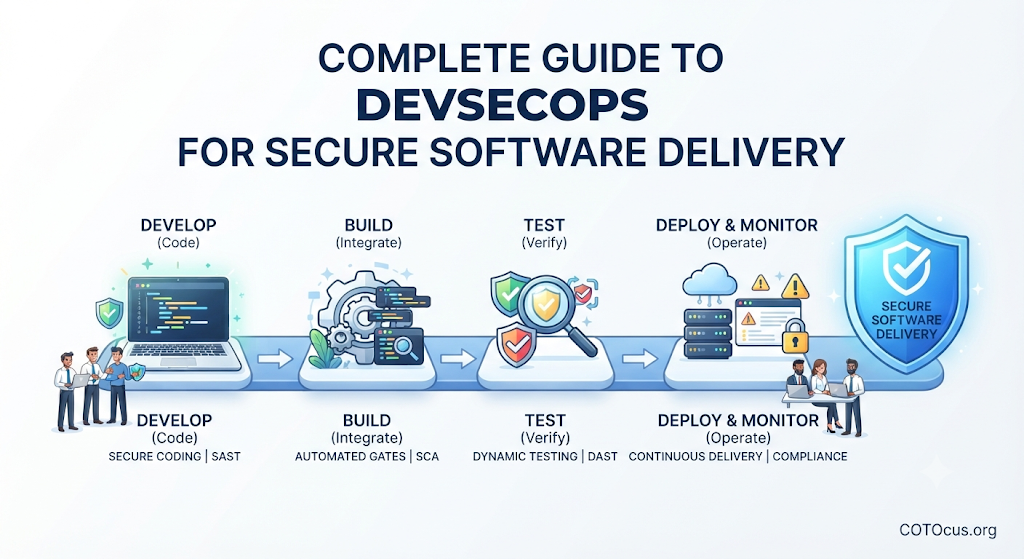
A DevSecOps pipeline automates security testing across different stages of software delivery.
1. Static Application Security Testing (SAST)
- What it is: Automated tools that scan raw source code for known security flaws before the code is compiled.
- Why it matters: It finds vulnerabilities like SQL injection flaws while the developer is still working on that specific feature.
2. Software Composition Analysis (SCA)
- What it is: Tools that check third-party libraries and open-source packages used in the project for known security vulnerabilities.
- Why it matters: Modern software relies heavily on external code packages. SCA ensures those dependencies are safe and up-to-date.
3. Dynamic Application Security Testing (DAST)
- What it is: Automated testing performed on a running application by simulating external attacks.
- Why it matters: It uncovers runtime configuration issues and vulnerabilities that static code scanners cannot see.
How DevSecOps Works in Practice
Implementing DevSecOps requires shifting from a siloed workflow to an integrated pipeline.
- Planning: Security requirements are defined alongside functional feature requirements.
- Coding: Developers write code using secure coding guidelines while local IDE plugins flag insecure patterns instantly.
- Building & Testing: Automated CI/CD (Continuous Integration and Continuous Deployment) tools run SAST and SCA scans on every code commit.
- Deployment: Infrastructure as Code (IaC) templates are scanned for misconfigurations before servers or cloud resources launch.
- Monitoring: Runtime protection tools monitor application behavior in production to detect abnormal activity or active attacks.
Comparison: Traditional Security vs. DevSecOps
| Feature | Traditional Security | DevSecOps |
|---|---|---|
| Timing | Checked at the end of development | Integrated into every phase |
| Responsibility | Handled exclusively by a separate security team | Shared by developers, operations, and security |
| Speed | Slows down releases with manual audits | Accelerates delivery through automation |
| Feedback Loop | Weeks or months after code is written | Minutes after code is committed |
Common Mistakes in DevSecOps Implementation
- Relying Solely on Tools: Buying expensive security scanners without training developers to understand the output leads to ignored warnings.
- Slowing Down the Pipeline: Adding heavy, manual security sign-offs defeats the purpose of continuous delivery.
- Ignoring Developer Feedback: If security tools generate too many false positives, developers will bypass or disable them.
Risks and Limitations
- Alert Fatigue: Automated scanners can produce hundreds of low-priority warnings, overwhelming engineering teams.
- Cultural Resistance: Moving from an isolated security model to shared accountability requires patience and cultural change.
- Tool Complexity: Managing multiple security testing tools increases operational overhead if not integrated smoothly.
Decision Framework: Adopting DevSecOps
- Assess Current Maturity: Determine how your team currently handles security reviews and deployments.
- Start Small: Introduce one automated scan (such as dependency checking) into your existing pipeline before adding complex dynamic tests.
- Train the Team: Provide basic secure coding training for developers so they understand why alerts occur.
- Measure Success: Track metrics such as vulnerability remediation time and pipeline build duration.
DevSecOps Checklist
- Automated SAST tools integrated into the code repository.
- Open-source dependency scanner (SCA) active on all builds.
- Infrastructure as Code (IaC) configuration scanning enabled.
- Clear process established for reviewing and fixing high-severity vulnerabilities.
- Regular access reviews and credential management protocols in place.
Key Terms
- CI/CD: Continuous Integration and Continuous Deployment; the automated process of building, testing, and releasing software.
- False Positive: An alert that incorrectly flags safe code as a security vulnerability.
- Infrastructure as Code (IaC): Managing and provisioning computer data centers through machine-readable definition files rather than physical hardware configuration.
- Remediation: The process of fixing a security vulnerability or bug.
- Vulnerability: A weakness in an information system that can be exploited by a threat actor.
FAQs
What is the main goal of DevSecOps?
The main goal is to integrate security checks and practices into every stage of the software development lifecycle without slowing down delivery speed.
Do developers need to become security experts?
No. Developers do not need to be security specialists, but they should understand basic secure coding practices and how to respond to automated security alerts.
How does DevSecOps differ from DevOps?
DevOps focuses on collaboration between development and operations to deliver software quickly. DevSecOps adds security as a core pillar throughout that entire workflow.
Are automated security tools enough on their own?
No. Tools find known patterns and vulnerabilities, but human oversight, threat modeling, and security awareness remain essential for robust protection.
When should security be introduced in a project?
Security should be considered during the initial planning and architecture phase, long before any code is written.
Conclusion
DevSecOps transforms security from a roadblock into an integrated part of software delivery. By combining automated testing, shared team responsibility, and continuous monitoring, organizations can release software quickly while maintaining high standards of safety and reliability.