Introduction
Imagine running a busy online store. Thousands of shoppers are browsing, adding items to their carts, and checking out. Suddenly, the checkout button stops working.
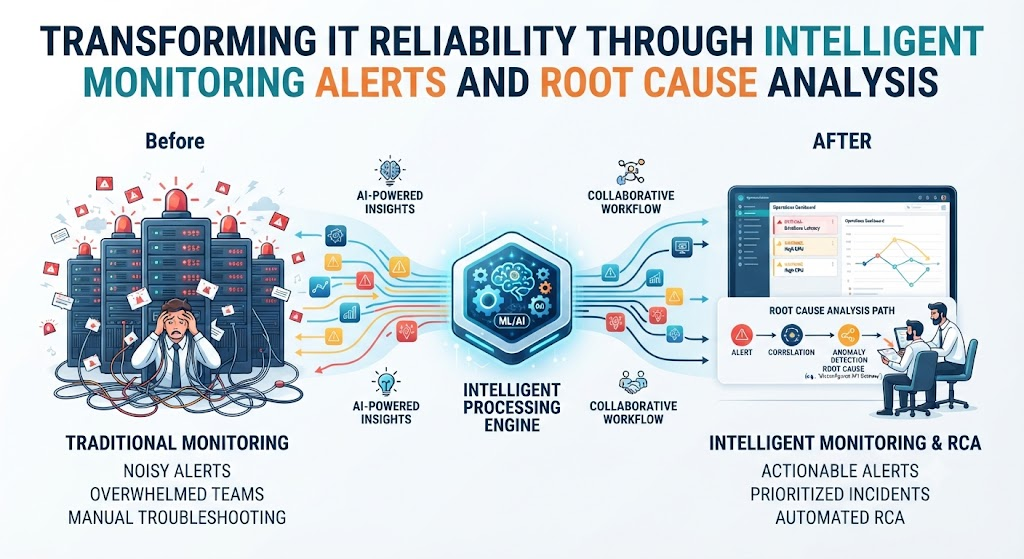
Within seconds, the computer monitoring systems notice a problem. But instead of sending one helpful message saying, “The payment gateway is offline,” the system sends five thousand warning messages. Every server, database, and network switch starts shouting for help at the exact same time.
The engineers on duty are overwhelmed. They spend hours reading through endless error logs just to figure out what broke first.
This happens in companies every day. Traditional software monitoring tools are reactive—they wait for something to break and then panic. But modern digital systems are too complex for humans to watch manually.
This is where AI changes the game. By automating how we watch systems, handle warnings, and find root causes, AI helps teams fix problems before customers even notice.
What is AI-Driven IT Operations?
To understand how AI helps, we first need to look at the three main steps of keeping digital systems healthy:
- Monitoring: Watching the health of servers, networks, and software.
- Alerting: Notifying engineers when something looks wrong.
- Root Cause Analysis (RCA): Figuring out the original trigger that caused a system failure.
Traditional monitoring relies on static thresholds. For example, an engineer sets a rule: “If CPU usage goes above 80%, send an alert.”
The problem? Sometimes a server runs at 85% CPU every afternoon during normal peak hours, which is totally fine. But the static rule still triggers an unnecessary alert.
AI-driven IT operations (often called AIOps) use machine learning to understand normal behavior. Instead of relying on rigid rules, AI learns the daily rhythms of your application. It knows that 85% CPU on a Tuesday afternoon is normal, but 40% CPU usage accompanied by a tiny spike in database latency on a Sunday night is a dangerous sign.
How AI Improves System Monitoring
Traditional monitoring tools collect massive amounts of data—metrics, logs, and traces. Humans simply cannot read all of it in real time. AI acts as an intelligent filter and pattern matcher.
1. Spotting Anomalies Automatically
AI looks at historical data to establish a baseline of what “normal” looks like. If a metric deviates from that baseline in an unusual way, the AI flags it as an anomaly.
- Simple Meaning: The system learns how it usually behaves and instantly notices when something weird happens.
- Why It Matters: You don’t have to guess and manually set thousands of alert rules for every tiny server component.
- Example: An e-commerce website usually has low traffic at 3:00 AM. If traffic suddenly spikes by 500% at that hour, AI flags it immediately as unusual, whereas a static rule might miss it if it stays below the 80% threshold.
2. Correlating Multi-Source Data
A modern application runs across cloud servers, content delivery networks, and microservices. When an error occurs, it leaves clues in different places. AI brings these clues together. It connects a drop in user sign-ups with a slight delay in a database query and a spike in network packet loss, showing them as a single connected event.
How AI Solves the Alert Fatigue Crisis
Alert fatigue is one of the biggest operational risks in tech teams. When engineers receive 500 alerts a day, 495 of which are false alarms, they stop paying attention. Eventually, a critical alert gets ignored, and the system goes down.
AI cleans up this chaos through smart grouping and noise reduction.
[Raw System Logs] ➔ [AI Noise Filter] ➔ [Event Grouping] ➔ [1 Clear Incident Ticket]
1. Alert Deduplication and Grouping
When a core database crashes, it triggers a domino effect. The database throws an error, the backend API throws an error, the frontend website throws an error, and the user login service fails.
Traditional tools send alerts for all four failures. AI groups them together into a single incident: “Database failure caused API, frontend, and login errors.” Engineers get one clean notification instead of a flood.
2. Suppressing False Positives
AI models study past incidents to recognize false alarms. If a routine background backup causes a temporary memory spike every night without affecting users, the AI learns to ignore it rather than waking up an engineer at 2:00 AM.
How AI Accelerates Root Cause Analysis (RCA)
Root Cause Analysis is the detective work of finding the original reason a system failed.
Without AI, RCA can take hours or even days. Engineers have to dig through gigabytes of text logs, compare timestamps across different servers, and argue about what went wrong.
AI speeds this up dramatically using natural language processing and historical pattern matching.
1. Automated Log Parsing and Pattern Matching
When a failure occurs, AI scans millions of log lines in seconds. It looks for error signatures and compares them against past incidents stored in the company’s knowledge base.
- Simple Meaning: The AI remembers past outages and matches current symptoms to previous solutions.
- Why It Matters: It cuts troubleshooting time from hours to minutes.
- Example: The AI scans the logs and says: “This exact memory leak error happened three months ago after the v2.4 software update. The fix was rolling back to v2.3.”
2. Predictive Diagnostics
The best root cause analysis is the one you do before the failure happens. Advanced AI models can spot subtle warning signs—like a tiny memory leak that grows by 0.1% every hour—and predict that the server will run out of memory in six hours. This gives teams time to restart the service during a quiet window rather than crashing during peak business hours.
Practical Example: A Real-World Scenario
Let’s look at how AI transforms an incident response workflow for a mid-sized financial technology company.
- The Situation: A payment processing service slows down dramatically. Customers cannot complete credit card transactions.
- Without AI:
- 40 different alerts hit the PagerDuty app.
- Three different engineers wake up and log in.
- Engineer A looks at the web servers. Engineer B looks at the database. Engineer C looks at network routing.
- After 45 minutes of arguing and reading logs, they realize a third-party banking API is timing out.
- Total downtime: 55 minutes.
- With AI-Driven Monitoring:
- The monitoring platform ingests all metrics and instantly groups the 40 alerts into one single incident ticket.
- The AI runs an automated root cause analysis and attaches a note to the ticket: “Payment slowdown correlated with 99th percentile latency spike on Third-Party API X (Confidence: 94%).”
- The on-call engineer opens the ticket, sees the exact cause immediately, and switches traffic to a backup payment provider.
- Total downtime: 8 minutes.
Trade-offs and Limitations of AI Monitoring
While AI brings massive improvements, it is not a magical cure-all. Understanding its limitations helps teams avoid costly mistakes.
| Approach | Advantages | Limitations / Risks |
| Traditional Monitoring | Simple to set up, predictable, easy to understand static rules. | High false positive rate, causes alert fatigue, misses complex systemic failures. |
| AI-Driven Monitoring | Reduces noise, finds hidden patterns, speeds up root cause analysis. | Requires clean historical data, can be expensive, creates a “black box” problem where engineers don’t understand why the AI made a conclusion. |
The “Black Box” Problem
Sometimes an AI model flags an anomaly or suggests a root cause, but it cannot explain its reasoning clearly. If engineers blindly trust an opaque AI recommendation, they might take the wrong action and break something else.
Solution: Always use AI as a co-pilot, not an autopilot. Let the AI narrow down the possibilities, but keep human engineers in the loop to verify the final decision before making major changes.
Common Mistakes Teams Make with AI Monitoring
When organizations first adopt AI for monitoring and alerts, they often fall into a few common traps:
- Expecting Magic on Day One: Teams plug in an AI tool and expect it to work instantly. In reality, machine learning models need weeks of historical data to learn what “normal” looks like for your specific system.
- Ignoring Data Quality: If your underlying system logs are messy, inconsistent, or incomplete, the AI will produce poor insights (“garbage in, garbage out”).
- Over-Automating Remediation: Letting AI automatically restart production databases or rewrite firewall rules without human approval can lead to catastrophic outages if the AI misinterprets a situation.
- Setting Thresholds Too High or Too Low: Tweaking sensitivity incorrectly can either cause the AI to flood you with noise or miss critical failures altogether.
A Practical Decision Framework for Adopting AI Monitoring
If your team is considering adding AI to your monitoring stack, follow this step-by-step framework to evaluate your readiness:
- Step 1: Audit Your Current Pain Points. Are you suffering from alert fatigue, slow root cause analysis, or blind spots in your microservices? Define the exact problem you want AI to solve.
- Step 2: Clean Up Your Data. Ensure your servers, applications, and cloud environments output clean, structured logs and metrics.
- Step 3: Start Small. Do not replace your entire monitoring stack overnight. Pilot AI anomaly detection on a single non-critical service first.
- Step 4: Measure the Impact. Track metrics like MTTD (Mean Time to Detect) and MTTR (Mean Time to Resolution) to see if the AI is actually saving your team time.
- Step 5: Maintain Human Oversight. Ensure engineers review AI-generated root cause analyses and keep human approval steps in place for automated remediation.
Checklist for Implementing AI Monitoring
Before rolling out an AI-powered monitoring and alerting tool across your production environment, verify the following points:
- Historical telemetry data (logs, metrics, traces) is collected consistently.
- Baseline behavior has been monitored and learned by the model for at least 2–4 weeks.
- Alert escalation paths are defined so critical warnings still reach humans if the AI fails.
- Engineers receive basic training on how to interpret AI anomaly scores and insights.
- Automated remediation scripts have human-in-the-loop safety checks enabled.
Key Terms
- AIOps: Artificial Intelligence for IT Operations; the use of big data and machine learning to automate operational workflows.
- Alert Fatigue: Mental exhaustion and desensitization caused by receiving too many false or low-priority alerts.
- Anomaly Detection: Using algorithms to automatically spot data points that deviate from normal patterns.
- Log Parsing: The automated process of reading and structuring raw text log files so software can analyze them.
- Mean Time to Resolution (MTTR): The average time required to troubleshoot and fix a system failure.
- Noise Reduction: Filtering out irrelevant, repetitive, or low-value alerts to highlight genuine problems.
- Root Cause Analysis (RCA): The systematic process of identifying the fundamental origin of a system failure.
- Static Threshold: A rigid rule set by a human (e.g., alert if disk space exceeds 90%).
Frequently Asked Questions
Will AI completely replace human system administrators and DevOps engineers?
No. AI automates repetitive tasks like sorting through logs and grouping alerts, but it cannot architect systems, design business logic, or handle complex strategic decisions. It acts as a powerful assistant that frees engineers to focus on higher-value work.
How much historical data does an AI monitoring tool need to work properly?
Most machine learning models need at least two to four weeks of steady telemetry data to accurately learn your application’s daily and weekly traffic patterns.
What is the difference between traditional monitoring and AIOps?
Traditional monitoring tells you when a specific static rule is broken (e.g., CPU > 90%). AIOps uses machine learning to look across all system data, predict failures before they happen, group related alerts together, and pinpoint root causes automatically.
Can AI-driven monitoring prevent all system outages?
No. While AI drastically reduces detection and troubleshooting time, it cannot prevent outages caused by sudden hardware failures, zero-day software bugs, or external cloud provider outages.
Is AI monitoring safe to use with sensitive customer data?
It depends on the tool and how it is deployed. Many enterprise teams use on-premise or privacy-focused cloud monitoring solutions to ensure sensitive logs and metrics do not leak to third-party AI providers.
How do I know if our team is ready for AI monitoring?
If your team spends more time triaging false-positive alerts and manually searching logs than building features, your organization is a great candidate for AI-driven monitoring.
Conclusion
Keeping modern digital systems running smoothly is too difficult for manual oversight and rigid rule-based tools. When systems fail at scale, alert fatigue and slow root cause analysis can cost companies time, money, and customer trust.
AI transforms monitoring by filtering out the noise, grouping chaotic alerts into clear incidents, and pointing engineers straight to the root cause of a failure. By adopting AI as an intelligent assistant while keeping human oversight in place, teams can catch problems earlier, resolve them faster, and deliver reliable digital experiences.