Introduction
Modern computer networks are massive. They run thousands of servers, cloud apps, and databases. Every second, these systems generate millions of warning messages, error logs, and performance metrics.
Humans cannot read all of that data. When something breaks, IT teams waste hours searching for the real cause.
To solve this, companies turn to AIOps. AIOps uses smart algorithms to sift through the digital noise, spot hidden patterns, and alert engineers before a total crash happens.
However, many companies fail during their first AIOps rollout. They buy expensive software, turn it on, and realize it creates more confusion than clarity.
This guide explores the real-world roadblocks teams face when adopting AIOps and explains how to solve them without losing your budget or your sanity.
What Is AIOps?
AIOps combines big data analysis with machine learning to manage IT infrastructure.
Think of a traditional IT monitoring tool as a smoke detector. It rings loudly whenever it senses smoke. But it cannot tell you if there is a blazing kitchen fire or just someone burning toast. It just makes noise.
An AIOps platform acts like a smart fire safety system. It collects smoke signals, temperature readings, and camera feeds from across the building. It analyzes all that data together, figures out where the real fire is, ignores the burnt toast, and automatically sprays water on the hot spot.
Why Does It Matter?
Without AIOps, IT teams suffer from alert fatigue. This happens when engineers get flooded with thousands of daily warning alerts until they start ignoring them—sometimes missing a critical system failure. AIOps cuts through that noise.
Simple Example
Imagine a banking app that suddenly slows down. A basic monitor sends 50 alerts about high CPU usage on 50 different servers. An AIOps engine groups those 50 alerts into one single incident report: “Payment Gateway Database is unresponsive.” Engineers fix one root cause instead of chasing 50 ghosts.
How AIOps Works
AIOps relies on a continuous loop of data collection, analysis, and action.
- Data Ingestion: The platform pulls live logs, metrics, and event alerts from every part of your technology stack—servers, cloud storage, networks, and applications.
- Pattern Recognition: Machine learning models study historical data to learn what “normal” behavior looks like for your systems.
- Anomaly Detection: When something acts abnormal—like a sudden spike in memory usage on a Tuesday afternoon—the system flags it instantly.
- Root Cause Analysis: The engine connects related events to find the true origin of a problem.
- Automation: The system either triggers an automated fix script or sends a clear, prioritized alert to the right human engineer.
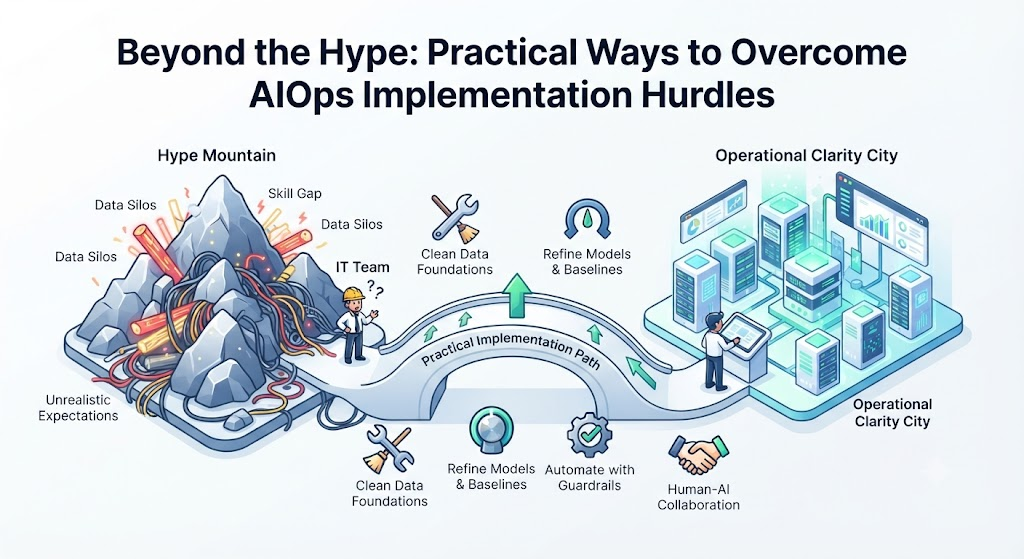
Major Challenges in AIOps Implementation
Setting up AIOps is rarely smooth. Here are the most common hurdles organizations face.
| Challenge | What Goes Wrong | Why It Happens |
| Data Silos | The AI gets incomplete information. | Different teams use separate monitoring tools that do not share data. |
| Alert Noise | The AI generates fake alarms. | Models are trained on dirty, uncleaned historical log data. |
| Skill Gap | Teams cannot configure the models. | Staff know traditional IT administration, not data science or machine learning operations. |
| Loss of Control | Automated scripts break production systems. | Teams blindly trust machine learning recommendations without safety guardrails. |
1. The Data Quality Problem
What Happens
Garbage in equals garbage out. If your company feeds incomplete, disorganized, or contradictory log data into an AIOps platform, the machine learning models will make bad predictions.
Why It Happens
Many organizations have grown through mergers or quick expansions. Their monitoring tools are scattered. One team uses open-source log collectors, another uses proprietary cloud tools, and a third relies on old custom scripts.
Practical Solution
Do not try to connect all your data sources on day one.
- Pick one critical application or service.
- Clean and standardize the log formats for that single service.
- Feed only that clean data into your AIOps pilot project.
- Expand to other systems only after the first model proves its accuracy.
2. Alert Fatigue and False Positives
What Happens
Instead of reducing noise, a poorly configured AIOps tool can create a new wave of useless notifications. Engineers spend all day clicking through false alarms.
Why It Happens
Machine learning models need time and tuning to understand your business cycles. A sudden spike in web traffic on a Friday evening might look like a security attack to an uncalibrated AI, even though it is just normal weekend shopping activity.
Practical Solution
- Set baseline periods: Let the AI observe your systems for at least two to four weeks before turning on automated actions.
- Tune thresholds: Adjust sensitivity settings so the system only flags statistical anomalies that impact real users.
- Feedback loops: Create an easy way for engineers to tag false alarms so the machine learning model can learn from its mistakes.
3. Cultural Resistance and the “Black Box” Problem
What Happens
IT engineers often reject AIOps platforms because they do not understand how the AI made a decision. If an automated tool restarts a production database and causes downtime, engineers will turn the tool off and never use it again.
Why It Happens
Many commercial AIOps tools act like a “black box.” They give an answer or take an action without showing their work. Engineers are naturally cautious and prefer predictable, script-based automation over black-box machine learning.
Practical Solution
- Start with visibility, not automation: For the first few months, let the AIOps tool suggest fixes or point out root causes on a dashboard, but require a human click to approve any action.
- Demystify the tech: Educate your team on basic machine learning concepts. Show them that AIOps is just advanced statistics looking for patterns, not magic.
- Build trust slowly: Once the team sees the tool correctly diagnose minor issues 100 times in a row, they will trust it with more critical tasks.
4. Unrealistic Expectations and Scope Creep
What Happens
Management expects AIOps to fix every IT problem within a month of purchase. When that does not happen, leadership cuts the budget and declares the project a failure.
Why It Happens
Software vendors often market AIOps as a magical silver bullet that will eliminate outages and replace half your operations staff. In reality, AIOps is a powerful tool that requires careful tuning and ongoing maintenance.
Practical Solution
- Set clear, measurable goals before buying any software.
- Instead of aiming to “fix IT operations,” set a specific target like: “Reduce mean time to detect database latency spikes by 30% within six months.”
- Treat AIOps as an ongoing engineering project, not a one-time software installation.
A Step-by-Step Implementation Framework
To avoid the common traps listed above, use this practical framework when rolling out AIOps in your organization.
- Define the Use Case: Pick one painful operational problem—such as slow incident triage or repetitive server reboots—and focus only on solving that.
- Audit Your Data: Check if your logs and metrics are complete, time-synced, and accessible.
- Select the Right Tool: Choose tools that integrate well with your existing tech stack and offer transparent, explainable insights.
- Run a Pilot: Test the platform in a staging environment or on a non-critical application for 30 to 60 days.
- Review and Expand: Measure your success against your initial goals. Once stable, expand the scope to larger systems.
Checklist for AIOps Success
Before launching your AIOps initiative across the entire company, verify that you have covered these essential items:
- Defined a specific business or operational problem to solve.
- Consolidated and cleaned data sources for the pilot application.
- Established baseline performance metrics before turning on machine learning models.
- Configured the system for human-approved actions rather than full, blind automation.
- Trained operations staff on how to interpret AI-driven insights and provide feedback.
- Set up a regular review schedule to check model accuracy and adjust thresholds.
Key Terms
- Anomaly Detection: The automated process of spotting unusual patterns or data points that stray from normal system behavior.
- Event Correlation: Grouping related alerts, logs, and metrics together to show a single underlying incident instead of hundreds of separate warnings.
- False Positive: An alert that incorrectly indicates a problem or threat when the system is actually operating normally.
- Machine Learning Operations (MLOps): The practice of deploying, monitoring, and maintaining machine learning models in production reliably and efficiently.
- Telemetry: The automated collection and transmission of data from remote systems, such as servers and apps, to a central monitoring dashboard.
Frequently Asked Questions
Will AIOps replace human IT engineers?
No. AIOps removes boring, repetitive tasks like manual log analysis and alert triage. This frees up engineers to focus on higher-value work like system architecture, security improvements, and feature development.
How long does it take to see results from AIOps?
Most organizations see initial value within 3 to 6 months. This timeline depends heavily on how clean your initial data is and how well-defined your pilot project is.
Do we need data scientists to run AIOps?
While having a data scientist helps, modern AIOps platforms are designed for IT operations professionals and system administrators. You need a strong understanding of your IT infrastructure more than advanced math skills.
What is the difference between traditional monitoring and AIOps?
Traditional monitoring tells you what is broken right now using fixed threshold rules. AIOps uses machine learning to tell you why it broke, predicts when it might break again, and correlates data across multiple systems.
Is AIOps suitable for small businesses?
Small businesses with simple IT setups usually do not need AIOps. Traditional application performance monitoring (APM) tools are usually enough. AIOps becomes necessary in large, complex, cloud-native environments that generate massive amounts of daily log data.
Conclusion
AIOps offers a powerful way to tame the complexity of modern digital infrastructure. It turns millions of confusing log lines into clear, actionable insights.
However, success does not come from buying the most expensive software on the market. It comes from clean data, realistic expectations, careful pilot testing, and keeping human engineers involved in critical decisions.
By starting small, solving real operational pain points, and building trust in your automation tools, you can turn AIOps from a confusing buzzword into your team’s most reliable operational asset.